


Amazon now has a multibillion-dollar advertising business and is set to become the third largest digital ad seller by 2020, behind Google and Facebook.
With quarterly advertising sales surpassing £1.5 billion for the first time in the first quarter of 2018 and nearly 200 million visitors per month it’s not hard to see why.

Amazon’s advertising business is growing fast and one all agencies should be considering, using and understanding — now adding billions of pounds to Amazon’s quarterly sales.
Amazon disclosed in April 2018 that its advertising revenue jumped 139 percent to £1.6 billion for the first quarter of the year, and the first time that it’s surpassed the £1.5 billion mark. So plenty of merchants, agencies and marketers are spending their hard fought advertising budgets with Amazon.
“It’s now a multibillion-dollar program and growing very quickly,” Brian Olsavsky, Amazon’s chief financial officer said.
Olsavsky also said that advertising on its site is beneficial to both the customers and sellers on Amazon’s platform. Ads help Amazon shoppers discover new brands and products more easily, while sellers are able to more effectively reach their target customers, he said.
While Amazon’s ad business is still tiny compared to Google and Facebook, which collectively account for more than half of the digital advertising market, it’s on track to become the third largest ad player by 2020 and one every PPC retailer, merchant and e-shop should be considering as part of their marketing mix.
Amazon generates most of its advertising revenue by selling product search results, allowing sellers to buy slots for “sponsored products” similar to Google’s Shopping and Search platforms. There are also going to be opportunities for video ads to feature through its Prime Video offerings in the future, but for now there are no plans to roll them out… yet!
These product ads predominantly appear above the standard organic product listings, increasing not only their visibility and click-ability but costs and revenues for Amazon too, you can see why they are starting to take note of the power they bring.
“We want customers to get the benefit of the new brand and product discovery, and then we want to let sellers for both emerging and established brands reach those customers,” Olsavsky said.
Advertisers who want to gain more exposure for their products on Amazon can pay for these positions by bidding on specific keywords, which will lead to higher visibility in the Amazon SERPs. The advertiser will then be charged when a shopper clicks on their ad. You can essentially see Amazon’s advertising platform as the Amazon version of Google Ads.
For marketers, Amazon represents the best of multi worlds: search intent, like Google, combined with identity, like Facebook. Amazon also lacks some of the platform dynamics that have created tension between Google and Facebook with their advertisers. There is no user-generated content on Amazon’s video platform, for example, and therefore no inappropriate content to police, as YouTube must. Moreover, there are no bots on Amazon; each account represents a real person, with a verified purchase history.
If you’re all over Google, Google Shopping, the Display Network, and Bing, well, there’s no better time to break into one of the largest remaining online ad networks. For e-commerce businesses, Amazon ads should be a no-brainer & if you’re not on Amazon shopping, your competitors most likely are!
For any help with Amazon or anything else PPC related please feel free to get in touch with myself or the team and we will be happy to help.
Responsive Search Ads: Should I include them in my marketing campaign?
What are Responsive Search Ads?
Responsive search ads are a new ad format released by Google which is currently in beta. The format allows you to choose up to fifteen 30-character ad headlines and four 90-character descriptions. Google then serves different combinations to customers and their machine learning assesses which combinations perform best together and shows the top performing combinations above the more poorly performing combinations. In theory responsive search is designed to put an end to traditional A/B testing.
The Benefits of Responsive Search Ads
One benefit of responsive search ads is that they allow you to work faster. Simply think of up to 15 headlines and 4 descriptions, and Google will arrange the combinations together for you. There are thousands of combinations that can be created, which saves you time creating separate ads and A/B testing them yourself to find which combinations work best.
Google tests the different combinations and prioritises the best performing combinations automatically. Google is able to take into consideration multiple signals such as search query, device, past browsing behaviour etc. to try and assure the final ad will be the most relevant to the user.
Google also reports that customers using responsive search ads see between 5-15 percent uplift in clicks compared to standard search ads.
At the time of first testing responsive search, the increased real estate was also a major benefit. However, now that Google have introduced 3 headlines and 90-character descriptions for normal expanded text ads, are responsive search ads still the way forward?
The Results
The results I have seen personally haven’t been particularly ground-breaking. Although there have been some ad groups where responsive search ads improved the conversion rate by 3-4%, on the whole the performance was very similar to expanded text ads. One interesting thing I found is that not only did responsive search ads not improve the click-through rate; the overall click-through rate actually fell from 5.8% to 3.13% on one account. The area responsive search ads did improve was conversion rate; admittedly this was a very small increase from 9.19% to 10.20%, however in this specific account that extra 1.1% could mean an extra 200 conversions a week.
Another finding from my test was that the responsive search ad stats improved over time, and also improved when we included more headlines for the machine learning to create more combinations with. This suggests that Google’s machine learning used in responsive search does really work but it needs to be given time. To put this into perspective, in our first week of being live we achieved a click-through rate of 2.62% and a conversion rate of 8.06%. With the latest weekly data, after 5 weeks of being live, this rose to a click-through rate of 3.13% and a conversion rate of 10.20%. I think, when considering responsive search ads, the question has to be would this save time on your traditional A/B testing method?
One benefit of using responsive search is that you can check the combinations which have been served to customers along with the impressions they received. Although there is no direct way to see individual metrics such as conversion rate for the best performing ad, you can presume that the headlines and descriptions receiving the most impressions are the top-performers, and Google’s machine learning will prioritise these combinations. This was helpful because it revealed that some of the most successful combinations were in an order that I usually wouldn’t have considered. The ad had a question intended to invoke customer consideration as headline 2 with an informational headline as headline 1. I would have always logically put the question headline first; however the results showed that this didn’t work as effectively. This is now a factor I can bring in to my future ad copy for the account.
Top Tips
My best piece of advice for RSA would be to use all of the space you are given. You can have 15 headlines, so use them! We first tested RSA with 5 headlines and 4 descriptions and the results were disappointing. After we increased the headlines to 15, we did notice an uplift in performance, as Google Ads had more combinations to choose from and test.
Another piece of advice when writing the headlines would be to change it up; it would be useless to have 15 very similar headlines. Try to have an aim for each headline you create and make them highlight something unique in each headline.
Another top tip is to check which combinations are being shown; you can do this easily by clicking on view asset details and then clicking on combinations. It is important to make sure your ads actually make sense and although Google’s machine learning gets it right the vast majority of the time, there has been a few instances where this hasn’t been the case. This can easily be fixed by pinning a headline or description to a particular position; for example, if there is a headline that is designed to grab the reader’s attention it may be best practice to pin this into position 1.
Conclusion
In conclusion, I would say that there are positives to using responsive search ads; however I wouldn’t adopt the strategy thinking that it is going to drastically improve an account. The changes we saw were very minimal and they both positively and negatively affected performance. Saying that, I would also say that responsive search is definitely worth testing. Every account is different, and just because we didn’t quite see the 5-15% uplift in clicks that Google have seen, doesn’t mean you won’t experience it in your account. It is also worth bearing in mind that responsive search ads are still in beta, so although in this case responsive search ads didn’t perform as well as Google suggested, it doesn’t mean that we won’t see this performance once the full version is launched.
PPC & The World Cup: Russia 2018
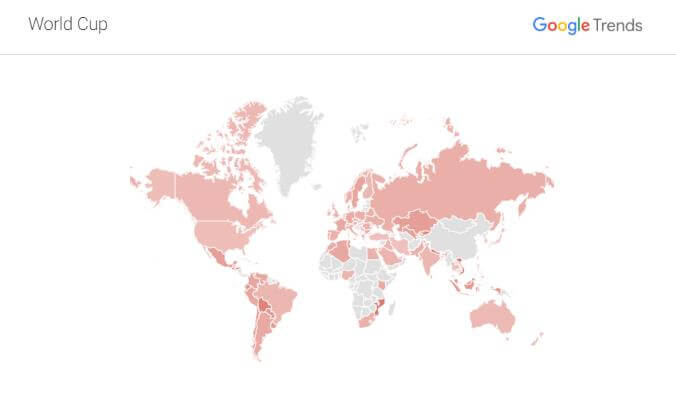
The Global Reach
The World Cup is the most-watched global event of all, and attracts a viewership that by some estimates reach nearly half the world’s population. The 2014 World Cup broke several TV audience records in international markets, including the United States and Germany – the final between Argentina and eventual champions Germany attracted a worldwide audience of 695 million.
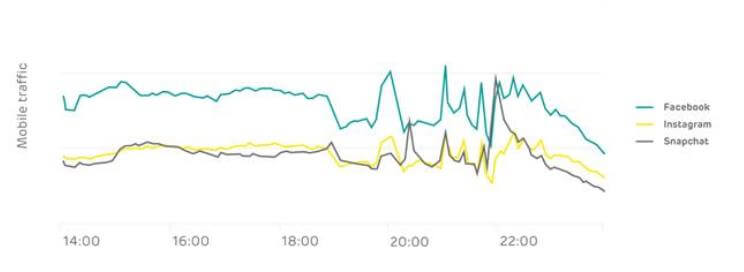
In terms of Search, internet traffic increases around this period, but it also becomes a little more erratic around the World Cup fixtures. EE report that they have seen people put down their devices during the action, but then return to them at half-time and after the game.
Interest Builds & Builds
Interest in the tournament starts to gather momentum in early June, before dominating search traffic throughout the remainder of June and into July.
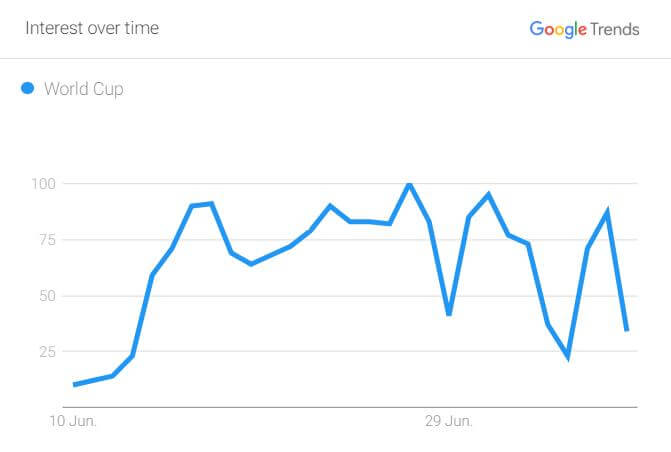
Unlike some other major events, the World Cup keeps people hooked and coming back for more. The more people watch the World Cup, the more they become emotionally invested in it. Can the golden-generation of Belgium go all the way? Can France win their first tournament since 1998? Or can England bring football home again?!
In Numbers: The Teams
Search traffic is also not dominated by the larger teams within the competition and is distributed reasonably evenly between all the nations that have entered. Sure, Germany may have driven 8% of search traffic within the group stage – but one good result ensured Mexico attracted 5% of search traffic within this period.
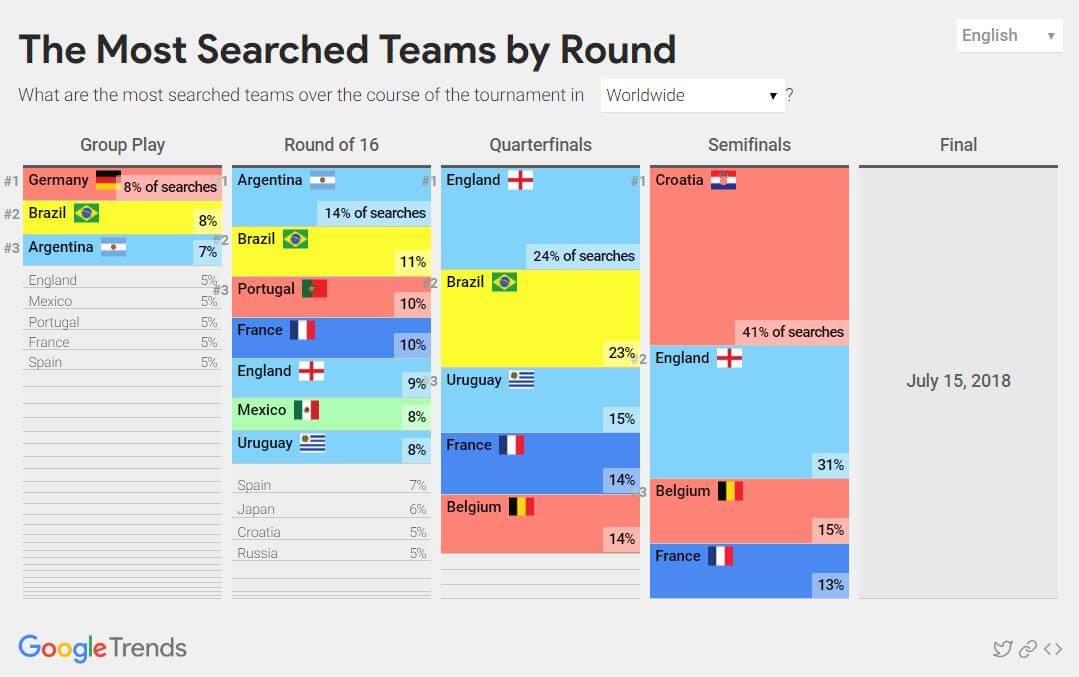
Interestingly, as the tournament nears the closing stages, it’s actually the smaller nation in Croatia that has driven the majority of searches, as users research the country for more detail. There is less search traffic around France, who are the favourites for the competition by this stage.
In Numbers: The Players
It’s the players who are the real stars, and with three goals in the tournament and a man of the match performance against Argentina, Kylian Mbappé has been the most searched-for superstar. The 19-year-old wonderkid has nearly twice as many users clambering to find out more about the PSG striker than any other player in this year’s tournament.
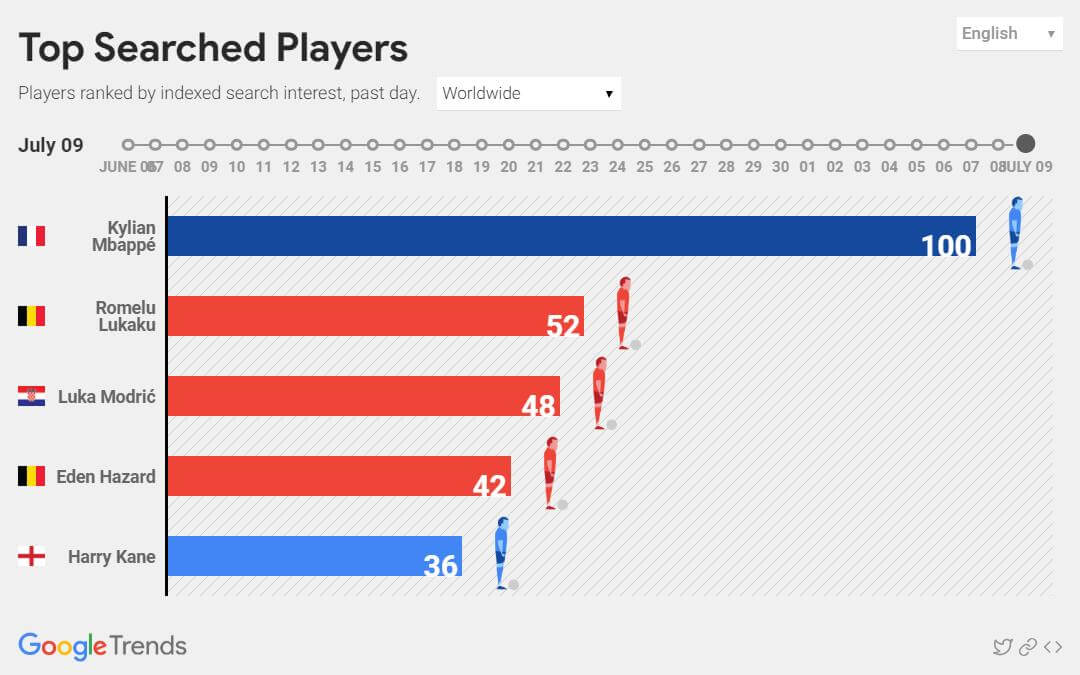
Other stars that have attracted interest during this tournament include the Belgian pair of Romelu Lukaku and Eden Hazard, Luka Modric the Croatian Midfielder and our own Harry Kane – the frontrunner for the Golden Boot award, with six goals to his name.
Back in England: It’s Coming Home
Closer to home, the country has been enjoying the longest heat-wave since 1976 – and coupled with the national team’s performances within the tournament – this has made for a party-like atmosphere throughout the nation.
Almost 20 million people tuned in on their TV to see England reach the World Cup semi-finals for the first time since 1990. The Three Lions’ 2-0 win against Sweden attracted over 15m viewers over the course of the match. Earlier in the tournament, an average of 16.5m tuned in for the team’s triumph against Colombia.

But it’s not only the TV set to which users turn to for information and entertainment around the World Cup. Users are comfortable accessing several devices at any one time, such as watching the game on TV, while surfing the net on their smartphone looking for information about the game and other related content.
Users are also searching for products and services – such as a location to watch the game, a taxi home from the pub, or a restaurant to book for later in the evening – and it’s at these moments that as an advertiser we are presented with the opportunity to connect with our audience.
Search traffic is increased during the World Cup and it’s important to us – just as to any team manager entering the tournament – that we have the required tactics to succeed and beat the competition. It’s vital that we understand how best to take advantage of an increase in traffic, while still maintaining and returning our desired level of performance.
Here at Circus, we’ve seen one of our retail client’s revenue increase 67% month-on-month during June and July, while maintaining a similar return on ad spend and cost-per-acquisition to that of May. The client has benefited from the warm weather, the World Cup and the increased visibility this event generates by tailoring their PPC strategy to suit.
It’s important to understand your audience – what they require and when they require it – to ensure that you are there at the right moment to connect with them, when they are searching for your products, services or offering.
As an advertiser, how can we take advantage of this landscape to deliver more?
Bidding & Budget Management
The World Cup brings out the heavyweight advertisers who have multi-million pound budgets to deploy during this period. As a result, it is typical to see an increase in the average CPC of some verticals. Bidding and budget management during this period are imperative.
Bid only what delivers the required performance for your business and don’t get drawn into a bidding war. Sure, it’s great to hold top spot for certain key search terms, especially around brand, but consider the overall effect this increased CPC is having on your return on ad spend.
Ensure you have control over your daily budget, and that this aligns with your overall advertising budget for this period. With an increase in average CPC, it is very easy to drive additional spend in any given day. Ensure that you are managing budget and increasing only when return on ad spend demands, rather than the market.
Ad Scheduling
You may want to consider implementing ad scheduling around certain key fixtures. For instance, you may feel that with your potential customer base hooked to their TV set for 90 minutes, your advertising budget may be better used at a different time of the week.
Similarly, you may decide that it would make sense to up-weight your CPC bids around the World Cup fixtures. Perhaps a restaurant would want increased visibility around the end of a fixture, so may decide to be more aggressive when the final whistle blows. Understand your audience and set your bidding strategy accordingly.
Ad Copy
Consider incorporating World Cup themed ad copy into your account. Users like to see relevant copy and attention-grabbing ad content is a great way of increasing your overall CTR and account health. Try split-testing some fun World Cup themed ad copy alongside your regular ad copy to assess performance.
Google Shopping
If you are a retailer, consider which products you stock and how demand may increase or decrease during this time. For instance, it may be a great time to increase your aggression around BBQ equipment in the run up to a match day – but you may be less inclined to attempt to push men’s clothing when your core audience’s attention may be elsewhere.
Ad Extensions
Ad Extensions are a great way of providing additional information about your business or product offering. Consider call out extensions or sitelinks directing users to areas of your website that contain “World Cup” themed products.
Call Extensions
Another thing to consider is when you – or your business – will be available for contact. A sole trader, who uses PPC to drive telephone enquiries, may find it useful to pause any call extensions they have active during the hours of the game.
Negative Keywords
A review of your Search Term Reports would be a good idea during this time. Are there any new searches appearing, related to the World Cup? For instance, a retailer selling sports equipment could be picking up irrelevant traffic around national football kits, football clips or other football-related queries.
Expand Your Reach
If you have considered increasing your PPC presence to other platforms, then this could be the ideal time to do just that. Bing Ads and Facebook are both a great way of increasing your visibility across multiple platforms and could possibly help cushion some of the increased CPC on Google AdWords.
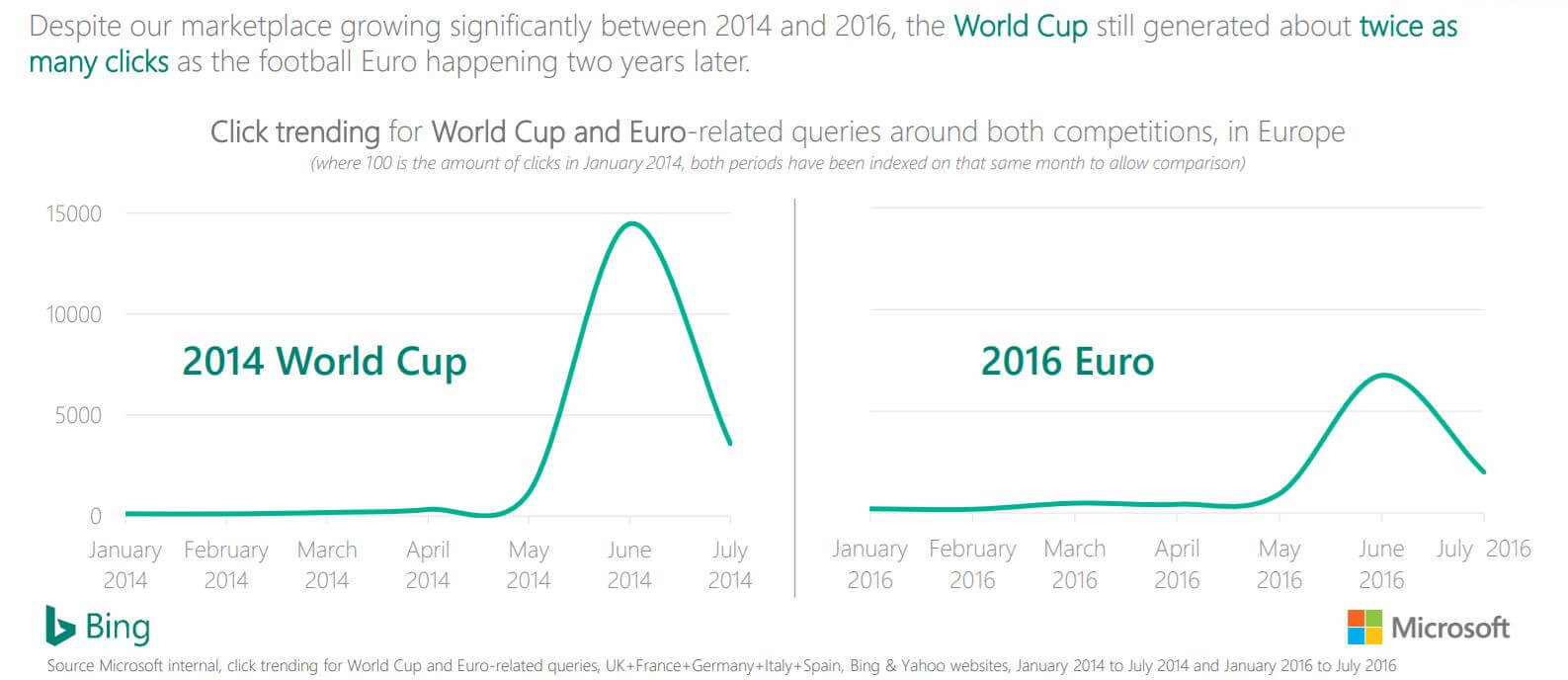
Bing Ads reported that World Cup 2014 generated twice as many clicks as Euro 2016, despite a growth on this platform. The World Cup is a great time to start exploring the opportunities that this platform could present for your business.
Video Advertising
It’s not only on TV where users are consuming their fix of the World Cup action. Users are switching to mobile and streaming website such as YouTube to view highlights of the games and find out more about their favourite stars.
Did you know? Football has among the highest engagement rates across all categories on YouTube – when users interact with football content on YouTube they are more likely to engage with this content and your advertiser content too.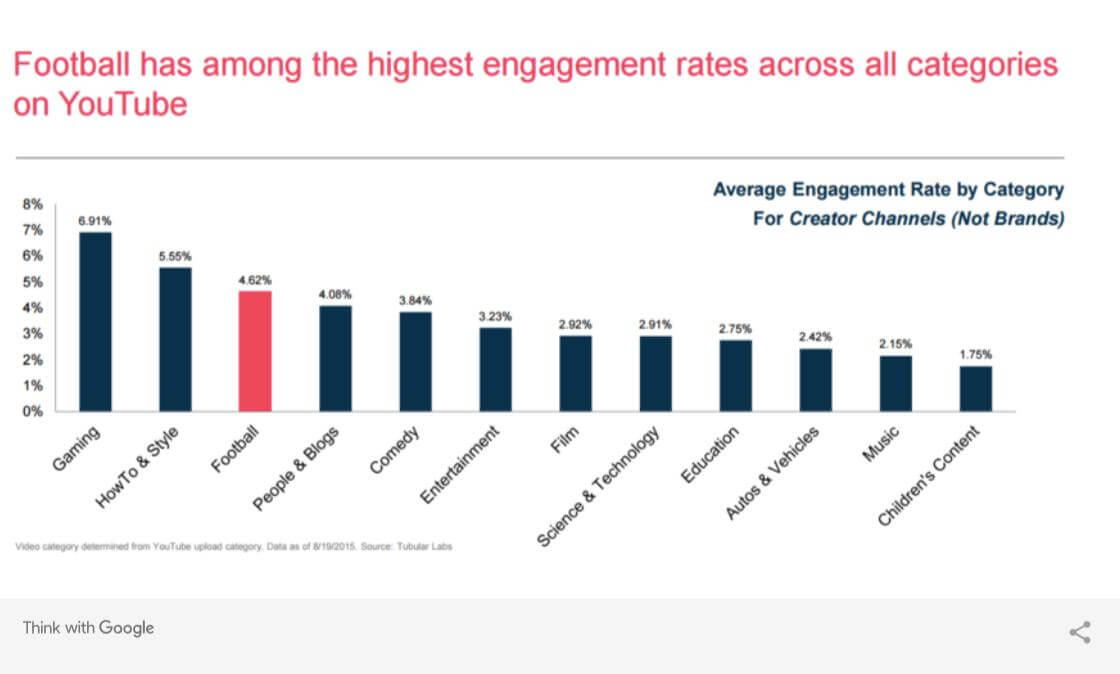
Consider placing your video ads alongside relevant content on YouTube, or across the Google Display Network. If you have football-themed video ads, this could work really well. Take advantage of the increase in football-related searches by piggy-backing your PPC activity and targeting this content.
Summary
In summary, it’s important to embrace the PPC opportunities that an event like the World Cup can present. It is worthwhile taking the time to plan and execute a strategy to ensure that you maximise your online visibility when your audience is statistically likely to convert.
It is vital to understand your audience and consider their browsing habits during the tournament so that you can connect when they are searching for products or services like yours.
Consider your advertising budget for the period and ensure that your bidding strategy is one that works for you and your business. Ensure that you are bidding for return on investment at all times.
PPC optimisation during this period is imperative. With surges in traffic around key fixtures, ensure that your strategy is aligned, and that you are deploying budget when it is most effective.
Consider incorporating World Cup themed ad copy into your account and updating any relevant ad extensions and sitelinks to direct traffic to World Cup offers or product groups.
Increase or decrease bidding aggression around products on Google Shopping, depending on how popular you would consider them to be at this time of year.
Try experimenting with new ad formats or platforms during this time. Expanding your visibility to other ad platform such as Bing Ads, YouTube or Facebook could help drive additional conversions, while offering the chance of a reduced cost in some cases.
Finally, take time to monitor closely and report on your PPC activity during this period. PPC traffic can be erratic over the World Cup, and it’s important to be ready to react to any changes you see in the market place.
We hope that this advice has given you some food for thought around your own winning World Cup PPC strategy.
Did you know? We often find that the optimisation actions carried out on the back of a free Circus PPC audit can not only cut waste spend substantially, but also actually help increase sales and revenue by placing your advert in front of a more receptive audience. Get in touch with us to find out more.
Here at Circus, we love to discuss client’s business objectives and we enjoy working with them to help implement a winning strategy for their business. If you would like a helping hand with setting up Google AdWords, or any other element of PPC advertising, then please contact us for a free, no obligation PPC review and consultation with one of our PPC Experts.
What Is Display Expansion & How You Can Use It
For the most up-to-date information around Display ads, visit our dedicated Services page here.
What is Display Expansion?
Search Network with Display Expansion (formerly known as Search Network with Display Select) is a campaign setting in Google Ads where you can in effect combine your Search and Display campaigns into one.
This was previously very difficult to accurately do as placements would show on a number of irrelevant sites and conversions would remain low, so traditional Search advertisers would actively avoid using a combined approach.
However, Google have helped combat this issue with Display Expansion, which in essence allows you to take a Keyword Search campaign and start showing ads on very select sites or audiences on the Display Network.
Rarely do accounts use a combined approach but, when they do, I always recommend splitting up campaigns based on their network targeting; this allows for tighter targeting and cost control and also makes life easier in terms of analysing your performance.

How it works:
According to Google, your ads can appear when people search for terms on Google Search and search partner sites that match your keywords. They can also appear on relevant pages across the web on the Google Display Network. However, your ads are shown selectively on the Display Network and bidding is automated, helping you reach users who are most likely to be interested in the products and services you’re advertising.
Search Network with Display Expansion uses improved signals and methods for predicting when and where your ads are likely to perform best, and sets a higher bar for when to show them. This means your ads are more likely to be shown to a smaller number of prospective customers, who are more likely to be interested in your offerings.
Google applies it’s Enhanced CPC framework to the Display Network in order to help advertisers feel more confident that their budget is really going to work for them.
“Display Expansion” allows an advertiser to quickly and easily show text and image ads on the Google Display Network to users based on their search intent.
| “Search Network only” | “Search Network with Display Select” | |
| Ad placement | Standard & All features Google search results, search partner websites |
Standard & All features Google search results, search partner websites, Google Display Network websites and video |
| Ad formats | Standard Text ads*All features Text ads* Shopping ads Dynamic search ads App/digital content ads*Includes keyword insertion |
Standard Text ads*All features Text ads* Image ads Display ad builder ads App/digital content ads*Includes keyword insertion |
| Targeting | Standard KeywordsAll features Keywords Remarketing lists for search only |
Standard KeywordsAll features Keywords Placements Remarketing lists for search only Website category options |
| Bidding | Standard & All features Manual and automated bidding for the Search Network. |
Standard & All features Manual and automated bidding for the Search Network. Automated bidding for the Display Network. |
When to use Display Select:
We don’t recommend turning on Display Expansion for all your campaigns right away; in our experience this can cause detrimental spikes in impression volume , traffic and costs but not always sales. Like any technology, it can work amazingly for some clients, industries or campaigns but not others. So test the setting with one or two campaigns first, analyse the results over a few months, and if the results are positive keep expanding until all campaigns are updated or tested.
Test brand and competitor campaigns first; this campaign setting is perfect for developing brand and product awareness and can have a positive effect on the overall performance of the account. Where users are actively discussing you or your competition, click-through rates and conversion rates will be higher.

How to Optimise Display Select:
As with most Google “Enhanced CPC” technologies, you should leave them to it to get the best results. This is mostly the same in this case, but there are a few things you can and should do:
Negatives
- Review SQR reports weekly or monthly and make sure that irrelevant or poor performing search terms are excluded by adding them to the negative keyword lists
Placements
- Review placement data to exclude poorly performing websites
Rotation Settings
- Make sure your campaign ad rotation settings are set to an optimised choice
Similar Audiences
- Add similar audience lists to the campaign with 20% or 30% positive bid modifiers
Bear in mind: If you’ve been running “Search Network only” campaigns and are switching to “Search Network with Display Select”, you should notice an increase in conversions (15% on average) at a higher cost (15% in most cases).
Conclusion:
Display Expansion is a Super useful way to quickly, easily and cost effectively expand the reach of the account, developing more impressions (eyeballs), traffic and sales with minimal effort.
If you’re not comfortable running Display Only campaigns this is a great way to test the network, grow brand recognition and improve the account.
If you would like help setting up Search Network with Display Expansion campaigns then please get in touch for a free account review.
For help with Display, Search & other PPC tech please do get in touch.
TOP 10 MOST COMMON PPC MISTAKES
Here at Circus, we offer any potential new client a free PPC audit and account review. This audit and review enables us to dissect an advertiser’s PPC account to report back on what is working well, how the advertiser could be wasting valuable budget and where we see room for improvement. While each account differs in quality of construction, there are often common mistakes within each AdWords account that are responsible for wasting advertiser budget. There are also always opportunity to be testing various features, strategies and creatives to ensure that you are always maximising the value of each paid click.
Think about your own AdWords account for a moment;
- Have you set bid adjustments against user locations?
- Are you split testing ad copy across multiple campaigns?
- When did you last check your Search Term Report?
A successful PPC account is always a work in progress. It’s an on-going project that requires regular maintenance and testing to get the most return-on-investment from your advertising budget. It’s important that you are regularly analysing the account for waste spend, just as regularly as you are looking for ways to increase sales and revenue. We’ve highlighted some of the most common mistakes, or areas that you may not have considered testing below…
Top 10 Most Common PPC Mistakes:
- Poor Keyword Selection
Review your keyword selection. This is one of the most common areas for improvement within any Google AdWords account. Often AdWords accounts contain keywords which are not directly related to the advertisers offering. It’s vital to be as specific as possible with keyword selection, to ensure that you are not wasting valuable budget on unrelated or uninterested traffic. Try to avoid one-word keywords and fill your account with relevant long-tail keywords and terms that are directly related to what your business is offering.
- Incorrect Keyword Match-Types
Keyword match types go hand-in–hand with keyword selection. We often find that advertisers will fill their account with relevant keywords – but select match-types that are either far too broad or far too restrictive. This will result in either far too much visibility for the advertiser’s ads for terms that are not specific enough or often very little visibility and the advertiser misses out on valuable traffic. It’s worth taking the time to get very familiar with keyword match types to ensure that you are using the most relevant match-type for the given keyword.
- No Budget Control
One of the main advantages of PPC advertising over other traditional methods of advertising is the ability to set and control a daily budget. This limits how much your PPC account can spend in any one day. It’s vital to set a daily budget that works for you and your business. Try to work out a monthly budget and then divide this into daily and weekly budgets. It’s important that you control spend in the early days of a campaign while you are improving and refining your traffic flow, and save budget for when you start to see performance. Once your CPA or ROAS is where it needs to be – then you have the ability to increase spend and increase sales and revenue on the back of this saving.
- Lacking Negative Keywords
Did you know that 16% of queries on Google have never been searched before? For this reason, it’s important to regularly review your Search Term Reports and add additional negative keywords to an account, to ensure that your ads are not showing for searches are not directly related to your business offering. It’s not enough to create a list of keywords and take no further action – with new searches entering the auction and the traffic flow changing on a daily basis – you could be paying for clicks on your ads from irrelevant traffic.
- Lack of Bid Management
Bid management is possibly the area that we see most potential for improved performance across advertisers. Google AdWords is a live auction so the bids placed yesterday, may not be the correct bid you’ll need to place today. Consider the CPC bids within your PPC account, consider the profit of any conversion and finally consider the ROAS that any activity should be returning. Review your account for any CPC bids that are too low or too high and implement any necessary changes. Finally, once you have a good amount of conversion data, it’s worth experimenting with automated bidding strategies to help reduce the amount of time required to make manual bid changes.
- Incorrect Geo Targeting
Did you know that Google AdWords gives you the ability to target specific areas? If your business doesn’t service a particular territory then ensure you are not displaying ads within that territory. It’s also possible to increase or decrease your CPC bids, dependent on where the user is located. For instance, if you are advertising a bricks-and-mortar store, then it would make more sense to increase your bids for users who are located near to the store at the time of searching. Explore Geo targeting in full to ensure you are placing ads in front of users that you can service.
- No Ad Copy Testing or Variety
Ad Copy is an area that should be consistently tested and refined. We often find that PPC accounts can be improved by revising the generic ad copy contained within an account, and replaced with location-specific or seasonal ad copy. Ensure that you are always testing three or four ad variations at any one time, and reacting to the fluctuations in performance that you see. Experiment with Ad Extensions such as Sitelinks, Call Extensions and Call-out Extensions to help you stand out from the crowd!
- Conversion Tracking Not Installed
How do you know what areas of your account to improve if you don’t know what is working, and what is not? We often speak to advertisers who haven’t had any success on Google AdWords but have never set up Conversion Tracking to understand what actions are being driven by the activity that they are running. Ensure that you have Conversion Tracking set up to track all conversion points that you would like to drive such as sales, contact forms and calls. It’s also recommended to link your Google AdWords and Google Analytics accounts, to benefit from the additional website data that Google Analytics can provide.
- No Ad Scheduling
We often review PPC accounts with no ad scheduling set up. After discussing this with clients, we often hear that this is because the client wants to maximise sales so feels it’s better to have the account running 24/7. While in some limited cases this may be true, it’s often a better strategy to save PPC budget when the account is statistically less likely to convert and reinvest this budget into times of the day when it’s more likely to convert. Also, it goes without saying that an advertiser shouldn’t be displaying ads when the business is closed, or unable to serve a customer request.
- Landing Page Analysis
The final tip is to regularly review your PPC landing pages. If you are sending traffic to your home page, consider if this is actually the best page within the site to help drive conversion. Consider split testing landing pages within the account, and review the results to decide which landing pages are best suited for a particular piece of activity. It’s also worth reviewing your Google Analytics account to analyse load time, bounce rate and other related metrics of each potential landing page.
We hope that this advice has given you some food-for-thought around your own PPC account. It’s really worth taking the time to consider the points raised above and analyse your own activity to see where you could be wasting valuable PPC budget. We often find that the optimisation actions carried out on the back of a PPC audit can not only cut waste spend substantially, but also actually help increase sales and revenue by placing your advert in front of a more receptive audience.
Here at Circus, we love to discuss client’s business objectives and we enjoy working with them to help implement a winning strategy for their business. If you would like a helping hand with setting up Google AdWords, or any other element of PPC advertising, then please contact us for a free, no obligation PPC review and consultation with one of our PPC Experts.
PPC on a budget: How to succeed
Every advertiser or marketer would love the luxury of an unlimited budget, but most of us have limitations on PPC budget and when this is the case – how can we hope to compete?
The vast array of features and settings within any PPC account can initially be quite daunting, but once you start to understand how and where your budget is being deployed, you can start to make your advertising spend go further – to help place the right ad, in front of the right customer, at the right time.
Return-on-investment is the most vital metric for most advertisers, and by correctly structuring and optimising the PPC account it’s possible to drive a strong ROI – and increase profits – which in turn, can be reinvested into the PPC budget to help increase visibility at a later date. Here at Circus, we’ve compiled a list of our top 10 tips to help any advertiser achieve success with a limited PPC budget.
Here are our top 10 tips:
- Daily Budget
One of the main benefits of Google AdWords and Pay-Per-Click advertising in general is the ability to control your daily spend by implementing a daily budget that you are comfortable with. It’s also worth remembering that the AdWords system can deliver up to 20% over your daily budget in any given day, so ensure you factor that into your PPC campaign planning.
- Search & Display Networks
Ensure you understand the difference in the available networks and where your ads could be displayed. The Search Network is great for direct response; the Search Partners can expand this reach further, while the Display Network reaches thousands of websites across the internet. Plan your objective and pick which network is going to help you drive the results that you need.
- Key Products or Services
If you have a limited budget, it may make sense to initially focus on a few of your core products or services and then add additional services once you see a positive return on your investment. Consider which products or services are popular, which drive higher revenue or most profit and start by promoting these products as they will help your PPC activity to start yielding a positive return.
- Keywords
If you are running a Search campaign, it is essential to familiarise yourself with the available keyword match types. It may make sense to start with very specific exact match keywords to ensure the traffic you generate is very relevant to your offering. Also consider your keyword selection – long-tail keywords tend to drive less traffic but a higher conversion rate as they tend to be deployed by users further down the buying cycle while broader terms tend to drive more generic traffic to the site.
- Bid Management
Explore the available automated bidding strategies to ensure you are maximising performance from your budget. The “Maximise Clicks” bidding strategy may be a good place to start on a limited budget as this allows the AdWords system to generate as many clicks as possible from your specified daily budget. When you start seeing conversions, it may be worth experimenting with Target ROAS or target CPA bidding to get the most from your daily budget.
- Geo Targeting
This feature allows the advertiser to specify in which geographical regions their ads will show. Start by targeting a specific radius, possibly local to your business and then start to expand as your daily budget grows. We find it’s better to have a strong presence over a smaller geographical area than to attempt to target nationally on a very limited budget. Consider bid adjustments which reduce the amount you pay per click, the further the customer is from your business.
- Devices
Is your website optimised for mobile devices? If not, it would make sense to exclude these from your advertising campaign. You should analyse historical data to compare performance across devices and place bid adjustment accordingly. If a user is more likely to convert on mobile, then it makes sense to increase visibility on these devices and limit your spend, on say, desktop computers.
- Conversion Tracking
With a limited budget it is essential you are tracking conversions to assess where your advertising spend is going and what the ROI is. It’s by taking the time to analyse conversion history to understand where your customers came from, the journey they experienced, and other factors that help you optimise effectively. Take the time to spot trends in this data and take action accordingly.
- Ad Scheduling
Ad Scheduling slows the advertiser to dictate what time of day, or what day of the week, that their adverts are displayed. For example, if your business relies on someone being available to take a customer phone call, then it makes sense to display ads during working hours when someone would be available. Assess your conversion history and implement ad scheduling to maximise visibility of your ads when you are statistically more likely to convert.
- Regular Analysis & Optimisation
Finally, and maybe most importantly of all, it’s vital to consistently carry out regular reporting, analysis and optimisation of your PPC account. You’ll find that by taking a few hours a week to carry out some basic optimisation tasks, you’ll start to see improvements across the account in areas such as cost-per-click, quality scores and click-through-rates. It’s worth running Search Term Reports and Keyword reports on a regular basis as well as various A/B split testing of ad copy.
We hope that this advice has given you some inspiration for tackling PPC advertising on a limited budget. It is possible, with the right strategy and ongoing optimisation, to sustain a profitable PPC account on a limited budget. Don’t get too obsessed about competitor activity and the potential budgets that you are competing with – just find a balance and work with a budget that works for you and helps make your business more profitable.
Here at Circus, we love to discuss client’s business objectives and we enjoy working with them to help implement a winning strategy for their business. If you would like a helping hand with setting up Google AdWords, or any other element of PPC advertising, then please contact us for a free, no obligation PPC review and consultation with one of our PPC Experts.
PPC Campaign Planning Mini-Series | Part 5 | Optimisation
So you’ve defined your business goals, you’ve setup your account, you’ve created conversion points and launched your campaigns. Its driving clicks its spending money and great, it’s converting! But what now? How do you improve the account? How do you improve Profitability, ROI and Cost per Acquisition? What do you look to change and what are the key metrics you should look for? In the 5th part of this mini-series we are going to go through the most basic, most important steps in optimising your PPC account, how these simple tips will allow you to grow Acquisition volume, improve conversion rates and reduce CPA.
In previous blogs we’ve discussed how to define your business goals Objectives whether you’re trying to drive Sales, Leads or Phone Calls. You’ve built the account in the right way to deliver the right ads to the right users in the most effective way Implementation and you’ve setup basic reporting to show you how that traffic is performing Reporting . So let’s grow the account, let’s isolate the best and worst performing keywords, ads and strategies and make improvements that day by day, week on week will deliver growth and efficiencies in the account.
- Setup your dashboard correctly
Without the correct reporting you simply will not be able to see the right data in the right way to make the right changes.
The Advertising platforms (mainly Google AdWords) do not always show you the most useful information out of the box, so we need to make a few changes to the dashboard interface so that we can quickly and easily see the best information to make informed decisions.
When looking at campaigns, Ad groups, Keywords, ads, Negative keywords or pretty much any report these are the main metrics and KPI’s that we would recommend using:
- Impressions
- Clicks
- CTR
- CPC
- Cost
- Avg. Position
- Impression Share
- Quality Score
- Conversions
- Cost/Conversion
- Conversion Rate
- Revenue
- Revenue/Cost
With these metrics on hand you can quickly and easily identify which elements are and aren’t working.
In Google and Bing you can achieve this by clicking on the Columns button in the filter bar:

Then select the relevant columns from the drop down list:

We recommend doing this for the Campaign, Ad group, Keyword & Ad tab to give you a good picture of what’s working at each level.
- Pause non converters
So now that you can see the conversion data you can easily identify which campaigns, ad groups and keywords are simply not driving any conversions at all, look for components that haven’t converted over a good data range as too little data can show you a skewed picture of performance. With high traffic accounts make sure it’s at least 2 – 3 days and spend is proportionally high, with low traffic account stretch this to 2-3 weeks, this will completely depend on your product & account.
For campaigns review this over a longer period, keywords a shorter period.
Look for keywords that have a high spend and haven’t driven any conversions at all, these keywords are simply not working for your product & account.
The immediate impact of this is that it will reduce wasted spend instantly improving your CPA and ROI
- Push good converters
Look for Keywords that are producing conversions with a low CPA or a high ROI and increase their bid price to increase their positions, this will drive more click traffic from these good converters and therefore more conversions and maintain a healthy CPA/ROI
Be careful to constantly review this as ultimately you will achieve a position and bid price that makes the CPA/ROI unprofitable. A healthy balance here between conversion volume and profitability is essential.
One great trick to improve performance of these good converters is to isolate them into their own campaigns. This allows you to give them their own individual budgets, improves impression share and quality score and also helps you to monitor and optimise them quickly and easily.
- Volume drivers
Typically 80% of the conversions in an account come from 20% of the keywords, and of these 20% typically only 5-10 are your best performers. These Volume or Power or Golden keywords are your more important keywords and need to be treated very carefully & gently so as not to upset the overall performance.
Firstly make sure they are in their own campaigns, this helps to isolate, identify and improve their performance which will have many positive benefits in the account as a whole.
Secondly do any of these have a below average CPA or above average ROI? If so then increase the bids & positions straight away, they are performing well! Make sure you get as much traffic out of them as you can.
With volume drivers we would always expect some of these to have an above average CPA and below average ROI and that’s ok, so long as the balance of the account is correct and the overall performance is strong. Use the volume drivers to increase Sales or Leads when other terms are driving the CPA down or ROI up; if the overall CPA or ROI is poor then these are the key keywords to optimise to improve the overall performance.
Small bid changes can have a massive affect so make small changes, often and treat them very carefully.
With a segregated structure it should be easy to identify if these keywords are performing or not.
- Ad Copy
Optimising ad copy is vitally important to the account, a keyword and its position can only go so far to improve performance, it’s the ad that gets the click, it’s the ad that convinces the user and it’s the ad that delivers all your oh-so important brand messages.
In every Ad group in your account you have at least 3 different ads with different messages in rotation (and if not you should), your campaign settings are set to optimise rotation for best performing ads, and you are therefore automatically testing different ads! Google will show your ads to users in rotation until one starts to perform better than the others, it gains a higher CTR (users like it) and a better conversion rate and then google priorities that ad over the others until it is shown most of the time. So it automatically chooses the best ad and optimises the account, which is great, but is there anything else that you can do? Well yes!
By looking at the CTR, the Conversion Rate and the % served you can see which the best ad in that Ad group is. What is it about that ad that is improving the CTR? What messages are conveyed that are making users click and buy?
Try and distil that information and create 2 new variations of that ad with slightly different positioning of the words, different positioning of messages, slightly different delivery of the same message, take the essence of the best performing ad to create 2 new “potentially” stronger ads.
Place the 2 new ads in the Ad group in rotation with the best performing ad and pause the 2 poor performing ads. You now have an Ad group with 3 ads that are stronger than before.
Leave these in rotation and google will prioritise the best performer over time again and repeat the process again in 3-4 weeks.
- Devices
We know that mobile devices perform differently to desktop devices and both perform differently to tablet devices, but great news we can quickly and easily modify and optimise our bidding strategies separately for each device. We can use the device information in the campaign or Ad group settings to see how each device performs in each:

The trick is to go campaign by campaign or ad group by Ad group and get a balance between the three devices so that CPA or ROI is similar across the three.
For example in the below example we can see that mobiles and computers have a higher CPA than Tablets and that the mobile CPA is higher than computers:

So we would apply a bid modifier to mobile devices and computer to reduce the CPC and CPA and balance it with the tablet one, we could even give the tablet devices a positive bid modifier to help with the balance:

Going campaign by campaign or Ad group by Ad group and repeating the same procedure will help you drive efficiencies in CPA and ROI whilst growing conversion volumes.
- Ad scheduling
Ad scheduling is hugely important to improving an accounts performance as we’ve discussed before Ad-scheduling Strategies and here Ad-scheduling Hacks The key is to make sure your campaigns are live when customers are researching as well as purchasing and that when neither of those things are happening your account is paused or that your bid strategy is very low.
Consider reviewing your ad scheduling strategy by Day of Week and Hour of Day for the best performance:
Day of Week:
- Increase your bid aggression on days that perform well and reduce bid aggression on those that don’t.
- Use bid modifiers +10% and -10% to get the right balance between conversion volume and CPA/ROI incrementally.
- Remember an increase in impressions shows research periods and don’t concentrate solely on conversion data.
- Review this data seasonally for optimal performance
Hour of Day:
- Increase and decrease bid aggression during times of improved and declining performance.
- Don’t be too restrictive on exact hours but rather break the day down into early morning, mid-morning, late morning, early afternoon etc. for the best overall performance.
- Remember to separate out weekdays from weekends as the hourly performance tends to differ wildly across the two periods
- Remember an increase in impressions shows research periods and don’t concentrate solely on conversion data.
- Don’t include your brand data in your reports as it will skew the data.
- Review this data monthly for optimal performance
- Geo Targeting
Did you know that some cities will perform better than others? And that you can change your bid strategy for those cities? Using the dimensions tab in google and selecting Geographic from the drop down menu you can see individual city performance overall or by campaign:

Make sure you have all the correct columns selected as above!
In the below example you can see that London has spent £131 but not produced any conversions, Birmingham has 1.3 conversions at £147 and Glasgow, Leeds, Bristol etc.. have a sub £100 CPA.

So we would want to pause London, reduce aggression in Birmingham and increase aggression in Glasgow, Leeds & Bristol. And we can do that in the Locations part of the campaign settings:

We simply click +Locations, input the city name, set a positive or negative bid modifier and click save. Now when someone in that area searches for one of your keywords the bid price will increase or decrease and the ad position will differ accordingly. This will give you an overall better CPA/ROI.
In the above example we would set the London bid modifier to -100%, Birmingham to -20%, Glasgow, Leeds & Bristol to +10% to improve the balance.
Summary:
Optimisation is a beast of a topic and we’ve only scratched the surface! We haven’t discussed shopping, nor video nor display and there are many many deeper facets to what has been discussed above, however what we have given you is the first steps to the main optimisation techniques & strategies that can deliver immediate, profitable results.
For help with optimisation please do get in touch.
PPC Campaign Planning Mini-Series | Part 1 | The Objective
Okay, you’ve heard about Google AdWords. You’ve been told you need an online presence. You may even have a brand-spanking new website, but how do you get started? What ad formats should you be using? What is a Shopping campaign? Should I be running video ads?

Pay-per-click advertising (PPC) is a very powerful tool for brand building, driving relevant interested traffic to your website, and encouraging user actions. However, it’s important to ensure that the advertiser has some level of understanding behind each of the available platforms and ad formats, prior to launching this activity. With Google’s unparalleled reach and vast amount of users, it’s very easy to spend a lot of money without seeing a return, without proper and effective planning, research, implementation and then on-going reporting & analysis and optimisation.
Over the next few weeks, Circus PPC will be presenting a mini-series which will attempt to explain each of these phases in a little more detail, to help any potential advertiser plan their own PPC activity.
We’ll start with the objective. Ask yourself, what are you trying to achieve?
What are you trying to achieve?
The objective of the PPC activity usually differs between advertisers, as some advertisers find some actions more valuable than others. While Google AdWords is a fantastic tool to help drive interested, qualified traffic to almost every business model, there is no “one-size-fits-all” when it comes to the planning and preparation of the PPC campaign. Every advertiser will have slightly different requirements and measures of success.
For example, please consider the four advertisers below.
- Online retailer interested in driving online sales and revenue.
- Local taxi company interested in driving more telephone calls.
- A brand new product launch.
- A local store with the desire to drive additional store visits.
You can see from this example that it is vitally important to establish the objective of the advertising campaign, and secondly, what potential user actions you are looking to drive.
For instance, a return-on-ad-spend (ROAS) metric that would be vital to our online retailer in the example above, may be less important to the local taxi rank, who would be more interested in driving calls and in turn tracking the cost of each phone call. Similarly, the online retailer may not value phone calls in the same way, if their transactions are only carried out online.
What user actions are important to you?
Once the advertiser has established which actions are most valuable to the business, the next step in the process is to ensure you are monitoring and tracking the relevant metrics within the Google AdWords account. Not all of the metrics listed below are mutually exclusive, as some businesses may find it useful to track several key-performance-indicators (KPIs) to build up a larger picture of their online presence, the effectiveness of the online marketing strategy and the overall return-on-investment of this activity.
- Online Sales & Revenue
What should you consider?
Perhaps the most common KPI is sales & revenue. In this care, it’s vital to implement conversion tracking and monitor your overall return-on-ad-spend (ROAS).
- Traffic
What metrics should you consider?
If your objective is to drive traffic to the site, then you should consider clicks as a key metric.
- Leads
What should you consider?
Are you looking to drive leads into the business, such as completed contact forms, or applications? You should be looking to implement conversion tracking and track your cost-per-acquisition (CPA).
- Calls
What should you consider?
Does your business value calls to the business? If so, it’s worth exploring click-to-call campaigns, call extensions and monitoring the CPA of the call.
- Store Visits
What should you consider?
Some advertisers would maybe look to drive footfall to their bricks and mortar store. In this case, geo-targeting and location extensions would be a priority.
- Downloads
What should you consider?
Are you interested in driving app downloads? You should consider creating a “Mobile apps install” campaign and tracking the CPA via conversion tracking.
- Video Views
What should you consider?
How many views of your video ad have you achieved? How much did it cost-per-view for a video view?
- Brand Awareness
What should you consider? Impressions, Reach & Frequency
How many impressions has your advert received? How many people has this advert reached? And how many times have they seen it?
Once the advertiser has established the correct objective for their business, and the relevant required user actions, it then makes it possible to align the online marketing strategy with the overall marketing strategy for your business. It also makes it possible to set key-performance-indicators (KPI’s) which will help with ongoing account optimisation, and will give the business owner the ability to assess and analyse the PPC activity, and quantify its effectiveness.
The next part in the planning activity would be the research phase, in which the advertiser should explore the various online platforms, ad formats and targeting options available. We’ll cover this subject, and more, in out next instalment of our PPC campaign planning mini-series – so keep an eye on our blog for further releases!
Here at Circus, we love to discuss clients’ business objectives and we enjoy working with them to help implement a winning strategy for their business. If you would like a helping hand with setting up Google AdWords, or any other element of PPC advertising, then please contact us for a free, no obligation PPC review and consultation with one of our PPC Experts.
How To Compete With National Retailers
National retailers can often dominate local search listings with their huge advertising budgets but there are many tips and tricks that you can use to compete and outperform without breaking the bank.


PPC gives online retailers the tools to show ads to a specific range of customers who are highly relevant, which drives higher conversion rates and higher ROI. Using the most current technology, ad copy tricks and PPC techniques you can place ads above the national retailers for the most relevant searches in the most relevant locations with lower CPCs, lower costs and a greater ROI. Here are some of the most important things to use in your PPC strategy that will help you achieve your goals:
Geo Targeting
The most important of all the strategies, all the major search engines such as Google, Bing & Facebook allow you to show ads to customers who are in a specific location only. Why show your ads to customers in Oxford when you only deliver in Newcastle! AdWords allows you to select Cities, Towns, Counties and Regions in the location settings. It will only show ads to customers who are searching in those locations and you can even drop a pin on a map and select to show ads to customers in a radius around that pin marker. Great huh! So, if you’re a high street retailer and only want to show ads to potential customers who are within 15 miles of your business then use the Radius setting, or if you’re a shop that covers all of Yorkshire then use that as your regional location choice. Showing ads to customers in your given area only will allow you to tighten up your budgets, make your target audience super relevant, reduce waste and improve position, CPC and ROI.
Localised Ad Copy
So you only deliver to customers in Newcastle? Say that in your ads! You’re showing ads to customers who live in Newcastle only, mentioning that you’re “Newcastle’s Biggest Shop” will improve CTRs which in turn will lower your CPC and improve your Position whilst also improving Conversion Rates, Sales and ROI. Make your ad copy hyper relevant, the national retailers won’t!
The Display URL
The Display URL is an often underutilised tool in making your ad copy locally relevant. If you only want customers in Bristol then adding that to the Display URL will improve the relevancy, which improves the CTR, which in turn lowers your CPC, improves your Conversion Rates, Sales and ROI.
Localise Keywords
Make sure you have separate campaigns that contain your main searched keywords coupled with your local place name keywords. For instance, if you sell washing machines in Hull then create a new campaign & ad group with the keyword “Washing Machines Hull” or “Buy Washing Machines In Hull” for instance. The more detailed you are the lower the CPCs tend to be, the more relevant the ads can be and the higher the CTR will be.

Call Extensions
Make sure you use a localised call extension in the ad, the localised call extension indicates to a customer that you are local company which will again improve CTR and Conversion Rate.
Google My Business
Ensure customers can find you easily by setting up a Google My Business account. By listing your business and including all the relevant details such as your address, phone number, website, etc. you make sure customers will be able to find you quickly and easily.
When using Google Maps and searching for a particular product, customers are often shown a box which contains three listings in the local area which match their query and supply the product or service they are looking for. This box is called the “Google Local pack” and it’s very convenient to be a part of it!
Ensuring your Google My Business account is set up properly and linked to your advertising account will help you get the top spot and thus your address will show up for people who are searching for your products locally.
Remember That Being Local Is A Good Thing
Finally, never forget to believe in yourself and your business’s potential. Being a small, local business doesn’t mean you don’t stand a chance against national retailers. Boxing clever and using all the tips above will drive up the CTR which in turn lowers the CPC, improves your Position, increases traffic, increases Conversion Rates, drives more sales and a higher ROI.

Remember, people love what they know and being a local business means there’s a greater chance your potential consumers will form an emotional connection with you.
Increasing your online presence is bound to increase your brand awareness. Whether you are a kid’s goods supplier or a car dealership, the end goal is for people to associate your area of activity with your brand.
For some initial ideas on how to utilise PPC for retail, head over to our Top 10 Tips for a pay-per-click strategy in retail
Written by Rick Tobin Managing Director at Circus PPC Agency
Google Analytics | The Intelligence Button
Google continue to tweak and update their suite of reporting tools and products on a weekly, if not daily, basis and the latest addition to Google Analytics interface is the addition of an “intelligence button”. This feature can be found on the home page – in the top right-hand corner – of any Google Analytics property.
You can see this displayed in the image below:

How Does Analytics Intelligence Work?
Google Analytics Intelligence makes it easy to discover what’s important in your data and help you make decisions which lead you to take actions, on website performance or marketing channels.
The “Intelligence panel” provides insights generated by Analytics, but also lets you ask questions about the data contained within this interface. You’ll also notice notifications alongside the Intelligence button – these notifications are known as Google Analytics “Insights” and will prompt you to take note of information related to your website. Insights will help portray certain explain trends, changes, and opportunities that can impact your website.
For example, Analytics might provide an insight about site speed issue, giving the user the opportunity to rectify the issue, before it turns into a long-term problem.

You can also ask Intelligence questions about your data which can be easier than analysing data contained within your custom reports. You can ask Google Analytics Intelligence things like:
- How many users did we have last week?
- What’s the bounce rate for CPC?
- Which medium had the highest revenue?

To ask a question, enter your query at the top of the panel. When you click into the box, Intelligence suggests questions that may be useful related to the information contained within the account. Click one of the suggestions, or start typing your own question to begin.
As you type, you’ll see some auto-complete options that can match the word or query you’re currently typing. The options are metrics, dimensions, and represent topics you can ask GA Intelligence about. Also, when asking about certain URLs, product or campaign names, or custom dimensions and events, the auto-complete options can be really helpful in making your question more precise to the data you are looking for.

You can tap “Share Insight” to share the insight via messaging, email, or social media or click the overflow menu to save, delete, or mark the insight as read. By saving the insight, it is then possibly to return to the GA Intelligence to review this information at a later date and review performance after making certain alterations to the website and/or marketing performance. It is also possible to click “Go to report”, which will take you directly to the report which contains the most relevant information to the query that you have requested.

What Information Can I Find?
It is possible to view most performance metrics using the Google Analytics Intelligence Button and below are a few examples provided by Google. Start by asking basic questions, and then move to compare sets of performance data and trends contained within the Google Analytics property. It is also possible to ask more complex questions containing multiple phrases to really help you start to understand the data contained within the account.

For example, if we wanted to see the current bounce rate of the PPC activity currently employed on this particular account, we’d be able to retrieve this information by simply searching for “cpc bounce rate” and Intelligence returns this below.

What Are The Benefits Of Intelligence?
So what benefits will this feature bring for both new and experienced users of Google Analytics?
- Find Data Quicker
It can be quite time consuming navigating the Google Analytics interface retrieving certain sets of information. The Intelligence button speeds up this process.
Easier Analytics Navigation
Google Analytics can be quite daunting for people who are new to this platform. The intelligence button helps new users retrieve information without having to know which tab or area of the interface to get this from.
- Data Recommendations
Insights notifications draw your attention to areas that you may have previously not noticed and will highlight areas for improvement.
- Links to Reporting
Once you have found information via a custom question, the links to reporting help you navigate to the most useful report based on the relevance to the query.
- Related Answers
Related answers help a user dig deeper and compare related information that the user may not have previously considered.
- Saved Account Insight
The ability to save Insights give the user the ability to revisit this information at a later date and compare historical website performance.
If you would like a helping hand with configuring your PPC strategy to incorporate Google Analytics, or any other element of PPC advertising, then please contact us for a free, no obligation PPC review and consultation with one of our PPC Experts.