


Mo joined the team in September 2023 – get to know more about him here….

Name: Mo Ibrahim
Date Started at Circus: September 2023
What first made you want to pursue a career in PPC?
I got into PPC because it’s like a digital puzzle I enjoy solving. When I realised how you can use it to reach the right people at the right time and measure the impact instantly, I was hooked. It combines my creative side with data crunching, making it a perfect fit for me.
What’s your favourite thing about working at Circus?
The ever-changing digital ad world keeps things interesting, and I get to work with a great team who I can bounce ideas from.
Who is your dream client?
I like my sports cars, so I’d happily take Lamborghini or Porsche as a client.
If you could solve one PPC issue forever, what would it be?
It would definitely be click fraud – putting an end to those budget-draining clicks.
What’s your dream holiday destination?
It’s hard to pick just one, but I’m a fan of the sun and palm trees. Any tropical island would do just fine!
What would your desert island meal be?
You can never go wrong with a bucket of fried chicken along with a large Kinder Bueno milkshake.
Tell us something about you that might surprise people.
One surprising thing about me is that I’m cross-dominant, which means I use both my left and right hands quite comfortably.
If you could guest star on a TV show, which one would it be and why?
Power – I mean, who wouldn’t want to be a wealthy nightclub owner in New York? Sounds like a right laugh!
Home or Office?
Both!
Morning or Evening?
Evening
Dog or Cat?
Cat
Countryside or City?
City
Spender or Saver?
Both!
Coffee or Tea?
Coffee
Summer or Winter?
Summer
What makes a ‘good’ workplace culture?
What makes a ‘good’ workplace culture? For us, we’re focused on cultivating a professional and productive, yet supportive and fun environment that allows people to thrive – whilst also continuing to promote our specialism as a PPC agency.
Will Cheng, Operations Director at Circus PPC Agency, spoke about the importance of fostering a healthy and positive workplace culture, and why effective communication is a huge part of being able to do so.
Hey Will! Let’s get right into it. How has communication changed in the agency since it was founded back in 2009?
Hey! Sure. So, because the agency was founded almost 14(!) years ago, communication was hugely different and over the past few years especially, we’ve had to learn to adapt to a new way of working and communicating effectively. It’s not been easy, but we’ve made it work, and the team is stronger than ever before.
Now that you’ve mentioned the pandemic, what effect has hybrid/remote work had on the agency?
Flexible working as a result of COVID, again, was initially hard to adapt to, but people like working this way and we want to be an agency that people enjoy working for. Regardless of the pandemic, working more flexibly means that people are more likely and able to work in a way that best suits them – for me personally, I get a lot done in the evenings, so having that freedom is really beneficial.
Of course, there’s no ‘perfect’ way of working, so there have been challenges along the way, and we accept that we’ll constantly be adapting to new ways of working.
How hard has it been to maintain a close-knit culture now that flexible working is in play?
Of course, it hasn’t been easy, but again – the willingness to adapt has become crucial in the way we navigate these kinds of circumstances.
We’re aware that working from home can also become quite lonely, so we remain aware of it, check in with people regularly, work with people and support them in a way that is beneficial and needed in order for them to thrive.
Having a day with every single person in the office is rare, but we make it a priority to organise team social events to bring everyone together on a monthly basis. Recently, we had our annual summer party, and spent a couple of days as a whole team, which was really valuable and ensured that everyone got a chance to talk and engage with, well, everyone. We’re not just about work, and the social culture of the agency plays a huge role in how we communicate with one another.
Are there any specific tools or technologies in place to aid communication/maintain a strong company culture?
We recently made a big shift in the way we communicate, switching from multiple communication methods such as Skype and Slack, to Teams, which offers and encompasses everything we need from an internal communication platform. Due to it being so fresh, we’ve not nailed down everything yet, but we are already seeing the benefits of a platform that is easy to navigate, and means that we don’t have to go searching across multiple platforms for what we need.
How do you manage communication with remote workers?
We’ve learnt that it’s all about knowing how to communicate with individuals, rather than having a set ‘type’ of communication across the board.
Because of the workplace culture we’ve created, we understand the way that different team members communicate, so we are aware when we might need to check in with some people if we haven’t spoken to them much that day, or with people that don’t need as much or are more comfortable working independently, we can give more breathing space before checking in.
It’s important to note that we’ve also tried to create very honest and open communication channels in order to make people feel comfortable reaching out and letting us know when they might need more, or even require less communication.
Obviously, there are still policies and guidelines in place, but we understand that different people need different levels of communication, so try to make the way we communicate more flexible for the individual.
Thanks for chatting Will! Any final thoughts to leave us with?
Yeah, I think the last thing to say is that we really champion transparency within the agency.
We try to be as transparent as possible to ensure the team feel involved and included in what’s going on within the agency – after all, how can we expect the team to be transparent if we’re not leading by example?
Having the best ideas and suggestions come through no matter what is really important to us, and if the team know exactly what’s going on, they are more able to share the ideas that could help find solutions to a problem, or improve in an area where the agency might be struggling.
We’re not the best at everything, and we don’t claim to be, but I believe that as long as we continue our dynamic methods of communication, as well as prioritising time spend collaborating and having fun as a team, we can maintain a great workplace culture that ultimately, makes us all want to come to work!
Meet The Team – Will
Operations Director, Will Cheng, has been working at Circus for almost 9 years and is passionate about helping businesses grow through PPC. We spoke to Will to find out more about his love of PPC, desert island dish, and more!
Find out more about Will here…

Name: Will Cheng
Date Started at Circus: August 2013
What first made you want to pursue a career in PPC?
I sort of fell into PPC actually. Luck happened to put me in the right place at the right time where I was given an opportunity to work with Google when they wanted to expand support to UK businesses with their AdWords campaigns.
Fast forward 15 years later and here I am working within a PPC specialist agency still helping businesses grow. I genuinely love it.
What’s your favourite thing about working at Circus?
Without a doubt, it’s the people & culture. There is nothing more uplifting than working with a passionate team who are up for overcoming challenges.
We help each other grow & seeing everybody’s development journey is especially rewarding & an honour to be part of.
Who is your dream client?
I don’t really have a dream client. But rather any client who has a dream. Too cheesy?
Any clients with a vision, ambition & the courage to want to grow. I find this type of client inspiring to work with because it’s the challenge of moving from A to B that is exciting.
If you could solve one PPC issue forever, what would it be?
Measurement & attribution. We need accurate data to work with to help guide our decision making. If the tracking is setup correctly then everything else is so much easier.
What’s your dream holiday destination?
I much prefer a winter holiday to a summer holiday so having the wind on my face as I snowboard down the Canadian mountains. Then warm up in front of the log fire afterwards with some poutine (chips & gravy).
What would your desert island meal be?
Pizza solves most problems in life.
Tell us something about you that might surprise people.
I do a Duolingo lesson every day and my current streak is 2836 days. Doesn’t mean I’m fluent though unfortunately. I can read and understand most basic Spanish & started Ukrainian earlier this year.
If you could guest star on a TV show, which one would it be and why?
My favourite show is probably Parks & Recreation so there I would be, on the campaign trail with Leslie Knope, trying to make a small difference to a small part of the world.
Home or Office?
Office – being around the team is what drives me. I find there are many distractions when working from home. I’m always making toast or doing laundry.
Morning or Evening?
Morning – I’m not always a morning person but it is my favourite time of the day where I am most productive & with the whole day ahead of me.
Dog or Cat?
Cat – independent & graceful.
Countryside or City?
City – I was raised in Glasgow so used to concrete rather than mud.
Spender or Saver?
Saver – I tend to only take calculated risks so I save unless I can really justify spending.
Coffee or Tea?
Coffee – I do like coffee culture. Must’ve watched a lot of Friends in the 90’s.
Summer or Winter?
Winter – that fresh crisp air on a sunny winter’s day!
Meet The Team – Aphrodite
Aphrodite joined the team as a PPC Assistant in February 2022. With her, she brought an enthusiastic outlook and drive to succeed. Get to know Aphrodite here!

Name: Aphrodite
Date Started at Circus: February 2022
What first made you want to work at Circus?
I feel like PPC has a great impact in the marketing field and the knowledge you can gain by working in PPC is endless.
What’s your favourite thing about working at Circus?
The fact that I get to work on different things daily and the happy working environment I come to every day.
Who is your dream client?
I would love to work with a make-up and beauty company, such as Korres.
If you could solve one PPC issue forever, what would it be?
Tracking information – tracking is becoming more limited therefore I would solve all the tracking limitations and make them disappear forever 😊
What’s your dream holiday destination?
Portugal – it’s hot and has amazing cuisine and culture!
What would your desert island meal be?
Probably nuggets and fries 😊
Tell us something about you that might surprise people.
I’m actually very shy! I take a lot of time to laugh around people (I have a very loud laugh) – because I’m afraid I will scare people off!
If you could guest star on a TV show, which one would it be and why?
Peaky Blinders because I would love to experience living in the early 1900s and getting to be involved in all the activities that no longer happen!
Home or Office?
Home
Morning or Evening?
Evening
Dog or Cat?
Cat
Countryside or City?
Countryside
Spender or Saver?
Saver
Coffee or Tea?
Coffee
Summer or Winter?
Summer
Google Ads Tracking
Common questions we get asked:
- Why do Google Ads and Google Analytics not match?
- Why do the PPC numbers not match with the backend numbers?
- How does tracking work? (sometimes with added expletives!)
We wanted to try and answer these questions here so below we have created a scenario where a sale occurs on a Wednesday – and then explained why this sale may report differently across Google Ads, Google Analytics, and backend data systems.
Google Ads allocates credit when the click occurs, not when the sale/lead occurs, so our conversion reports may differ to the client’s backend sale/lead data.
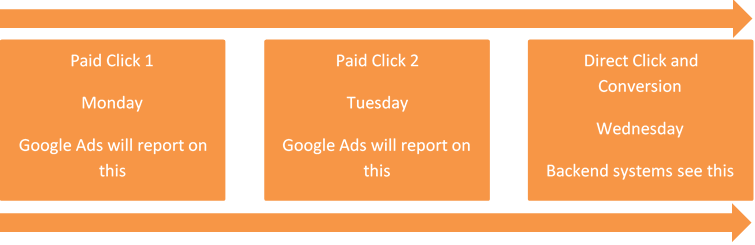
*if you are still using last click attribution then in the above example it will not report on Monday in Google Ads, only on Tuesday. Ideally advertisers should move away from last click attribution to a different model.
We also need to remember Google Ads and Google Analytics do not track in quite the same way.
Google Analytics credits when the last non-direct click occurs, so if the conversion journey was Paid > Organic > Direct then Analytics would credit Organic, but Google Ads would ignore the organic and credit the paid click.
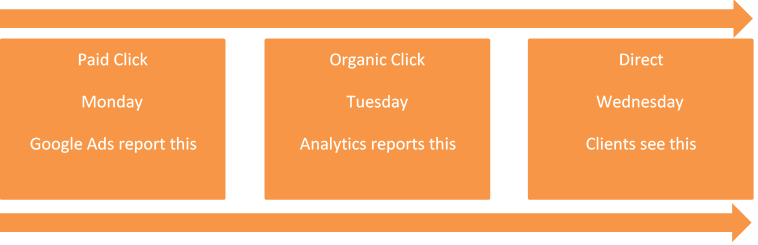
*there are reports in Analytics which allow you to see the data in different attribution models, which better reflect reality.
This can be quite confusing and cause a great deal of hours to be spent looking through data, only for it to not add up.
Other platforms also work differently which can create further confusion if you are managing the accounts yourself.
If you are unsure as to why you have tracking issues, or need the help of an expert agency who understand this and can help you better strategize for the future, then please do get in touch.
Google Conversion Tracking Fundamentals
WHY CONVERSION TRACKING IS SO IMPORTANT
When you create a website, it should be with a specific purpose in mind. Usually that purpose is to sell either your services or your products.
After you have spent time, money and effort on a new website then ideally you want to know if it actually fulfils the purpose that it was designed for and whether it needs further improvement.
This can be analysed using conversion tracking and is especially important if you are continuing to spend time, money and effort on digital marketing to send traffic to your website.
Here we focus on the options and methodology rather than the technical implementation as there can be many ways to implement the code depending on your own bespoke circumstances.
WHAT ACTIONS TO TRACK
When visitors reach your website, what is it that you want them to do?
You need to identify and decide which actions matter to you and that you want more of.
Start by looking through the website and listing every possible action, for example:
- Add to basket
- Online purchase
- Free sample request
- Online quote
- Submit an enquiry form
- Initiate live chat
- Telephone call
- Newsletter sign up
- Create an account
- Valuable page visited (eg. contact us page)
- Time spent on site
- Number of pages visited
Then you need to separate your list into macro and micro goals because every action has a level of importance attached to it.
Macro goals are the main goals that are key to your business and will be used to measure your website performance and marketing performance.
For a lead generation company this is usually a phone call lead or an enquiry form submission.
For an eCommerce business this is usually a sale of a product and the revenue generated.
Micro goals are the other valuable actions that may eventually lead to a macro goal. These could be viewed as valuable signals that will help you optimise to gain more macro goals.
For example, newsletter signups aren’t the end goal but the more you attain the more people you can keep in contact with that may lead to a future sale.
You also need to identify how each action can be tracked for example a specific page is viewed (eg. a thank you page) or an event that occurs (eg. a button click).
TRACK CONVERSION VALUES / REVENUE
You can record a value for each conversion action that you track.
This is crucial for an eCommerce business because you need to know how much revenue your sales are getting you.
Making 1000 sales a month for a product that costs £2 will have a very different impact to your business than 1000 sales for a £500 product. You need to measure the value of your sales, not just the volume.
Lead generation businesses may find it more difficult to assign a value because not every lead turns into a sale and the monetary transaction may occur much later on. However, there is a way you can estimate the value of each conversion if you have historical data.
For example, if on average it takes you 20 form submissions to make a sale of £500 then you can estimate that each form submission is approx worth £25 to your business.
DUPLICATION – ONE VS MANY
Before adding any tracking code, you need to think about how you want to interpret the data that you capture.
If somebody converts multiple times then you need to decide whether you want to count them all as only one conversion duplicated multiple times or count each conversion as a separate conversion.
Lead Gen Scenario:
A user clicks on your ad and reaches your website. They submit a contact form to ask about your pricing. They then submit another contact form to asking about your availability.
In this scenario, you have not received multiple opportunities so you should only count this as “one”.
eCommerce Scenario:
A user clicks on your ad and reaches your website. They browse your products and purchases something. Before leaving your website they see something else they want to buy and runs through the checkout process again.
In this case, each purchase adds value so each conversion should be counted. Therefore, use “many”.
ATTRIBUTION
User journeys are often complex with multiple touch points. You need to decide how you want to credit those touch points by choosing an attribution model.
User Journey Scenario:
On Monday, a user is researching on their mobile phone and clicks on your ad but does not make a purchase.
On Tuesday, that same user is browsing on their tablet and clicks on another ad to do more research but again does not purchase.
On Wednesday, while they are on a desktop computer, they click on another ad and finally decide to purchase.
In this scenario, how do you want to attribute the conversion? Do you consider this a sale from Wednesday on a desktop computer (ie. last-click attribution)?
But if those previous clicks didn’t occur then there might not have been a click on Wednesday that gained the sale.
Choose an attribution model:
As a general rule, Google recommends the following priority order:
- Data driven – if you have enough conversion data to be eligible then Google strongly recommends using this.
- Position-based – the first click starts the journey and the last click closes the deal so these are deemed the most valuable touch points.
- Time decay – more credit is given the closer it is to the last click that the conversion.
- Linear – each touch point along the journey is given equal credit
- First-click – the first click is given all the credit for bringing that customer to you. Without this, the remainder of the journey wouldn’t happen
- Last-click – the last click is given all the credit. Traditionally this has been the industry default and matches more closely to your back end sales data but is not optimal for optimising performance.
For a deeper explanation of what these are, here is a post I wrote called Better PPC with Google Attribution Modelling.
GOOGLE ANALYTICS
At the very least, use Google Analytics. It’s free and provides a lot of information about how visitors reach your site and what they are doing when they get there.
You need to create a Google Analytics account and place some code onto every page of your website. Then in the Google Analytics interface, create the goals by choosing a goal page URL or setting up event tracking.
The goals you create in Google Analytics can be imported into Google Ads.so that you do not have to duplicate creating these in Google Ads. Just make sure you link the accounts together.
GOOGLE ADS – GLOBAL SITE TAG
If you do not have access to Analytics then you could generate tags to be placed on your website.
The Google Ads code has changed in recent times. Previously, you just had to place the conversion code snippet on your goal page. Now you need to place a global site tag on every page of the website and also a separate event code on the goal page that you want tracked.
GOOGLE TAG MANAGER
Each time you want a piece of code adding to the website, you will need to create the goal, generate the code, and send it to your web developer to implement.
Sometimes we come across issues where the developers take several weeks to action this or charge additional fees for developer time each time you need a code added or amended.
Google Tag Manager is a free tool where you only need the developer to place a container code once, then all other tracking codes can be created within the Tag Manager interface.
This means you can set up whatever tags you want, whenever you want without waiting for the developer or paying extra fees.
No coding experience is required and you can provide access to your digital marketing agency to set up the tags that they want to track.
You can also, test the tags are firing correctly before publishing changes to your website..
Each change you publish creates a new version so that you can always roll back to a previous version if ever you needed to. Without this, the alternative is that you change the actual code itself and if it goes wrong then you need to change it all back again manually to exactly what it was before.
It’s free and the benefits are endless so definitely consider using Tag Manager.
TRACK OFFLINE CONVERSIONS
If your website generates leads that may not all turn into true conversions or not until a later stage then it is still possible to track these. This is especially pertinent for loan providers, mortgage lenders, law firms, etc.
For example:
If you are a loans provider, not everybody who applies for the loan will eventually take out the loan. Some will change their mind, some may fail the credit check.
So if you want to track true conversions rather than leads then this requires just a little more work.
Whenever somebody clicks on one of your ads, a Google Click ID (GCLID) is generated to identify that click. You need to set up your website to capture these GCLIDs and if one of your leads eventually turns into a sale, you need to upload that GCLID information back into Google Ads. This will then tell you which keyword, ad, device, day, etc drove that conversion so that you can optimise accordingly.
For more information, Rick wrote an article about Using GCLID & Imported Conversions to Track Offline Sales.
TRACK PHONE CALLS
Another form of offline tracking is when somebody calls your telephone number to make an enquiry or purchase instead of conducting the transaction online.
If receiving phone calls adds value to your business then it only makes sense to track which parts of your marketing strategy are driving those phone calls.
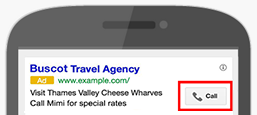
Google Call Extensions
These are the phone numbers or call buttons that appear with your ad (see image below)
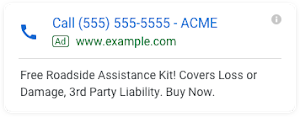
Google Call-Only Ads
These ads appear on mobile devices and when clicked will call your phone number instead of sending the user to your website (see image below).
Some consider this technique to be a little bit brute force because you are only giving the user the option to call you.
Some users will like it and some won’t. If they don’t like it then they will either not click on your call-only ad or hang up when they realise it starts calling rather than directing to your website.
It might still be worth testing and can work very well in certain industries, such as, emergency plumbers, electricians, locksmiths, etc.
Google Call Forwarding
For Call Extensions and Call Only Ads, Google can supply a call forwarding number (in some countries).
This allows Google to record that a call has occurred and that it was driven by PPC, whilst passing the caller through to your actual phone number.
Google Website Call Forwarding
Google can also place a call forwarding number on your website
This requires a snippet of code that will dynamically change your phone number to the Google forwarding number if a visitor reaches your website via a paid click.
This means that if somebody calls you after they have reached your website, you will still know that it was driven by your PPC marketing efforts.
Limitations
Google call forwarding is limited to only Google Ads traffic though, so if you get a call that isn’t from Google Ads then you won’t know which other channel it may have come from (such as organic, referral, social, direct, or any other)
Another limitation is that you do not know what the call is about so you cannot ascertain the quality:
For example:
If you get 10 calls enquiring about your services then you have the potential to make more sales.
But, if you get 10 calls from people selling you toner and complaints then the marketing spend is not well spent.
Google’s solution for this is to allow you to count calls as conversions only if they exceed a specified length of time, for example, if a call lasts for longer than 60 seconds then you can assume that it must have been a reasonably worthwhile conversation.
3rd Party Call Tracking Software
If you wanted better accuracy then you could employ more sophisticated call tracking software at an additional cost.
The phone number on your website will dynamically change based on the traffic source so you can measure phone call performance across all channels.
Post Call Rating is another key feature where you can rate the call after it has happened so that you can identify the good leads. Once you import this data into Google Ads, you will be able to optimise to drive more of these valuable calls.
Call recording is also usually included as standard so you can use this to help monitor your own call quality for staff training purposes.
There are plenty of providers to choose from but the big ones are Infinity and ResponseTap.
OTHER PLATFORMS
If you are using other platforms (such as Bing Ads, Facebook, AdRoll, etc.) then make sure you implement their tracking too (ideally using Google Tag Manager).
WHAT TO DO WITH THE DATA
Having accurate conversion tracking on your website opens up many possibilities:
- You can optimise your PPC campaigns for better performance.
- Reallocate budgets to the parts of the campaign that are working well.
- Adopt automated bidding strategies to target with better precision than manual bidding is capable of.
- Target new audiences that are similar to your existing converting leads.
- Remarket ads to loyal customers to cross-sell complementary products.
CONCLUSION
Being able to track performance is one of the key benefits of digital marketing so we should take full advantage of this. You cannot improve performance if you cannot see what is working and what is not.
In traditional advertising (such as TV, radio, magazines, billboards, etc.) you may notice a general surge in enquiries but won’t know exactly who or how many were a direct impact from your marketing spend.
I still come across so many businesses that don’t fully understand tracking and what options are available. A tracking audit is the first thing we do when we begin working with a new client so that we can reduce your wasted marketing spend and optimise for better quality traffic.
If you would like help ensuring your tracking is set up correctly and optimised for the best possible PPC performance then please get in touch for a free audit.
AdWords Target CPA Bidding: Case Study
Earlier this year, Circus attended a Google Partners Bootcamp where one of the key topics discussed was automated bidding strategies and the benefits they bring to clients and agencies.
After the event, I wrote a post that highlights why and how we should be using them, which you can read here: circusppc.com/adwords-automated-bidding-strategies
Now that a few months have passed, I want to share with you the results of some testing we conducted using the Target CPA automated bidding strategy.
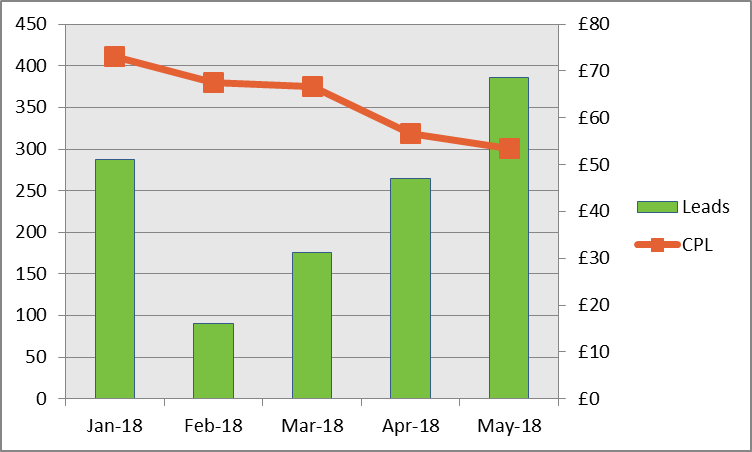
The account used was a lead generation client aiming for 350 leads per month at £50 CPL (cost-per-lead).
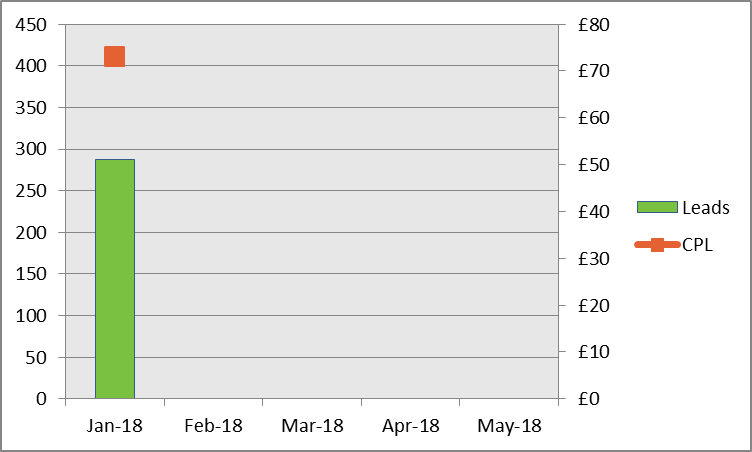
January 2018
Bid aggression was high (£4.97 CPC) which led to relatively strong lead volume with 288 leads generated. However, CPL was also very high at an unsustainable £73.05.
| Month | Leads | CPL |
|---|---|---|
| Jan-18 | 288 | £73.05 |
February 2018
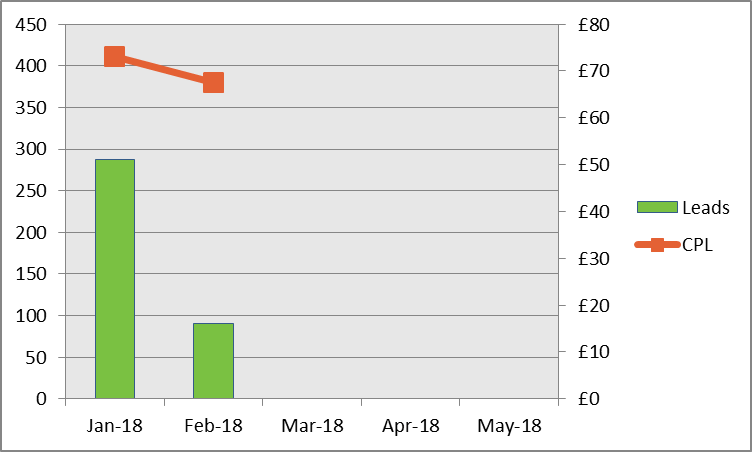
Due to high CPL in January, bids were manually decreased in February to try and bring CPL down to a sustainable level.
CPL did improve but not by much and lead volume dropped considerably to 91 leads.
| Month | Leads | CPL |
|---|---|---|
| Jan-18 | 288 | £73.05 |
| Feb-18 | 91 | £67.52 |
March 2018
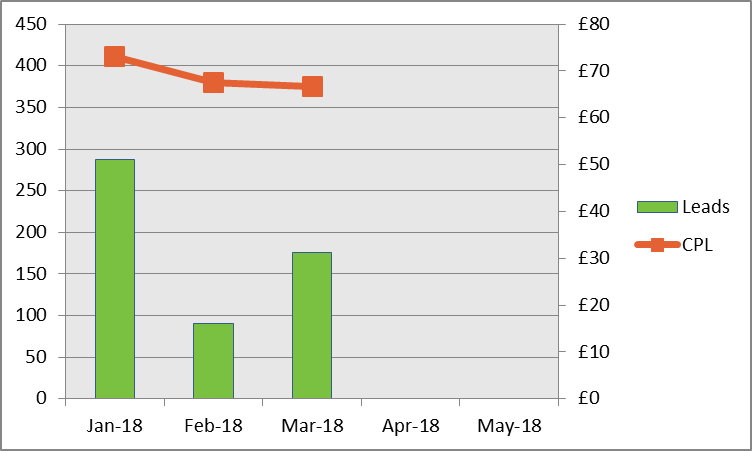
Target CPA automated bidding strategy applied in March. Google’s recommendation is to start with setting the Target CPA as the current CPL so that the algorithms have time to learn and stabilise.
Target CPA set to £67. Leads improve by 93% with CPL improving ever so slightly.
| Month | Leads | CPL |
|---|---|---|
| Jan-18 | 288 | £73.05 |
| Feb-18 | 91 | £67.52 |
| Mar-18 | 176 | £66.67 |
April 2018
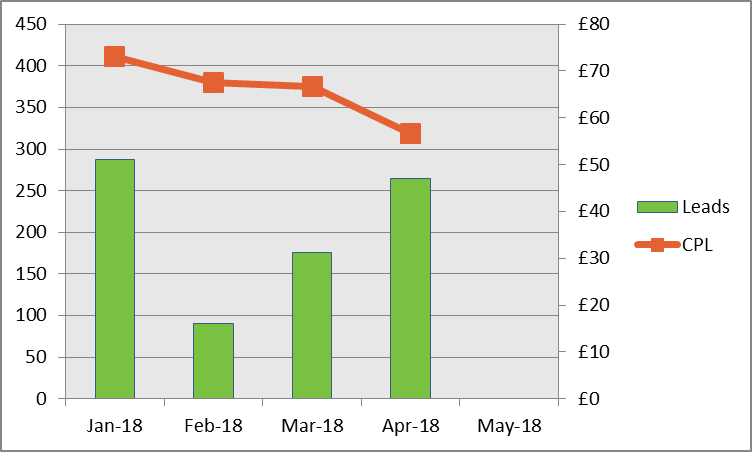
Google recommends reducing the Target CPA gradually only after the automated bid strategy learning period has ended.
Target CPA reduced to £55. Lead volume increases by another 50% from March to April. CPL reduces from £67 to £57.
| Month | Leads | CPL |
|---|---|---|
| Jan-18 | 288 | £73.05 |
| Feb-18 | 91 | £67.52 |
| Mar-18 | 176 | £66.67 |
| Apr-18 | 264 | £56.68 |
May 2018
Target CPA reduced to £50. May exceeds the target 350 leads and brings CPL down very close to £50 CPL target. CPC this month has come down to £1.38 (from £4.97 in January).
| Month | Leads | CPL |
|---|---|---|
| Jan-18 | 288 | £73.05 |
| Feb-18 | 91 | £67.52 |
| Mar-18 | 176 | £66.67 |
| Apr-18 | 264 | £56.68 |
| May-18 | 386 | £53.47 |
CONCLUSION
February to May shows a 324% increase in leads and a 21% reduction in cost-per-lead. These are pretty astounding results!
In addition, a lot of time and effort is saved where manual bid optimisation would normally be applied, so now that time can be dedicated to improving strategy.
In automated bidding, Google takes into account multiple factors in real time that are just impossible for a person to do manually.
Despite these great results, I would still encourage careful and phased testing rather than abandoning manual bidding altogether immediately.
Follow the best practice guidelines and be patient throughout the learning period. It is tempting to make changes when you don’t see the results immediately.

If you would like help taking your PPC campaigns to the next level then please get in touch and see what Circus can do for you.
Written by William Cheng Operations Director at Circus PPC Agency
Automated Bidding Strategies: You’re Doing It Wrong
Have you transitioned to Automated Bidding Strategies on AdWords yet? And if so, how have you found the results?
With mixed results being reported, there has been a lot of debate about this within the PPC industry.
Circus were recently invited to attend Google Bootcamp for a day of training at their new Digital Academy in Victoria, London. Here we discussed several hot topics but in this article we will dive a little deeper into Automated Bidding Strategies and how to get it right.
Why Use Automated Bidding Strategies?
The ad auction is always changing as competitors are entering or leaving the market and changing their bids. The user journey is getting more complex with multiple touch points.
Manual bidding requires a lot of time to segment users and make adjustments for devices, locations, day of week, hour of day, etc.
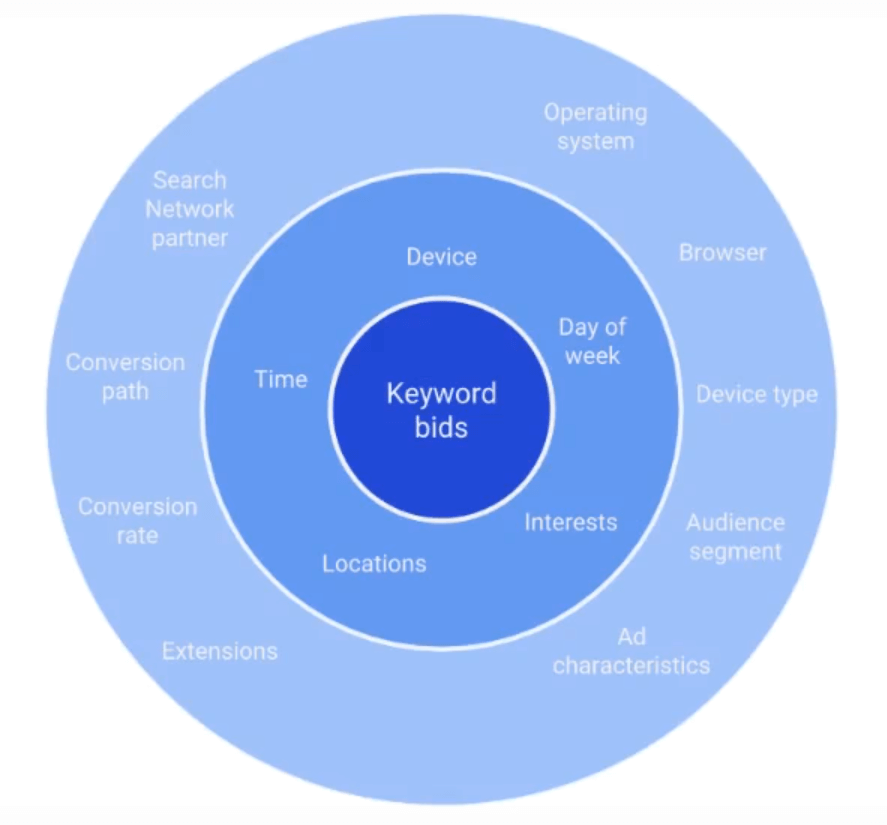
Currently 80% of time is spent doing manual tasks and 20% on strategy. If we could spend 80% of the time on strategy and 20% on implementing then we might find better ways of achieving our goals.
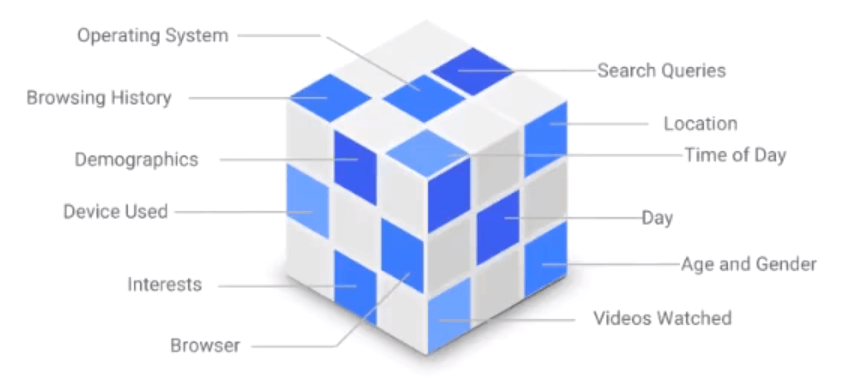
Smart bidding tries to offer a solution to these problems that are so time consuming to solve manually and also factor in auction signals in real time that cannot be done by a person.

Example – 3 different people typing in the query Hilton London could all be looking for different things:
- User 1 – Person looking to book a hotel stay in London
- User 2 – Person who has already booked and looking for directions to get to the hotel
- User 3 – Person already in the hotel and looking for information about the facilities, check out times, restaurant opening hours, etc.
Manual bidding means that we might bid the same amount for the keyword but the value of each user is clearly different.
Automated Bidding Strategies factor in other auction signals in real time to determine the intent of that user then adjusts the bid accordingly.
Which Automated Bidding Strategy To Choose?
There are several Automated Bidding Strategies to choose from and each is designed to meet a specific business goal.

To drive awareness Google recommends using Target Search Page Location or Target Outranking Share.
To drive awareness but also consideration then Google recommends Maximise Clicks.
To drive conversions or grow loyalty Google recommends Target CPA, Enhanced CPC or Maximise Conversions.
To drive revenue or grow loyalty for eCommerce Google recommends Target ROAS (Return On Ad Spend).

How well a bidding strategy might work for you is also dependent on your situation.
Enhanced CPC still allows a lot of manual control if you’re not quite ready to fully let go and trust the machines yet. Google recommends having at least 15 conversions in the last 30 days for this to be more effective.
For Target CPA to work well, Google recommends having 30-100 conversions in the last 30 days.
Whereas Target ROAS requires 50-150 conversions in the last 30 days for better accuracy.
TOP TIPS
Google has been investigating the reasons why some people think that automation is not working for them and they have found the following pitfalls to avoid:
Don’t Be Too Ambitious Too Soon
Set Targets carefully when using Target CPA or Target ROAS. It works best when optimising to realistic goals so don’t just set the target to something that has never been achieved.
Start off slowly setting the target to what it has been recently. Then once it has stabilised, begin to amend the target gradually in small increments. For longer consideration purchases, wait longer to capture more data.
Don’t Change the Conditions
Limit the number of changes to the campaign immediately after transitioning. Every adjustment you make, the algorithm needs to adapt so starts from scratch again.
Don’t Judge Too Soon
Avoid immediate analysis of Smart Bidding performance – it takes 1-2 weeks for the algorithm to calibrate to the new bidding strategy, depending on how much conversion data is available.
There is a Bid Strategy Report that tells you how many days are left in the campaign’s learning period.
Set Conversion Windows Appropriately
Most clicks don’t result in immediate conversions so know your standard time lag from the first click to the conversion and factor this into the waiting period.
For Search campaigns – identify your time lag by visiting Search attribution reports, setting a 30-day window and looking at the conversion lag from the first click.
For Display campaigns – set a 90-day window and segment your campaign-level conversion data by “days to conversion” in order to calculate average conversion lag.
Be Mindful of Seasonality
The Bidding Strategies learn best across normal, stable conditions. This means try to avoid changing to a new strategy over peak periods such as Black Friday.
If you would like help with setting up your AdWords campaigns and implementing bidding strategies in the most optimal way then please get in touch.
Biggest PPC Changes in 2017
The PPC industry never stands still and as we head into 2018 it feels like a befitting time to take a moment to look back at how things have changed over the last year.
We’ve gained lots of new features and seen the end of others so here we highlight some of the most notable changes in PPC in 2017.
CONVERTED CLICKS REMOVED
Google finally sunset converted clicks and erased its presence from the AdWords Help Centre as if it never existed.
However, this does not mean that Google has decided to automatically count your duplicated form submissions or multiple checkouts by the same user.
You are able to choose whether multiple sales or form submissions by the same user should be counted every time or only once. This can be applied in the conversion settings page in AdWords.

ATTRIBUTION MODELS
Google made a massive push to kill off Last Click attribution last year.
Attributing the sale or enquiry to only the Last Click does not give you a complete insight into the full journey that led to that conversion. It doesn’t give credit to the other keywords and ads that also contributed.
On that same note, neither does First Click so avoid using that one too.
Google recommends using Data Driven (if you have enough data), Position Based, or Time Decay attribution models.

EXACT MATCH NO LONGER EXACT
In the beginning, exact match keywords only matched an exact search term. Then, since 2010, exact keywords began to also match close variants, such as, plurals, misspellings and typos.
In March 2017, this was broadened even further to ignore word order and remove, change or add function words.
Example: The keyword [women’s hats] could be triggered when someone searches for “hats for women”
Advertisers who put a lot of money through very specific, exact match keywords may find that some of that money will now be spent on unwanted, poorer performing search terms.
ENHANCED CPC 30% CAP REMOVED
Enhanced CPC bidding is not new to AdWords. Google introduced this in 2010 to help advertisers ease the burden of managing all the different bid adjustments available.
This feature allowed Google to dynamically adjust your bid for each search up to an additional 30% or even reduce it down to zero depending on the chances of converting.
Example: If you have a keyword with a bid of £1.00 then Google may change this bid for a particular search up to £1.30, if it is deemed likely to convert.
In 2017, this +30% cap was removed so Google can now increase the bid as high as they deem necessary if the chance of conversion is very likely.
OVER-DELIVERY 20% TO 100%
Previously, setting a campaign budget at £100 per day meant that AdWords could over-deliver by 20% and actually spend up to £120, if they expect impressions to be high during that day.
AdWords would then try to balance this out by underspending on other days where impressions are expected to be lower. By the end of your billing month, the total spent will not be more than the average of £100 per day.
Over-delivery has now been increased from 20% to 100% which means that a campaign daily budget of £100 could spend up to £200 on any given day. Again, AdWords will try to even this out across the billing month.
However, there are some scenarios (which we have written about previously) where this can cause a problem, especially if AdWords spends most of your budget on days that are high impressions but low conversions.
HISTORICAL QUALITY SCORE
Google has now provided us with a view of historical Quality Score which we can segment by time.

Being able to see these changes in historical Quality Score is helpful in several ways:
1) Ad Copy Testing
We can check to see whether our ad copy changes had a positive or negative impact on Quality Score.
2) Shed light on why stats may have suddenly changed
Sometimes a keyword’s performance appears to be very volatile. Cross referencing this against historical changes in Quality Score may show a correlation that could explain it, so you no longer have to guess whether it is because of a change in the market or an effect from competitors.
3) It is a signal to highlight where you want to focus your efforts
If a usually good converting keyword suddenly decreases in Quality Score and stats decline, you know you need to make changes here to try and restore the good Quality Score and performance.
GOOGLE SHOPPING
In late June, Google was fined €2.4 billion for favouring its own shopping search results over other price-comparison sites.
This had a huge impact within Google as Search and Shopping had to be separated immediately to operate as completely independent entities. This caused massive disruption and very sudden internal restructuring, with teams being split apart and people relocating offices at a moment’s notice.
The effect on users is that they will start to see more ads appearing from other price comparison sites and not just by Google, such as:
- Kelkoo
- Pricerunner
- PriceGrabber
- Shopzilla
- Twenga
ADWORDS NEXT – NEW INTERFACE
Google launched their new AdWords interface and has been phasing it in last year.
This is Google’s mobile-first design with the aim of unifying the AdWords experience across all devices. Not only is it less cluttered but it also uses data visualisation to help the way we view reports.
If you’ve ever tried to use the old AdWords interface on a mobile device then you will welcome this change with open arms.
Advertisers still have the option to revert back to the previous interface and in some cases it is necessary. Some features are only available in the old interface and others are only available in the new interface.
I expect that once Google finish transferring all of the features across to the new interface, the old one will begin to disappear.

If you would like expert PPC management to help you navigate through all of these changes and upcoming changes then please get in touch so that we can help you plan for the year ahead.
Written by William Cheng Operations Director at Circus PPC Agency
Google AdWords 2x Budget Over-Delivery Explained
Earlier this month, Google made a sudden announcement that AdWords can over-deliver up to twice your daily budget on any given day. Not only was this unexpected but the changes came into effect on the very same day, 4th October 2017.
If you are responsible for managing the PPC in your company then maybe you have seen your daily spend suddenly jump up over the last few weeks?
Or, if you are an agency, maybe you have had clients asking you why they are spending significantly higher than the daily budgets that they authorised for you?
Let’s take a deeper look into what is happening.
PREVIOUSLY – 20% OVER-DELIVERY
Spending more than your specified daily budget is nothing new in AdWords. Previously you could spend up to 20% over the daily budget on high traffic days and Google would try to balance this out on other low traffic days. This is called over-delivery.
So, for example, you set a daily budget cap of £1000 per day. Google can spend up to £1200 on any given day.
Google will try to make up for this by underspending on other days so that you do not spend more than your monthly charging limit of £30,400 (£1000 x 30.4 days)
“Your monthly charging limit is the average number of days in a month (30.4) multiplied by your average daily budget.”
If at the end of the month, your total spend is over £30,400 then Google will give you an over-delivery credit for the amount that went over.
This has always been a reasonably easy conversation to have with clients. They seemed to understand and accept the reasoning behind it without need for a lot of justification.
NOW – 100% OVER-DELIVERY – 2X YOUR DAILY BUDGET
So, you set a daily budget cap of £1000 per day. AdWords can spend up to £2000 on any given day.
Google will still try to make up for this by underspending on other days and will still give you an over-delivery credit if the accrued costs go over £30,400 in a month.
This change was so sudden that Google hasn’t been able to update it across the AdWords Help Centre yet.

SPEND MORE THAN 2X YOUR DAILY BUDGET?
So, you set a daily budget cap of £1000 per day. You know that AdWords can spend up to £2000 on any given day.
Is it possible to spend over £2000 per day? Well, actually, the answer is YES.
However, if you accumulate over £2000 in costs on any given day, you will only be charged £2000. So, if you set a daily budget of £1000 and you accrue £2300 of costs, you will only be charged £2000.
It is worth noting that this is also returned to you in the form of an over-delivery credit (rather than changing the campaign statistics) to avoid corrupting the performance data that we use for optimisation.
SO WHAT’S THE PROBLEM?
Some people might be asking why this is a problem because they end up spending the same amount across the month anyway. But do you really? The scenarios below might shed more light on this.
Google says that this change can benefit advertisers because on higher search volume days we can get more traffic. But is this really helping us?
Yes, it is possible that on a good day, having the extra exposure can amplify the good performance by allowing more traffic that results in more leads/sales.
But, what if we are having a bad day? It can also amplify poor performance by spending more and not getting the leads/sales.
Before the change, the impact of over-delivery was less. Now, the effect is much bigger.
PROBLEM SCENARIOS
Here are some scenarios that might apply to you or your clients:
What if there is a technical problem on the website that isn’t noticed immediately?
If the online checkout or lead submission form breaks down then we wouldn’t want AdWords to serve double the daily budget on that day.
What if you have a set budget for a flash sale on a specific day?
Your client tells you that she has authorisation to spend an extra £500 for a flash sale today on top of the normal £500 daily budget. You increase your daily budget to £1000 but you end up spending £2000. Try explaining that one the next morning.
What if you only run AdWords on weekdays and not weekends?
Let’s say that you have £1000 per day for 22 working days of the month so while you are expecting to spend a maximum of £22,000, you could end up spending up to £30,400 as your monthly charge limit is calculated as £1000 x 30.4.
What if you run a campaign that does not run on for a full month?
Let’s say you have £5000 to run a 10-day campaign so set a daily budget of £500. If Google over-delivers and you spend up to £10,000 then Google will still hold you liable for those charges because you are still under your monthly charging limit of £15,200 (£500 x 30.4).
What if your company works on weekly budgets or irregular budget periods?
One of our clients in the travel sector has custom pre-defined periods that align with their seasonality trends. They have specific budgets assigned to each period, however, the period dates do not match Google’s billing months so over-delivery could misalign these.
What if you have a limited capacity to the number of leads you can handle at any given time?
One of our clients is a mortgage broker firm who increases or decreases the daily budget depending on how many leads they require. This is now taken out of their control and could send them more leads than they can handle.
Let’s say you have a monthly budget of £30,000 and sales tend to be stronger at the end of the month around pay day.
You might decide to have a reduced daily budget of £750 per day for the first 15 days of the month then an increased budget of £1250 for the last 15 days.
If the over-delivery doubles the daily spend to £1500 during the first 15 days then you will be left with only £500 per day for the remainder of the month.
This may be an extreme example but it emphasises the point that over-delivering early in the month would have the opposite effect of what we are trying to achieve in this situation.

CONCLUSION
Setting a daily budget cap allows us to mitigate risk so that if I spend £1000 today and don’t get many leads/sales then I can start again tomorrow with the same amount. If Google over-delivers up to £2000 then I have less budget available for the other days that might perform better.
Not only do we lose some of our control but we also do not know exactly what it is based on. All Google tells us is that, “AdWords will continue to optimize your spend based on daily fluctuations in traffic, what you’ve spent on previous days of the month, and other factors”.
Unfortunately, there is no setting to opt out of over-delivery.
However, some of our clients will be unaffected because they have unlimited budgets (as long as performance metrics are met). This means that the daily budgets are set so high that they are never reached. The spend is controlled by increasing or decreasing bid aggression based on CPA or ROI performance. This strategy is ideal but cannot be accommodated by all.
We will be monitoring our accounts even more closely now to see whether this change has a positive or negative effect on each of our clients. It is unlikely that all of our campaigns will improve and just as unlikely that all of our campaigns will decline. Some might perform better but we must react quickly to the ones that do not.
Written by William Cheng PPC Director at Circus PPC Agency