


Monitoring and improving prominence of your PPC ads has just become much easier with Google’s newly released Impression Share metrics. Advertisers finally have a reliable way to track the placement of ads on a page, rather than tracking the position your ads place in auction, as Average Position does. To pair with this, Google is also rolling out a new automated bidding strategy – Target Impression Share – where you will be given the option to let Google automatically set bids in order to achieve an impression share goal.
What are these new metrics?
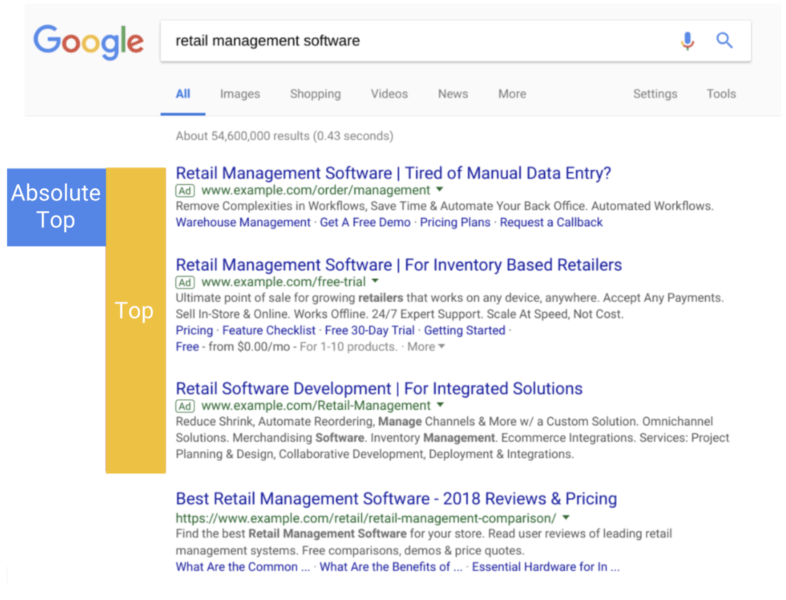
- (Top) % shows the percentage of all your impressions which appeared at the top of the page, above organic search results.
- (Abs. Top) % is the percentage of your impressions appearing in the very first position on the page, and tells you reliably how often your ad is the first thing someone sees on the page.
- Search (Abs. Top) IS is calculated by dividing your impressions at Absolute Top by the total possible number of impressions available at Abs. Top.
- Search (Top) IS is calculated by dividing your impressions in top positions, above organic results, by the total number of available impressions in these positions.
What is the new Smart Bidding Strategy?
Target Impression Share is Google’s newest bid strategy primarily aimed at improving awareness and reach. It allows you to set a target percentage share goal, and Google will automatically set bids in order to achieve this goal. There are three placement options: absolute top (the first position), top of the page (above organic results), or anywhere on the first page. After choosing a placement option, you can choose your impression share target – anywhere up to 100%. You can also set a bid limit in order to restrict spend, however setting a limit which is too low may end up in low traffic and your goals not being met.
How can these help me and my PPC campaigns?
Average position was – and is still – used by many as an indicator of the position of your ads in comparison to other advertisers. But have you ever had a high Avg. Pos., and yet seen a low CTR? This could be down to the fact that these numbers are only informing you about your position in relation to other ads in each auction. What Avg. Pos. fails to tell you is the location of the ads on the page. For example, Google’s algorithms may have determined the ad relevance too low to show at the top of the page, above the fold. By exclusively optimising using Avg. Pos., you would be fighting for that number 1 spot – positioned at the bottom of the page. When utilising these new metrics, you can ensure that you are always vying for that prominent spot above organic search results, or making informed decisions as to whether those lower positioned ads are still valuable to you. In fact, Google themselves now recommend using these new metrics exclusively to help bid for top spots, rather than using Avg. Pos. They make it possible to better evaluate your spending and alter your bid strategies in accordance with your true position in the search results.
So although you may have found Avg. Position useful in the past, it is important to remember that it only refers to the auction itself, not the position on the results page. Now, if you want to focus on prominence, you have a far more straight-forward way of monitoring this, and achieving success.
Using these two new features, it is now even easier to evaluate the effect location has on performance. Although it is important to remember that top locations may not automatically improve your stats, when this is combined with great ad copy and a well thought-out PPC strategy, you can drive clicks from the positions that matter most to you.
If you would like support with improving the position of your ads or any other aspect of PPC please get in touch and we will be happy to help.
Are You Getting The Best From Your PPC Account?
- Is your PPC account performing okay?
- Are you happy with just okay?
- Would you rather take it to the next level?
Many companies I have spoken to recently at events are unhappy with the work their agency is doing. One of the agency’s I spoke to wasn’t even aware their PPC account could actually perform much better. What is the reason for this?
Most likely they have been sold a dream by the sales team at the agency they are with which they have bought into. Unfortunately, sometimes it can be years down the line before you fully analyse your numbers and realise there has been no or little improvement in your account.
I have previously written a blog which explored whether PPC actually works (https://circusppc.com/does-ppc-work/). In that blog I discussed why some people think PPC doesn’t work and a lot of the reasons are related to who was managing the account, which will overlap a bit with this blog however I would encourage you to read both.
Why are you still with this agency?
Usually this is because of the fantasy which you keep getting resold or the misconception which you have bought in to (which the agency may even believe sometimes).
Fear of change could also be a factor; perhaps you have been with this agency for a while and do not want to change, regardless of results.”
Below I have highlighted some of the core things every client needs to look out for.
Are you working with an expert or an “expert”?
Are you actually working with a PPC expert? Just like a builder and an electrician are 2 different jobs despite being in the same industry, an SEO expert or a digital person is NOT a PPC experts.
Having worked in the industry for over a decade now, I have come across plenty of people who will claim to be an expert in PPC. Even someone who managed PPC accounts 10 years ago but not since (back when you simply added a keyword and set a bid) cannot claim to be an expert. In fact, the industry has changed so much in the past few years that even someone who hasn’t managed a PPC account for a year will take some time to get used to all of the changes.
Unfortunately many businesses are being conned by people who pretend to be experts and in some cases even pretend to be Google Premier Partners (again this is something to look out for).
Do you trust your agency too much?
A strong relationship is crucial between an agency and a client. We like to always think of ourselves as an extension of our clients marketing department. But at what point do you cross the line between having a strong relationship and trusting the agency too much?
This is why it is important to have some knowledge of what the potential of your account is. Data is available for this not just within your account but also using the free Google tools available. There are also some tools you can buy which can give you some more insights.
Some of these include:
- Google Trends
- Google Keyword Planner (which now has a forecasting feature)
- Analytics data
- Auction insights data within Google Ads
- SEMrush
This brings us to the next point …
Do you forecast?
One of the main reasons your PPC account may be plateauing is the lack of ambition to grow the account from the agency as they don’t know what your goals are. If they don’t know your goals then they don’t know how to help you grow the account. Sometimes they may know your goals but may still be unable to help you hit these goals.
If you do not forecast 12 months in advance then you should at least look ahead to the next month. In most cases the data is already available from the previous months and years which can be combined with trend data from Google of how your account is expected to perform. This will help ensure you plan for continued growth of your account whilst keeping seasonality in mind.
Do you have regular meetings with your agency?
Another common complaint of businesses is “Our agency doesn’t give us any time (or charges us for any time we want), whether this be phone calls, skype or face to face meetings”; all of which are essential and play a key role in not only nurturing the client-agency relationship but for ideas to flow and new plans to materialise. Whilst emails work really well for updates, phone calls are great for getting quick answers and to avoid confusion.
Face to face meetings on a quarterly basis work alongside the forecasting above, where both parties can do a stop check to ensure you are hitting forecasts, growing the account and come up with fresh ideas. The attendees of these meetings are always very important. Sometimes full service agencies may send client managers as opposed to PPC experts. Whilst this works really well from a relationship point of view, from an ideas of point of view it doesn’t.
Often whilst just talking to the client I may think of some new beta that Google Ads are running which is perfect for something new the client wants to do. This is something a client manager would not know about. Or perhaps which has existed for a while which would be perfect for a portion of the client’s business which we hadn’t discussed previously.
Is your agency lying to you?
Unfortunately, I have even come across situations where an agency is just blatantly lying to their client. The client saw the performance dip and was told this was due to tracking issues. When looking into this for the client we found there were no tracking issues and the agency was just managing the account badly.
Whilst this is an extreme example, this works well to explain my point that unfortunately there are agencies like this out there as well.
What you need to do?
Whilst some dubious agencies will always exist, some tips to help you are below:
- Demand your agency do forecasting for you which they update on a regular basis.
- Ask for regular meetings – at least quarterly.
- Are you getting access to betas? Only partners and premier partners receive access to Google Ads betas and Bing betas.
- Ask for updates on what is being worked on (hopefully your agency already provides this in the weekly updates it does for you).
- Try to keep your pulse on the industry – whilst this is not always possible as you outsource PPC for a reason, sometimes it is important to ensure you ask questions about new launches, developments, etc.
This piece wasn’t written to criticise other agencies but just to help companies understand some of what they can expect from a good or bad PPC agency and what they really should demand from their agency to help their own objectives and ensure a successful PPC account.
For a free honest audit of your PPC account please do get in touch with us today.
Seasonal Trends: What Will Impact Your Campaigns?
As seasonality is one of the most discussed topics in the digital marketing field, we decided to take a look at a few events and seasonal trends that will most likely impact the performance of your marketing campaigns in the next couple of months.
- Halloween
Despite Halloween being a traditionally American celebration, in recent years it has become more and more popular in the UK and Europe and it now represents a big opportunity for marketing professionals in certain industries.
Halloween related searches have increased year on year with “Halloween costumes” & “Halloween decorations” being some of the most popular terms.
- Black Friday
This day does not need an introduction as it’s become the biggest day in the history of e-commerce. Most retailers these days will run their promotions over the whole weekend, and some of them will start a few days in advance. If you have any retail accounts, this event is likely to have a major impact on your volume of sales so you might want get ahead of your competitors by carefully planning your campaigns in advance.
- Christmas
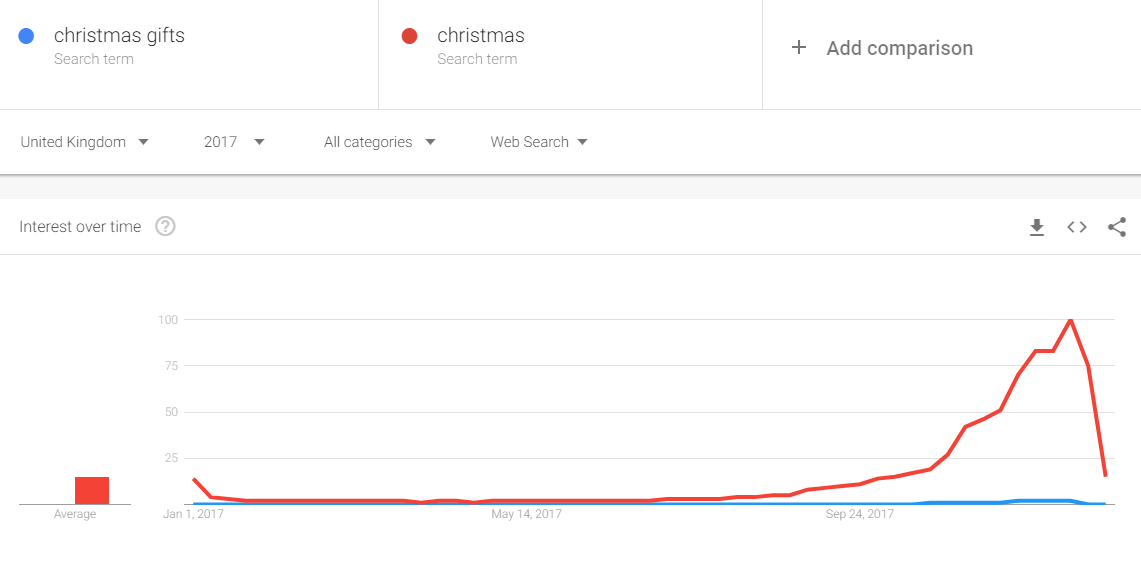
Even though we are only in August, the most magical time of the year is approaching fast. In recent years, we’ve seen the number of Christmas related searches increasing as early as September, so if you want to make the most out of the Christmas shopping season you might want to start planning now.
Analyse historical data
If you want to take advantage of seasonal trends and run a successful pay-per-click campaign, it is very important to understand what worked well and what didn’t in previous years.
For a general understanding of previous years’ performance ask yourself the following questions:
- Did you see a spike in traffic a few days before the event? What happened after the event?
- When did the traffic peak?
- Did your campaigns run out of budget? If not, what was the percentage increase in spend?
- Did any keywords or product categories perform particularly well?
- What type of messaging did you use in your ad copy?
- What are the industries that saw the biggest gains?
Campaign planning & budgeting
After you’ve analysed your historical performance and understood how different seasonal trends and events can impact your business, it’s now time to start planning your campaign.
Think about your promotions:
- Are you going to have product specific promotions or just a site wide sale?
- Do you know exactly which products are going to be on sale?
- Is your shopping feed up to date?
- Are you going to use a discount code or not?
Also, if your campaigns ran out of budget last year, you might want to increase your budget caps to avoid any surprises.
Make sure your ads are relevant
As they represent the first point of contact between your brand and your potential customers, I’ve always believed that ads are one of the most important elements in PPC.
When it comes to ad copy, the best practice is to make sure your ads are relevant to that specific sales event by mentioning it in the headline. This will ensure a higher CTR and better conversion rates.
Tips:
- Make sure all your ads have promotion extensions
- Reference the event in your ad copy (e.g. Black Friday Offers, Christmas Sale, etc.)
If you have any questions in regards to optimising your campaigns for any of the events mentioned above, please let us know as we are always happy to help.
Client Testimonials

Young adults holding up copyspace placard thought bubbles
We are great at PPC and do not shy away from telling everyone but isn’t it great when our clients say the same as well.
Here is some of the feedback from our lovely clients:
“Circus have done a fantastic job on our paid advertising channels not only growing our lead volume whilst reducing Cost Per Lead but also working closely with the business to understand the core KPI and waterfall goals required to achieve an improved and sustained ROI.
Their willingness to understand all products verticals, specialist skills, knowledge and dedication to improving our account is unparalleled.” Ian Johnson – Group Commercial Director – Freedom Finance
“Circus PPC has already impressively increased conversions and saved us significant spend in a very short time. We are looking forward to many years of growing the Drinkstuff brand together.” Buzz Seager – Head of Marketing – Drinkstuff
“Having been a very active online retailer for over 10 years we have lost count of the number of Paid Search companies we’ve worked with (from in-house employees to so called market-leading Paid Search companies). It’s an industry where you’ll never know who can really deliver a good managed service, unless you use them. We have been working with Circus for over 3 years now and from the very start they have been outstanding in all aspects of their service. They have been an absolute pleasure to work with.
We have been extremely impressed with the team’s in-depth knowledge, flexibility with communication, reporting, and most importantly delivering results. From virtually no spend on our paid search campaigns we are generating around 100k per month. The paid search campaigns are now a key part of the marketing strategy and we continue to have peace of mind that it has been delegated to a team that knows exactly what they are doing. We realise that working with a small team of passionate individuals, you get more expertise that an in-house team, and more attention to detail than a bigger management firm. Keep up the great work!” Mohammed Patel – Owner & MD – Kiddies Kingdom
“It’s evident that the gambling industry is one of most competitive markets to run PPC campaigns in the UK. Circus PPC have shown their expertise in this area. They have effectively managed our PPC budget within the challenging CPA and FTD targets we have set. They are a pleasure to work with and feel like an extension of our marketing team.” Andre Au – Senior Acquisition Manager – Betsson
“The Circus team have been part of our continued success this year, thanks to their diligence, hard work and insight. They have taken great pains to understand the needs of our business. They have helped deliver on our goals through effective management of our PPC budget with constant improvement and deployments of innovative techniques and technology.” David Roebuck – Managing Director – Direct Blinds
“Travel is a very competitive and challenging market. Our main aim was not only to protect our brand online, but also provide visitors with the USPs of tailor-made travel across international territories and languages. With our team needed hands on elsewhere we were glad to have our Paid Search activities in the safe hands of the Circus team.” Stefan Wirtz – Head of Online Marketing – Shanti Travel
“Rick and his team at Circus have been part of our continued success for over 4 years now, thanks to their diligence, hard work and insight – and have taken great pains to understand the needs of our business. They have helped deliver on our goals through effective management of our PPC budget with constant improvement and deployments of innovative techniques and technology.” Neil Addley – Managing Director – Trusted Dealers Ltd
“We’ve been working on our PPC with Circus for 6 months now. Since working together, we have seen a dramatic increase in revenue and have maintained a solid ROI throughout. The team is a pleasure to work with and provides detailed and straightforward reports that are always on time. They are always looking to further improve the campaigns and identify new opportunities to expand our online presence.
Circus are a highly knowledgeable company who are passionate about staying ahead of the curve and delivering top PPC campaigns.” Helena Linsky – Owner & MD – Pebble Grey
“Partnership is really important to us, and having someone who fundamentally understands how Google works and is an accredited Partner was one of the key reasons why we chose to pursue a relationship with Circus. Circus have been a breath of fresh air and I’d definitely recommend them – they’re a fantastic company to work with.” Steve Broodryk – Digital Marketing Manager – Miele
“The DISC Group have worked with Rick and the team at Circus for a number of years! The main thing that I appreciate is that I never just feel like a number and that they are going through the motions… the guys continually look to better understand our business and constantly look for new ways to generate high quality leads at the most competitive CPC.
I would have no hesitation in recommending the Circus team… great people who do what they say they will do!” Dave Pike – Managing Director – Disc Group
“Circus has helped us make a significant difference to our PPC efforts. We’ve had an instant 25% decrease in our CPA since we started working together. I’ve worked with Circus in my previous company as well and find them very reliable. The team is very responsive, initiative and experienced at what they do.” Sapna Ahuja – Marketing Manager – UAccount
“We tried various agencies and could not get a partner who took the time to understand our sector or our business. After moving over to Circus, the patience and diligence shown when building our campaigns has been nothing short of exceptional. Above and beyond at every step.” Paul Gorry – Head of B2C Ecommerce – LEW
Retailers Guide to PPC Ad Scheduling
Ad scheduling is not uncommon in the retail sector, and almost all PPC managers will use this tool to their advantage; it allows you to choose specific hours and days of the week that you would like your ads to run.
It’s unlikely that you will run your AdWords account all year round at the same level – planning for seasonality using ad scheduling is a vital strategy for success in PPC for retailers. But not everyone is getting it right, and this leads to a lot of wasted budget.
There are some common errors made when it comes to ad scheduling. For example, one of the biggest trends in retail is that online shoppers love Mondays. This may be correct for some retailers but how you ensure that the same applies to your site? Ad scheduling may seem like an obvious thing to set up, but in reality a lot of retailers aren’t sure when they should run their ads.
This is where your data comes in. If you have been managing your account for a while, the data that this can provide is an invaluable source for shaping your strategy and future campaigns. Every account is different and therefore you need to analyse your own data over a long period of time to get accurate information on such things as conversion rates.
To give you an insight into how this works, Circus PPC have taken the data from a number of their retail accounts to create an average. The below graph shows just how much the conversion rates differ each day, throughout the year – disproving the “Monday is best” theory.
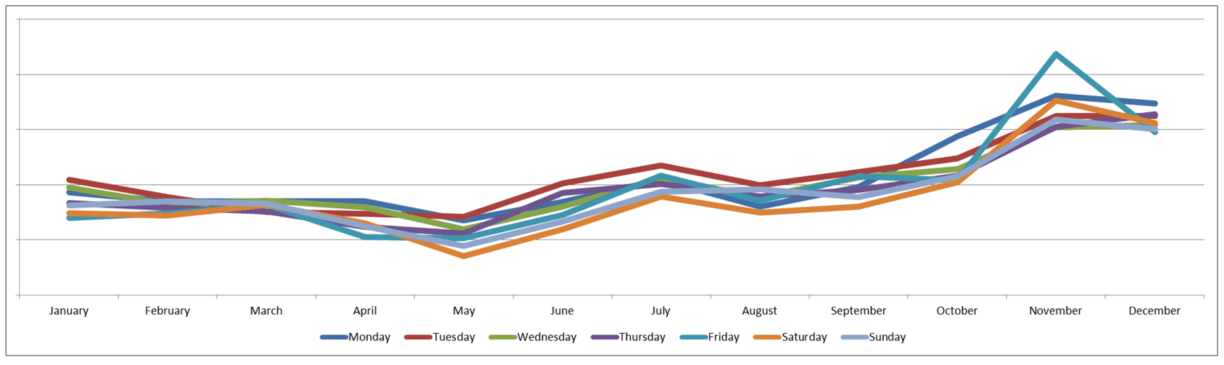
The graph shows that in November, Friday’s are the best performing day – this may be due to Black Friday having a large impact on conversion rates. However, it shows that in December, Friday’s are the worst performing day. It also shows that Monday’s are only the best performing days in April and October.
Therefore, you can’t just rely on industry trends to formulate your ad scheduling strategy – using your own data to your advantage is key.
But it doesn’t stop here. As we discussed, ad scheduling does not only allows you to schedule by day, but also by hour.

This graph shows the conversion rates per hour each month and this is where it starts to get really interesting. In November, we can see that we have some really high conversion rates at times that we might not have otherwise considered – for example, we can see a spike at 11pm but then a much bigger spike between 4am – 5:30am. This is a perfect example of how you can use ad scheduling to your advantage to get ahead of competitors at extremely busy times of year.
The data shown here is likely to impact on key events, for example Black Friday, Christmas, January Sales and any other sales you may run throughout the year. You may also want to consider how your other marketing will impact your paid search activity.
Here are some key examples of when you may need to adjust your ad scheduling strategy in line with other marketing activity:
- Your eCRM activity will impact the time in which searches are made
- Times in which you are running promotions will need to considered – if you are running a promotion between the hours of 2pm – 10pm, you will need to update your ad scheduling in line with this
- If you have a VIP event this will impact the updates you need to make
- Keep an eye on news events related to your industry and competitor activity as both of these will also impact your performance
This approach should help you in understanding what needs to be considered when it comes to managing your ad scheduling strategy. However, for every account and website the data will be different, so it is important to run your own data over a long period of time and analyse it yourself.
For help with ad scheduling, please do contact us.
Global PPC: How To Target International Markets
As the world gets smaller and smaller and consumers embrace the advantages of globalisation, most companies came to the conclusion that if they want to be really successful they need to have an international presence.
One of the most effective way of promoting your business in a foreign market is through PPC, however, many companies struggle to achieve a good ROI or even fail miserably as they tend to overlook some aspects that are critical when it comes to international marketing.
Assuming you’ve already identified the countries you want to expand to, you might want to investigate the following aspects in more detail:
- What search engines and devices are most effective in the target country?

Some search engines are more popular than others in certain countries, so before placing all your eggs in one basket you might want to know what search engines people in that market use and how they use them.
Is your target audience using Google, Bing, Baidu or Yandex? What devices to they use and what is their purchasing behaviour? If the mobile device adoption rate is really high, you might want to think twice before sending traffic to an unresponsive website.
- Overcoming the language barrier
It is highly recommended that you create separate campaigns for different languages as that will make your life a lot easier when it comes to optimisation, especially when you want to add new keywords, ads or negatives. We also believe that having a website in the local language is essential for success as it provides more consistency and users won’t have any issues in finding whatever information they are looking for.
Please note that countries like Spain have different dialects so in that case you might want to create a different campaign for each of them.
Also, if you want to target English speaking people, having a separate campaign with English keywords in your account is the way to go.
TIP: Avoid using google Translate and hire a professional translation company
- Cultural Background, Local Values & Attitudes
Even though globalisation took its toll and pretty much all the nations share similar values, local customs, traditions and beliefs still play a really important role in some other places, so you might want to be aware of that.
Before you start localising your marketing materials, have a look at the questions below and see what implications they have for your strategy:
- What’s the dominant religion in your target country?
- Are they more liberal or conservative?
- Do they have any stereotypes or prejudices?
- Are they very ethnocentric?
- What are their main national holidays?
- Consider time-zones
If you’re running campaigns in multiple countries across the globe, it is very important that each campaign has its own time-zone, otherwise optimising your ad scheduling bids will be very difficult.
Managing an international PPC campaign can sometimes be challenging, however, if you do it right the benefits will be immense.
If 2018 is the year you’re thinking of tapping into international markets and want to leverage our extensive knowledge to turn your PPC campaigns into a success, please don’t hesitate to get in touch with our experts.
Written by Daniel Lupu PPC Analyst at Circus PPC Agency
The 4 A’s of Pay-Per-Click & Why You Shouldn’t Ignore Them
Even though the PPC landscape has seen many changes recently, there’s no doubt there are some best practices that advertisers still need to follow in order to drive increased account performance and get the best possible returns on their spend.
As a Google Premier Partner, we’ve recently had a conversation with our Google reps and concluded that the most important elements that advertisers need to pay attention to in order to drive amazing results are the 4 A’s:
- Assets
- Audience
- Automation
- Attribution

- Assets
- 3+ ETAs
- Optimised Ad Rotation
- 3+ Extensions
Assets could be considered the most important element as they represent the first point of interaction between users and your brand and you definitely want that to have a positive impact.
In terms of best practice, Google recommends that each account should have at least 3 different ads in each ad group. Also, please make sure that your ad rotation strategy is switched to “Optimise” so the best performing creative is delivered more frequently.
Another best practice is to use at least 3 ad extensions in order to provide users with more information about your product and make the ad more relevant and appealing.
- Audience
Long gone are the days when audience targeting used to apply only to Display advertising – advertisers can now use remarketing lists for search ads to re-engage users who have already visited their website but not made a purchase.
In order to take full advantage of RLSA, make sure that your search audiences have enough depth. For example, we’d suggest creating multiple audiences and setting different bids for each of them based on consumer intent:
- All users +50%
- Returning Users +75%
- Abandoned Baskets +100%
TIP 1: Make sure that your remarketing lists are updated frequently so target the right people
TIP 2: Use Similar Audiences if you want to reach more users that have a similar behaviour to that of your existing customers.
TIP 3: Use exclusions if you want to avoid targeting certain users.
If you want to gain more insights into how understanding your audience can improve your PPC performance, go on and read this amazing blog post I wrote last year.
- Automation
Even though it may sound scary, automation has already started taking its toll and you might not even be aware of this. If you’re using smart bidding or Dynamic search ads you are already a step ahead in the PPC automation game. If you’re not using any of those, you might be missing out, so let’s have a look at the advantages provided by Smart Bidding and DSA.
Smart Bidding (Target CPA, Enhanced CPC, and Target ROAS): AdWords uses advanced machine learning to optimise your bids in every auction so you are more likely to receive a conversion or to achieve a certain CPA, based on the strategy that you chose.
Dynamic Search Ads: By using DSA, you basically allow Google to crawl the website and analyse all the keywords you have on each page and whenever a search query matches the keywords on the website, it will display a text ad that has that specific search query in the headline.
- Attribution
In order to give marketers a more complete insight into the full path to purchase of a certain user, Google has decided to ditch Last Click attribution as it does not give credit to other keywords, ads or shopping products that might have contributed to that conversion.
If your account has enough conversion data (at least 600 conversions in the last 30 days), Google suggest that you use Data-Drive attribution as it calculates the actual contribution of each keyword across the conversion path and you can make better decisions when optimising the account.
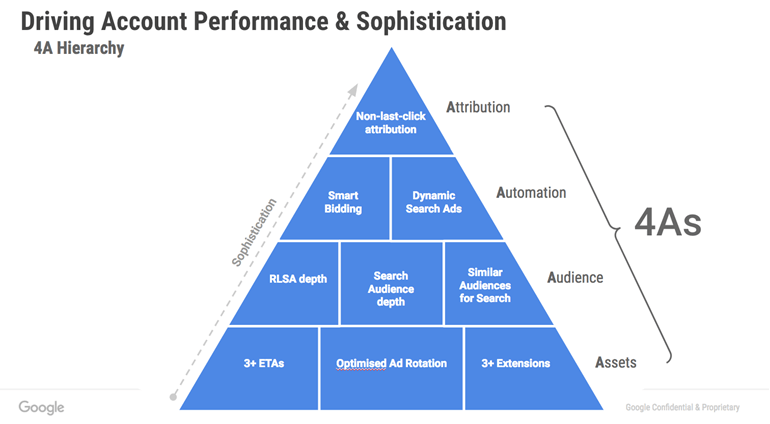
Circus is a big advocate of the 4 A’s if you want to achieve great results. By focussing on the correct implementation of the 4 A’s and carefully addressing our customers’ needs Circus have managed to drive considerable improvements for our clients and increase their return on ad spend.
If you would like help with improving your account performance with the above in mind then please get in touch for a free account review.
Written by Daniel Lupu PPC Analyst at Circus PPC Agency
Why Man will Always Beat the Machine
As the saying goes “they will replace us all”, but is that really true?
Can a machine really do the job of a PPC expert?
Over the years several leaps have been made that can automate many day to day PPC tasks; we use automation to generate reports. This makes sense as we run daily reports for all our PPC accounts to:
- See yesterday’s activity – has traffic spiked/dipped?
- Get a landscape of the account – are there days where traffic is more profitable etc.?

Other useful automation tools help us in our day-to-day management of our PPC accounts:
- Ad Scheduling – very useful for governing the days and hours when campaigns should run, increase/decrease aggression etc.
- Rules – Handy for many things such as running flash sale ads without having to manually enable or pause them (especially at the weekend when nobody is in the office)
We use these because they are very straightforward, routine tasks which can and should be automated.
The big question is, should you trust your account to be fully run by a machine? This is where, as PPC experts we would say “no” to the computer!
Here are a few key reasons why you shouldn’t:
Client Relations:
An agency is run by people. People talk, communicate and bounce ideas off each other. Every client needs (and deserves) communication, whether it’s over the phone, by email, Skype etc.
Clients want to know what’s happening with their accounts. Wouldn’t you if you were in their position?
Sure, machines are interactive in many ways but they cannot look at a PPC account the way a human does. When we look at accounts we can look at the data creatively, not algorithmically. A machine cannot understand tone of voice, body language, hand gestures, facial expression – all of these whether they are good or not so good.
Have you tried using Alexa, Siri or Cortana? Note the emotionless responses you get – when they work…
A machine cannot discuss KPIs or new ideas. A human being understands the client, their needs or desires, and their personalities.
The emotional connection; we all greet one client differently from the other. A machine can’t do that.
We shake hands with our clients when we meet face to face.
Creativity:
Not a chance that a machine wins over a human here. This is why agencies employ people. A person can use experience and knowledge to come up with more creative ideas for so many elements of a PPC account:
- Keywords
- Ad copy
- Account structure
These are just a few examples of where humans excel over a machine every time! Let’s try this example; a client wants a sitelink to promote magnums of champagne over Christmas, with 20% off over the Christmas period. The machine would take the raw facts and create a sitelink a headline saying “20% Off Magnums”.
A human (in this case me – real life example) would say something like “Magnums, Go Big & Go Home” then I would get to the facts of the offer. A machine couldn’t come up with a headline promoting the extravagance of this offer. Customers are humans, and humans know how to make things appealing to humans. A machine can’t light up an ad or an ad extension.
As human PPC experts we have the ability to think sideways about the accounts we manage.
Knowledge:
Any decent agency will have members of staff with different areas of knowledge and experience. The staff is the core of any agency’s business. If it isn’t then it really ought to be.
Team members bring creativity, the pooling of knowledge and experience. A few times, when I’ve come up with ideas on how to develop an account I’ve sounded it out with my colleagues to get feedback, whether positive or negative and ask for their ideas/alternatives on what I could do.
PPC isn’t just changing bids on ad groups or keywords. What’s in season, what’s new, what’s the next big thing? These are questions that a machine will never ask itself. As humans that’s what we do. We ask ourselves questions all the time and put ideas out to others. That’s how collective knowledge and experience works.
As an agency we are not “yes” people. If a client has an idea they would like to try out we would discuss it with them to gauge the potential benefits or even drawbacks of that idea. We might identify ways of refining the idea before putting into action. We talk to our clients and help them enhance/augment their ideas.
Thinking Ahead:
Hardly a day goes by when something in the world of PPC doesn’t change. It is one of the fastest moving industries in the world. In the six years I have been doing this I’ve seen PPC evolve from simply being keywords and ads to something far more dynamic (Expanded Text Ads, RLSA, Demographics, Enhanced CPC, Callout Extensions etc.).
As an agency we keep on top of the upcoming industry developments. Most of the time we read about it and get ready. Automated systems don’t think ahead like we do. We advise our clients of new beta technologies that we would propose testing on their accounts to enhance performance.
Overall:
I’m not totally discounting the use of automation on client accounts. It has its share of uses, mainly to make our day-to-day running of our accounts much easier. Functions such as Enhanced CPC and ad scheduling work in the background for us.
Automation is useful for seasonal periods, for example, a number of clients tend to pause for a few days over the Christmas holiday. Automated rules can be used to pause and re-enable accounts without the need to be up bright and early on your days off to manually do this.
Automation is there to assist us, not to dictate or take over. The human element will always be at the forefront of PPC management.
Personally, intuition and knowledge are human qualities and that’s why will win every time.
PPC Campaign Planning Mini-Series | Part 4 | Reporting and Analysis
After reading the previous 3 parts, the objective, the research and the implementation we will talk about reporting and analysis. Reports and analysis are being covered together as they go hand in hand.
Reports should be pulled together for the purpose of analysis. I have seen in the past when reports are pulled together for the sake of putting a report together without any analysis on the data. This can happen due to many reasons. Some of these are:
- The person running the report is running a report for the sake of it.

- They have been requested to run a report by someone else and have put it together but no analysis takes place on the data and hence no optimisation (Which happens to be next week’s topic).
- There is no conversion tracking on the account.
- This for me is one of the biggest cardinal sins I have seen in paid search accounts. The greatest thing about paid search is every penny is trackable and you can work out the ROI of every penny spent on paid search. This cannot happen if there is no conversion set up.
- The goals are not clear for the account (discussed in part 1), which is leading to the report not reflecting the goals.
- The Adwords and Analytics accounts are not linked.
- The agency has a standard report they pull for all of their clients
- Every client has individual goals. Every campaign can have individual goals. This cannot always be achieved if you have the same report for all clients.
I will below breakdown the ‘why’, the ‘what’, the ‘how’ and the ‘who and when’ for reports and analysis.
Why?
Something I alluded to above was ensuring you report on your goals. Why you need to put reports together is so you can analyse the data and ensure you are running your paid search account profitably.
As mentioned above every last penny can be tracked on paid search, whether your goal is branding, driving leads, sales, phone calls (even store visits these days). It can all be tracked. However if you do not run and look at the reports and analyse the data, you cannot optimise the accounts to get more from the money you put into it.
We have taken over accounts and doubled the ROI in the 1st month with the exact same budget just by reviewing the data, analysing it and optimising the account based on the data.
What?
In every report you will have your standard columns which will be:
- Impressions
- Clicks
- Cost
- Average CPC (cost per click)
- CTR (click through rate)
- Average position (for search ads)
- Impression Share
Then we have columns which are specific to you:
- Leads
- Sales
- Phone Calls
- Phone call sales
- Sales Value
- ROI (return on investment
- CoS (cost of sale)
- ROAS (Return on ad spend)
- CPA (cost per acquisition)
As you go into different industries there are industry specific columns like in iGaming you will have:
- Total Loss
- Loss per player
- Total Bet
- Bet per player
For affiliates you will have:
- Click offs to the merchant websites
- Profit by merchants
For video you will have:
- Views
- View rate
- Average cost per view
These are only some of the columns you can report on. Before you know it you may end up with a report which has 20+ columns. On top of this you should look at the data at the different levels as well.
- Accounts (Adwords, Bing, Facebook, etc.)
- Month on month
- Week on week data
- Campaigns
- Keywords
- Shopping breakdown (if a retail client)
- Ad copy data
- Results on any split tests you currently have in place
- Video Data
You will also want to ensure you keep an eye on the overall traffic to avoid cannibalisation. Whilst your PPC revenue might be increasing if you are just eating out of your other channels whilst paying for it, it isn’t worth it. Therefore you ideally want to ensure your overall traffic and revenue improves along with the PPC traffic and revenue.
Automated Reports vs Excel vs Build Your Own
I didn’t want to finish the section without talking about this.
What is the best route for you? It all depends on your goals, your excel skills and your reporting needs. In Excel you can build some fantastic reports these days. However it isn’t always the correct route for everyone. Most PPC specialists I have come across in my career can build reports in excel however it isn’t the only way.
Adwords have plenty of reports you can build as well and with tools like Data studio you have the capability to do a lot more without paying anymore. Something like Double click would cost you a lot more but not everyone needs this.
Some companies have in house tools that they have custom built for their companies which allow them to plug in their PPC data in there.
You will need to look at cost vs reward vs time to work out the best route for you with a solid pros and cons list for all of the options. Personally I would always start with the free options and explore these fully before moving to paid options.
How? 
So how do you get this data?
There are various sources to pull the data from. It entirely depends on the engines you are live on. Using Adwords as a basis however I will run through where to view and pull the data for the different types of campaigns.
Keeping in mind Adwords has made the transition from the old to the new interface a lot of the data is easier to find. You can click on any of the links shown to the right in your Adwords interface and see the results of that particular section. Remember you can customise columns so you can pull exactly what data you need.
What about conversion data if it isn’t tracked in Adwords. If you are using analytics and your accounts are linked, you can pull this data into Adwords which will make life easier especially when optimising. If you are using backend tracking or 3rd party tracking which cannot be automatically pulled into Adwords you have 2 options.
- Use imported conversions. Using the GCLID (Google click ID) data you can import conversions into Adwords. However this isn’t an option for all engines which is why I prefer to combine this with the 2nd Adwords explain it well over here: https://support.google.com/adwords/answer/7014069?hl=en-GB
- If you Excel skills are good, learn to link the different bits of data together. You will always have something to help you link the data or with the help of the developer build something in the backend of the site which helps you link the different bits of the data together. This can get a bit more complicated but does depend heavily on how the site works.
In the same way you can pull the data from Adwords, you can from Bing, Facebook and every other engine. Different engines will have different sets of data though and may need to play around a little to find the data you need.
Who and When?
Everyone in the business will want to see a different set of data and will want to see it at different times.
I have worked with some clients where I deal with the owner who is too busy for all of the data and just wants to see how much money is going in and how much he is getting back and if this is continuing to improve month on month. The rest of the data was still provided but he hardly ever looked at it. I have also worked with owners who want to see everything on a daily basis. The below table therefore is more of a guideline.
| Job Title | How Often? | Client Side/Agency Side | What data? |
| PPC Manager | Hourly/Daily | Can be both | The PPC Manager needs to keep on top of the account and keep a close eye on it throughout the day. Make changes based on what they see on the account and continually optimise the account which will be covered in part 5. |
| Marketing Manager | Daily or Weekly | Usually Client Side | Depending on investment, how young the account is, time of the year based on your industry; you will decide how often you want to see the data. It is important for the Marketing manager to work closely with the PPC account manager to ensure all information in the account is up to date and current. The PPC manager also needs feedback on new offers, any changes in goals, paused offers, changes to website, etc. |
| Head of Marketing | Weekly | Client Side | They usually want to see top line numbers by week and month. |
| Owner/MD | Weekly or Monthly based on involvement | Client Side | Usually want the very top line figures. How much did they invest? How much they got back? Is it working? Is it improving on an ongoing basis? What more can be done? |
Reporting and analysis can be tricky and you can easily spend a lot of time creating useless reports or not being able to create the useful reports. For extra tips and help with your personalised reports please do get in touch.
Following reporting and Analysis, the next stage is optimisation. Next week, we will go into depth on optimisation techniques.
PPC Campaign Planning Mini-Series | Part 3 | The Implementation
After going through the campaign objective and what research needs to be carried out, in this part of the mini-series we’ll talk about campaign implementation, covering two of the most important aspects: conversion tracking and the campaign structure & setup.
Conversion tracking
Setting up your AdWords conversion tracking is the first and one of the most important steps in the campaign implementation process as this will allows you to see what happens after a customer views or clicks on one of your ads – whether they made a purchase or completed any desirable action on your website.
Using conversion tracking has multiple advantages:
- You can identify what campaigns, ad groups, keywords and ads have the best performance
- You get a clear picture of where your ROI comes from and are able to make better decisions in regards to your ad spend
- Optimise your campaigns automatically using smart bidding strategies such as Enhanced CPC or Target CPA
- It provides cross-device conversion data so you can understand the role of each device in the customer purchasing journey
In order to set up conversion tracking, you need to create a conversion action or choose a conversion source in your AdWords account. To do this click on the Tools tab in AdWords and from the drop down menu select Conversions. Then click the +Conversion button and select one of the conversion sources below:
- Website Actions: track when someone completes a certain action on your website (sales, newsletter sign-ups, form submissions, etc.)
- Phone Calls: track when users call your business using the phone number on your website or the phone number in your ads
- App Installs: track when someone installs your app or completes a certain in-app action (in-app purchase)
- Import Conversions: allows you to import offline conversions by uploading a file(when a form submission turns into an offline sale)
If you choose Website Actions as a conversion source, you’ll have to paste a bit of HTML code on your website. Tracking Phone Calls on the other hand does not require a tracking tag, but you’ll have to use a Google forwarding number.
Now that conversion tracking for your website has been set up, it’s time to create your first campaign
Campaign Structure & Setup
Building your first AdWords account is a tedious task and many people usually ask the following question: “what is the best account structure?” The answer is simple: Having a clear, hierarchical account structure words best and is the best practice in the industry.
Before setting up your first campaigns, let’s have a look at the benefits that such an account structure brings:
- Better quality scores which lead to lower CPCs
- Allows the budgets to be allocated more effectively
- A clear structure enables easier optimisation
- Makes reporting a lot easier
Campaign type & settings
Based on your advertising goals discussed in the first part of this mini-series, you have to decide what campaign type and campaign settings you’re going to use. For example, if you want to reach users actively looking for a product or service similar to yours, you’ll use a search campaign, but if you want to increase brand exposure or generate awareness for a new product that you are about to launch, a display campaign would be more suitable.
To set up a new campaign, click the +Campaign button in Adwords and select your campaign type.
After choosing your desired campaign type, it’s time to look at the settings you’re going to use:
- Location targeting: decide that countries or cities you want to target. Once your locations have been added, you can set bid modifiers to increase exposure in certain areas
- Ad scheduling: decide what time of day you want your ads to be shown
- Device targeting: you have the option to set different bids for mobile, tablets and desktop devices
- Bidding strategies: Choose between Manual, Enhanced or Automated Bidding
- Budgets: set a daily budget for your campaign taking into account estimated CPCs and traffic
Each account will usually have multiple campaigns based around broader themes or product categories. For example, if you are a travel agency selling holidays abroad, you can structure your account by creating a separate campaign for each destination. Each campaign will now contain multiple ad groups, which contain keywords and ads.
Building Ad Groups
Ad groups are very important as they give your campaigns a clear structure and allow you to group similar keywords and ads together.
To create your first ad group click the +Ad Group button under the Campaigns tab in AdWords.
I’ll use the same example as above: if you are a travel agency and you’ve already created a campaign for a specific destination, you can now break that down into more specific ad groups based around different local attractions or holiday types.
Keyword Selection & other Targeting opportunities
Make sure your keywords are relevant to the text ads that you created and to the landing pages they direct to. The best practice is to keep your keywords tightly grouped together under a single theme.
Before adding any keywords in your ad groups, make sure you understand each match type and how they work.
If you are creating a Display or Video campaign, besides keywords, you’ll have the option to target specific websites, topics, general interests or remarketing lists.
Creating your first ads
To create your first ad you have to go in the Ads tab in your AdWords account and click the +Ad button.
Based on your advertising goals and the type of campaign that you initially built, you’ll have to choose what type of ads to create.
To drive action and achieve great results, your ads should be very specific, relevant and present an attractive offering.
Text Ads best practice:
- Use your keywords in the headline and description line for relevance
- Include your most important USPs in the headlines
- Use a clear call to action
- Include prices and promotions
- Make use of ad extensions
- Create at least 4 ads for each ad group and compare their performance
If you’re going to use a display campaign, you need to make sure your image ads are the right size.
Congrats! At this stage your AdWords campaign is ready to go live. Before launching, make sure you’ve added you’re billing details to the account so your ads can start running.
I hope you enjoyed this blog. If you have any PPC related questions, please don’t hesitate to get in touch.
The next part in the Campaign Planning mini-series is Reporting & Analysis, so keep your eyes peeled on our social media channels for next week’s release.
Check out the fourth instalment of our PPC Campaign Planning series here.