


Your 2020 vision? You want to see decent growth, you want to achieve new heights and you want to be successful as a business and provide excellence service for your customers… but where do you start?
OK, let’s think about what’s important to your business. Where do you want to be this time next year? How are you going to achieve that? With so many questions to answer and factors to consider, planning your 2020 strategy can seem like an overwhelming task but not to fear, we’ve broken down some of the most important thinking points for re-strategizing.

Realistic goals & objectives
- What do you want to achieve?
- This is the foundation for the rest of your planning, and therefore needs to be clearly defined and easily measurable. Whether you’ve got new product launches, want to drive a higher yearly profit or gain stronger brand awareness, the plan needs to be thorough in order to take next steps to develop it.
- Where/who are you going to target?
- You’ll already have a good knowledge of your target audience, but should you be thinking outside the box a little more? With millions of customers and placements at your fingertips and hundreds of marketing tools and programs available, mass reach is more achievable than it ever has been, so definitely make use of what you can to unlock the door to potential new customers.
Budgets
- Have you got a specific marketing budget for the year?
- As a data-driven marketer, you may face the challenging task of reviewing historical figures and calculating new budgets. Analysing how the distributed budgets performed and which areas are more profitable for your business are vital for getting the best return from your investment. This is where your objectives come back in to play; if your objective is increasing brand awareness and you’re consistently seeing strong brand uplift from running online ads, you should be thinking about increasing that budget split.
Peak times/seasonality
- Have you thought about upweighting around seasonality/peak times?
- During the budget planning process you may be creating projections for spend month on month, or by quarter, etc., which will have to incorporate uplift/downturn based on seasonality. If your business performs better during a certain month, a well-thought-out plan will capitalise on this, ensuring you’re providing fruitful results.
- How are you preparing for the low times?
- Similarly to when you’re pushing the peak times, you need to consider strategy for the quieter periods. Many marketers will tend to pull back around these times, but it could also be an opportunity to keep your brand name out there so when peak times come around you’ve generated an enlarged audience list.
Offers & promotions
- Promotions tend to go hand in hand with seasonality. We see most of our ecommerce clients run a sale around peak times (e.g. Black Friday, Boxing Day sales) when intent-to-buy is high and competition fierce. However, one of our other clients runs discounts all year round but they have to think about which of their products sells best at which times of the year and be more aggressive with those offerings.
- Last year £23.6b was spent on online advertising, making it 57% of the market’s ad spend. Online ads in 2020 is forecast to make up to 62% of all UK ad spend, meaning there’s increasing competition. Have you thought about how you want your brand to appear against your competitors? Customers are more likely to invest in your business if there is a real reason; USPs, promotions, etc.
- If you’re interested in reading more about how to prepare for peak times, read our previous blogs for hints and tips.
Cohesive marketing strategy
- Which channels are you looking in to?
- It’s easy to think of all channels individually, but this isn’t necessarily the best way to get the most out of them. We’ve always seen our clients benefit from drawing up a full digital marketing strategy that takes all channels into consideration. Again, this loops back to what your end goal is; different channels can achieve different results, but they’ll all play a part in providing a smooth journey for the customer, whenever they are exposed to your brand
- How are you going to align all your marketing activity?
- Things like your content, product releases/promotions and brand representation should all be aligned, no matter the channel. Stories and messaging should be marketed using a range of media to best capture the right audience at the right time for the unified image that your brand requires.
Expected platform updates
- Have you considered what these changes might have on your business?
- As we rely more and more on software, search engines and machine learning, it can be easy to look past how the platform updates may directly affect you. 2020 marketing trends are set to incorporate more personalization, smart bidding, increased video advertising and interactive media so be sure to keep your eyes peeled for more platform updates surrounding these.
- Whilst it’s near impossible to predict the exact changes, we do have a general understanding of what’s to come, particularly with PPC:
- Audience list expansion
- Continuous work on increasing list size and improving quality
- More options for niche audience targeting
- Keyword match type changes
- These have been changing a lot over the last year, with keyword match types becoming more unified for search queries
- Can affect PPC strategy as keyword choice is more limited
- Automation
- This affects forecasting, and manual strategy based on seasonality e.g. no CPC estimates available for automated bidding strategies, so can’t base spend projections on these
- Audience list expansion
2020 planning is going to be a substantial operation, but it doesn’t have to be a painful one. Taking time to allocate budgets and create projections for your unified marketing strategy should help you on your way to becoming a 2020 visionary. We can’t tell you what your strategy will be as that’s entirely unique to you, but we can help you implement your new PPC strategy. Get in touch today for a friendly chat or free audit of your account.
Smart Shopping
Intro
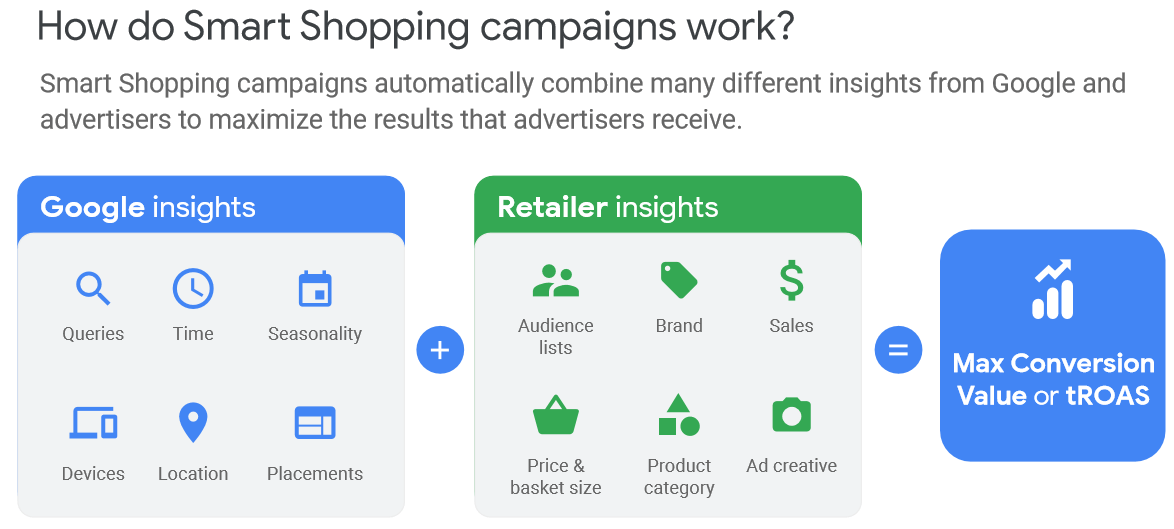
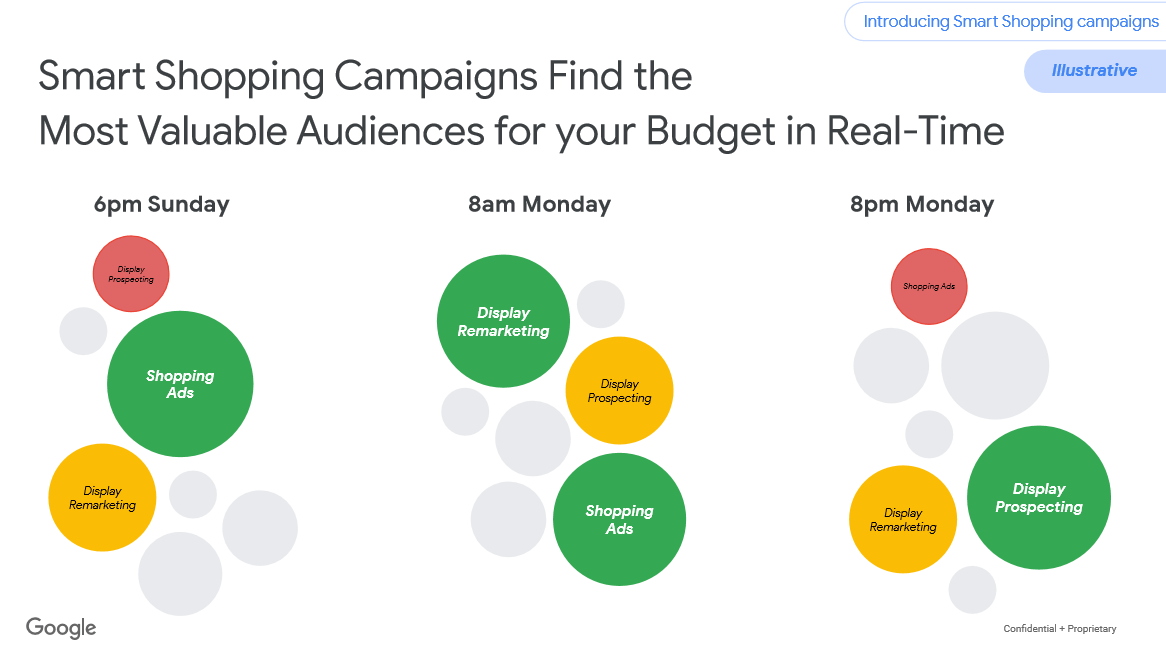
Smart Shopping is Google’s version of automated shopping which uses algorithms in order to maximise your return from shopping. One of the benefits with Smart Shopping is that it is able to look at many more signals in order to find the most valuable audiences on the Google network for your budget in real time. This means that Google can show your products to a relevant customer at the right time and through the right channel in order to maximise the chance of conversion.
Rather than just utilizing the Shopping network, Smart Shopping can use the display network, Gmail and Youtube as platforms to dynamically remarket products to customers which is another reason why advertisers adopting Smart Shopping see a 30% increase in conversion value when using Smart Shopping.
Set Up
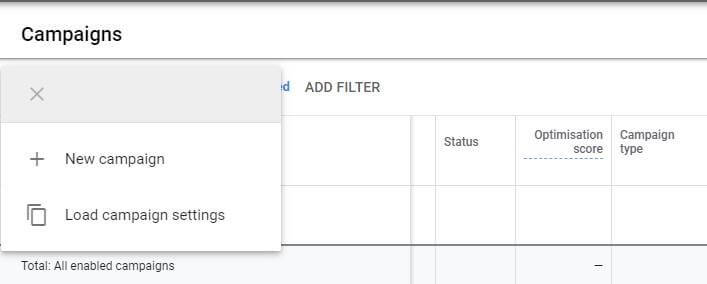
The set-up of a Smart Shopping campaign is very similar to setting up a normal shopping campaign in the Google Ads interface and can be done in 4 simple steps.
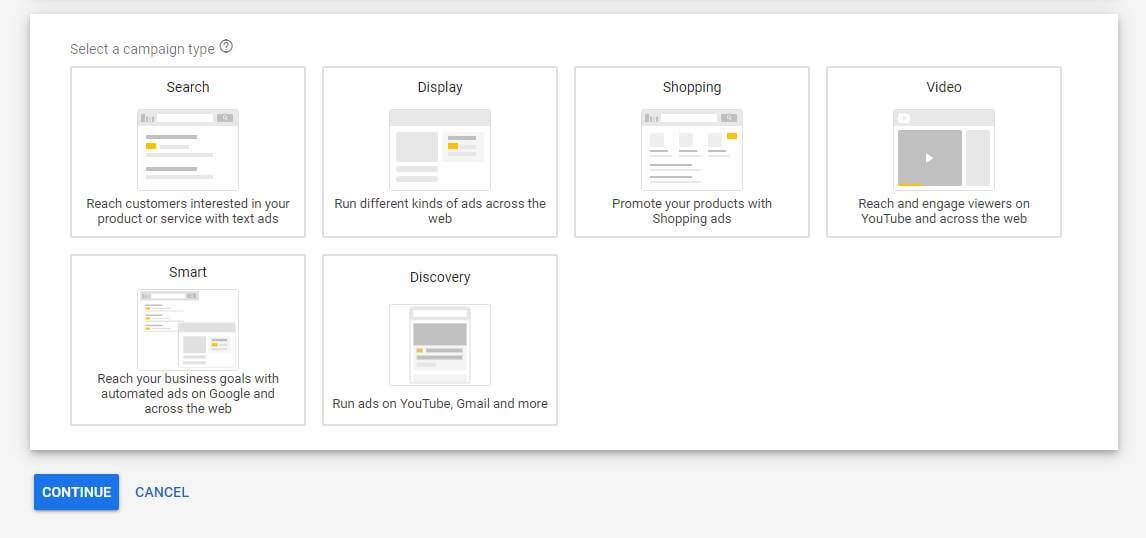
- Click New Campaign
- Click Shopping
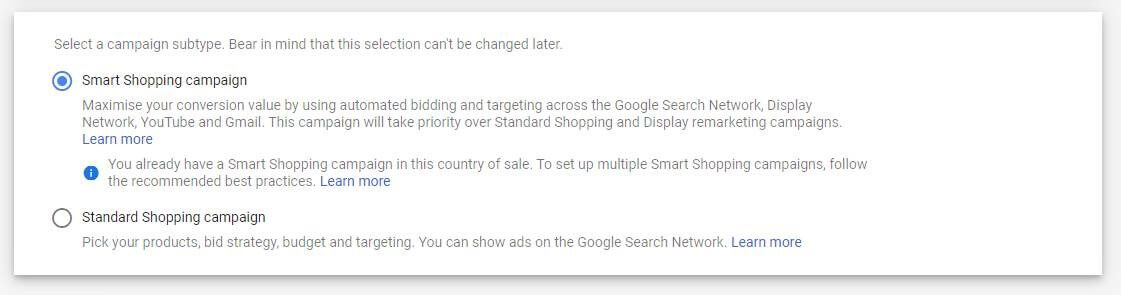
3. Select Smart Shopping Campaign
4. Set Budgets and ROAS Targets
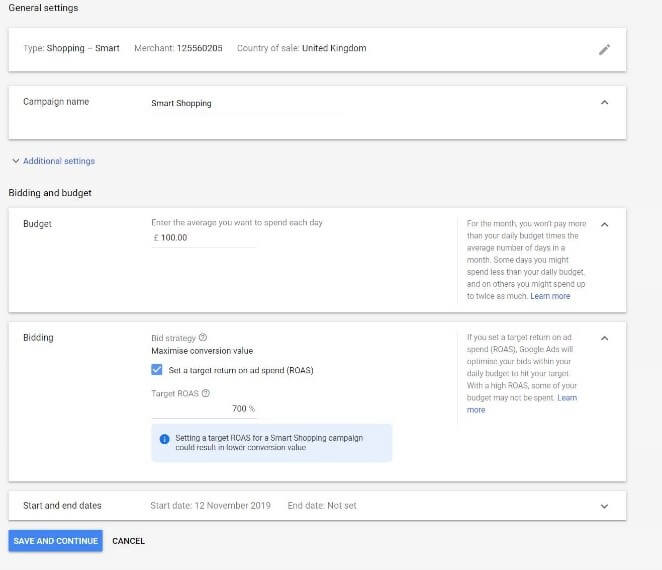
You need to take a different approach when it comes to Smart Shopping, Google say the more data the better. Instead of granular segmentation of the campaigns it is better to group products by a common goal (profit margin etc) which will give the algorithm more data to work with. Google recommends to build a campaign with product groups that have had at least 20 conversions in the last 15 days, ideally 100 in the last 30 days. If sales haven’t reached these benchmarks then it is recommended to combine product groups in order to give the algorithm more data to work with.
Strategies
Smart Shopping inevitably changes the way you will manage a campaign as there is less control over bids etc. This change doesn’t mean that Smart Shopping campaigns are less hard work, but it does mean the way you approach the campaigns should be different. In a normal shopping campaign there may be a handful of top performers which you are able to push hard by pushing the bids, there will also be some products which do not perform well on shopping which you will manually reduce the bids on. Smart Shopping is different in that it will do this testing for you and so the way you approach the campaign structure will be completely different.
If you are a small/medium company who has traditionally generated less than 100 sales a month through shopping, the best route is usually to include all products in one campaign to gather data. If Smart Shopping helps you dramatically increase sales in certain product groups, you can always think about breaking these categories out into their own campaigns in order to push these products. This strategy worked well for one of our smaller clients within the wine and spirits category, sales volume through shopping was low and so by consolidating the campaigns into 1 smart shopping campaign in order to give the algorithm more data to work with we saw a 155% increase in ROI and a 140% increase in revenue.
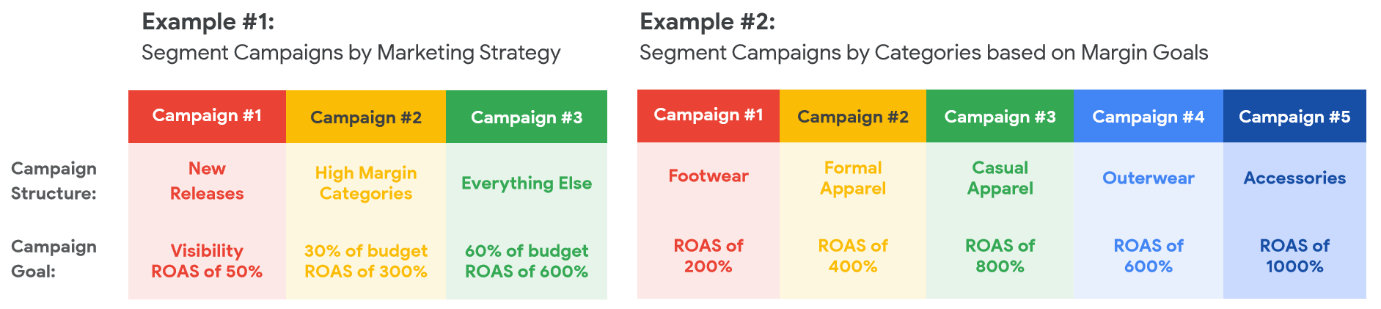
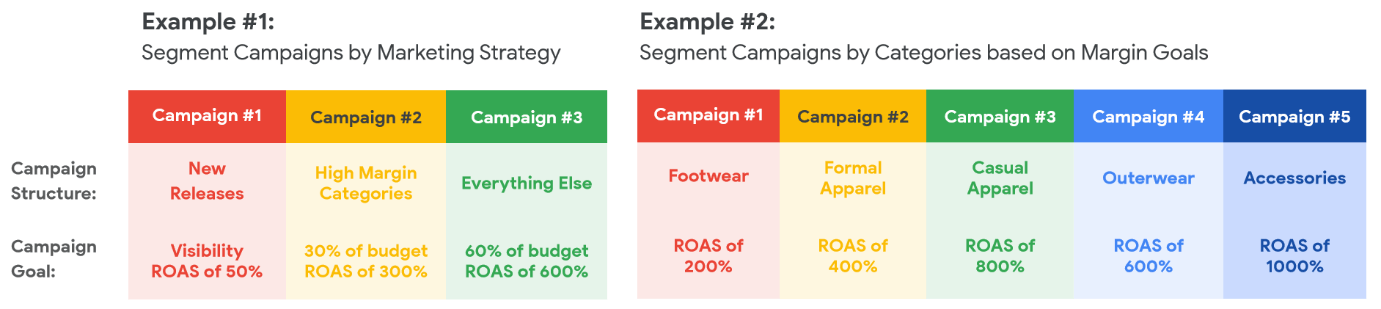
If you are a medium sized company and shopping is a bigger focus for you then a little bit more consideration should go into your smart shopping strategy, as there will be more historical data for you to look at in order to make educated decisions. Here I would look at your business goals and splitting the products out accordingly. This could be done by splitting the products into top sellers where you may be able to afford to relax the cost of sale target slightly or if you had new products on site then you could include these with a low ROAS target in order to drive visibility. We trialed this strategy by incorporating our third party CSS partner in order to mark out the top performing products where we could loosen the ROAS target, this strategy saw ROI grow by 25%, the conversion rate grow by 52% as well as the campaign accounting for a third of the total revenue made by shopping in the account.
Another approach shown in example #2 would be to segment your products by marketing goals and we have used this strategy with our large clients with big shopping budgets. This is useful in industries where you may have different ROI targets per category as some categories provide better margins than others. With this example you would create a campaign for each category, each with a different ROAS target depending on which category the campaign covered. We saw great results using this strategy in one of our accounts which has a different ROI target for each brand they have on site, leading to a 37% increase in ROI as well as a 50% increase in revenue when compared to standard shopping campaigns.
Top Tips
Feed Health
Feed health is extremely important with Smart Shopping. You should regularly keep on top of the feed and look out for any disapprovals to ensure you have as many products available as possible on the feed. Remember that the quality of the output is only as good as the data fed into Smart Shopping so it is imperative the feed is in good health.
As well as keeping on top of disapprovals, including Google product categories is also an important part of product feed optimisation, including these helps Google identify exactly what the product is in order to show for more relevant searches. You might find that impressions decrease when introducing these into your feed, however you should see clickthrough and conversion rate increase as the customers will be more relevant.
Also, be sure to include as many attributes as possible such as the colour, age and gender attributes. These help within the dedicated shopping section of Google and allow a user to filter the thousands of products found on a generic search into something quite specific. This could mean that a user could filter a generic search such as ‘jumper’ down to something as specific as ‘men’s green jumper size small’ – this leads the user down the sales funnel and makes them much more likely to purchase.
Use a CSS partner alongside smart shopping, here at Circus we utilise third party CSS providers which presents us with a wide range of benefits on our clients’ shopping campaigns. Not only does this offer a 20% off the CPC but also the feed audits and options to edit the feed allow us to optimize the product feed to help stand out in the crowded Google Shopping Marketplace.
Audiences
With Smart Shopping campaigns you may be confused as to why you can’t add audiences to the campaigns. This is because rather than manually adding in audiences in the campaign Smart Shopping will look at all audiences that you have stored in the audience manager and use the data in order to priortise certain audiences. To take full advantage of this it would make sense to create advanced audiences, i.e. not just people who have been on site, but people who have been on site for a certain period of time or people who have viewed key pages on the website. Instead of creating an audience with all converters, be more granular with this and set the audience to people who have converted and spent over the average order value – all of this data will help the algorithm deliver a better performance.
Optimisation
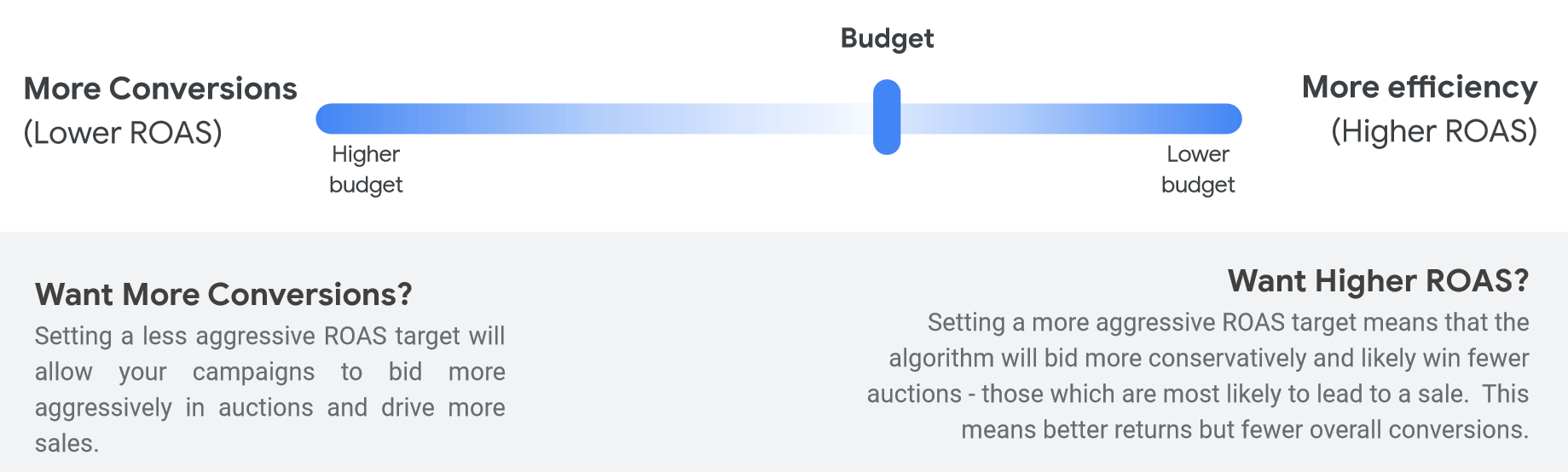
Because of the nature of Smart Shopping, the way you optimise campaigns will completely change. The general rule is if your campaign is overperforming in terms of ROI but you would like to drive more volume then you can raise the budgets and relax the ROAS target in order to give the algorithm more freedom to perform. If your campaign is underperforming then you can set a higher ROAS target which will mean that the algorithm will focus on people with more intent or if sales are low then you could consider combining some underperforming campaigns together to create a campaign with more products for the algorithm to test with.
Things to bear in mind
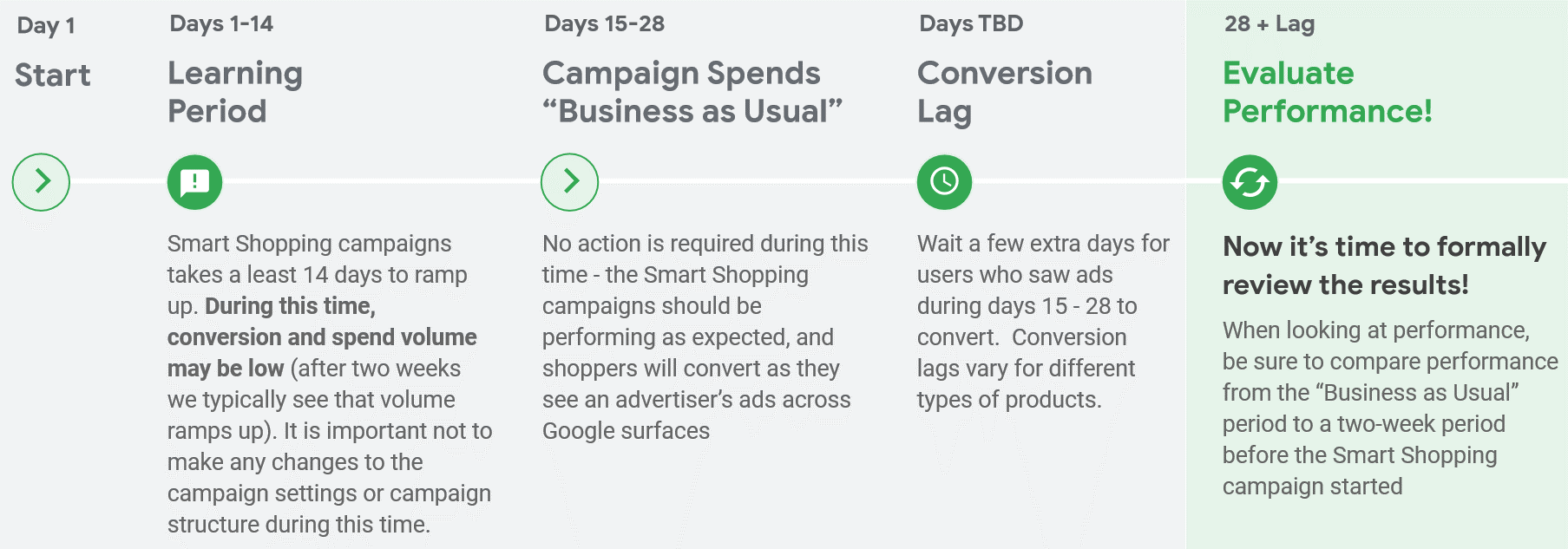
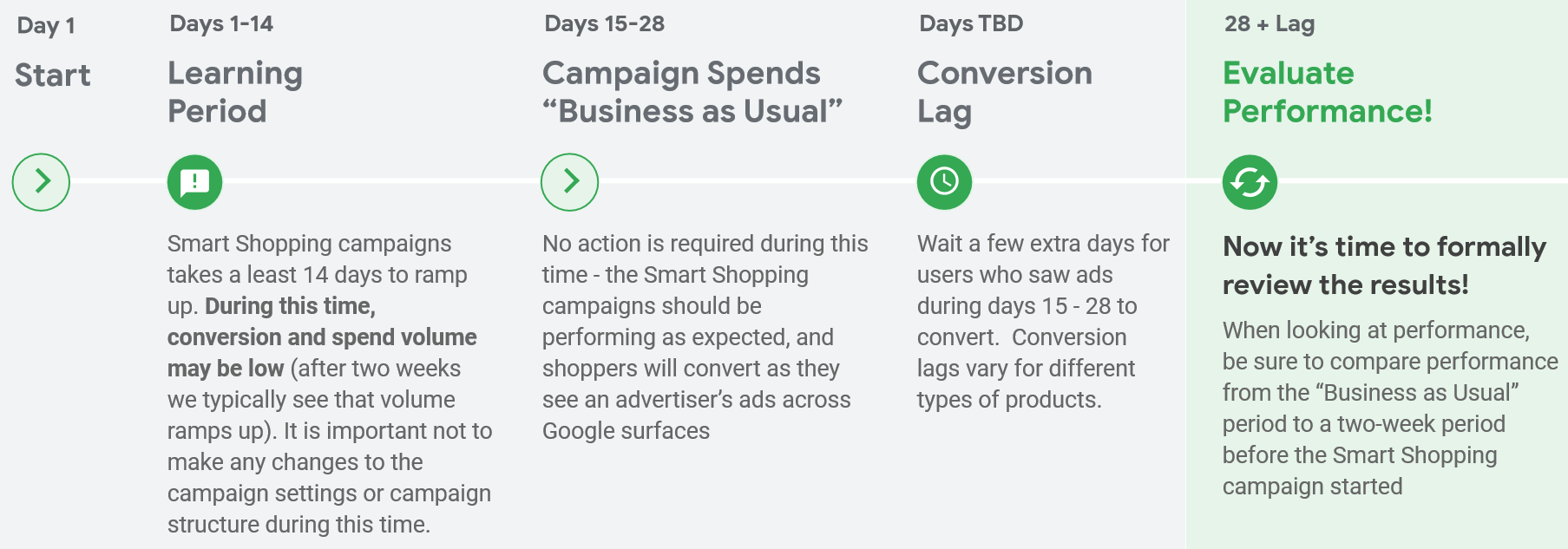
The most important thing to bear in mind is learning periods with Smart Shopping, like with all automation the algorithm needs time in order to gather data in order to give you the best performance. It is important that after setting up a Smart Shopping campaign that you don’t make any significant changes for the next 14 days as this will reset the learning period and mean that the campaign starts to gather data again, effectively setting you behind. It is then recommended to leave the campaign for another 14 days to perform before making any evaluations about the campaign’s performance. If you are in an industry which has a large conversion lag you should also add the average conversion lag time to this 28 day period before making any evaluations as this gives time for the conversions to come in.
As mentioned earlier you should also bear in mind that Smart Shopping does take away a lot of control from you, normal shopping campaigns allowed you to push products when needed – however Smart Shopping campaigns don’t allow this so will need some extra planning for seasonal peaks and more thought has to go into the strategy of the campaign because of this.
It is also worth bearing in mind that you should be realistic with the targets set when using Smart Shopping – we have seen Smart Shopping perform well, however it isn’t a miracle worker. Setting a target that is too high or a budget too low will mean that you don’t give the algorithm the room it needs in order to test and therefore you most likely aren’t going to see results. The general rule is to set a budget similar to what you have been spending in normal shopping campaigns and a ROAS target similar to what you have been seeing and then ramping this up after the learning period when you start to see the campaign performance pick up.
We have seen fantastic results using Smart Shopping with clients in a wide variety of sectors and is definitely an approach to be seriously considered with any retail focused account. There are of course drawbacks such as less control over the campaigns and the learning periods, however with careful planning these drawbacks can easily be overcome and mean that you can reap the rewards that Smart Shopping brings. Feed health is impetrative when it comes to smart shopping which is why we would advise using feed optimisation software alongside the Smart Shopping campaign to ensure the best results. The use of audiences within the audience manager section of the account also shouldn’t be neglected in order to get the most out of Smart Shopping.
For more information on Smart Shopping or on how to get the most out of your shopping campaigns, feel free to get in touch for a further discussion or a free audit of your Google Ads account.
Get Ready For The January Sales
Get Ready For The January Sales
Whilst in the US Black Friday is the biggest sales event of the year, Christmas & January sales continue to come out on top in the UK. January 2019 drove, on average, 4.5% more consumer spending year on year across all UK retailers – the highest year on year growth across retail sectors since December 2016. Despite this, surveys ran by Barclaycard indicated that over half of UK adults believe that January sales are less important than they were a few years ago. This could be because more retailers are offering discount periods throughout the year, and so holding off until January isn’t as important to consumers as it once was.
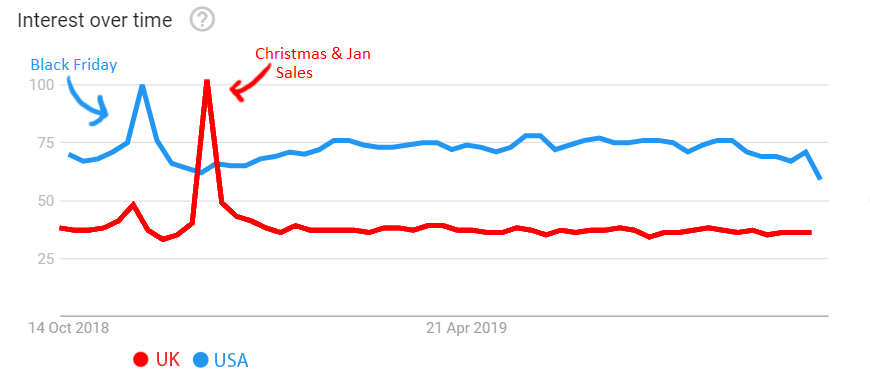
Trend data comparing US & UK interest in ‘sales’ keywords over the past year
When taking these statistics into account, it becomes more and more obvious that competition is going to be high during this time. Planning ahead means that your business can monopolise on all this increased intent, and, by tailoring your Search, Display and Shopping campaigns to your marketing goals early, you can see the maximum returns on your investment.
Top Tips For January Success
- Review Last Year’s Stats
Even if you didn’t run any specific January Sales focussed activity or promos last year, have a look to see how you performed. Perhaps stats dropped as you weren’t running offers, or maybe you were able to ride the January Sales wave without this and saw an increase in traffic and conversions anyway. Either way, this is something you can learn from for this year’s activity.
- When did traffic begin to pick up from? Getting ahead of the curve here can mean that you’re in front of customers at the very first touch point, which can influence consideration.
- Sales are beginning earlier and earlier, with many retailers deciding to start promotions as early as Christmas Day.
- With Mobile traffic growing more and more year on year (predicted to ‘increase seven-fold between 2017 and 2020’), consumers no longer have to be holed away in an office or computer room to browse online sales – meaning purchase can happen at any given time.
- Did a certain type of ad perform best? Use only the highest performers for a basis for your 2020 ads.
- If you’re not utilising Smart Bidding, what level were your CPCs at, and what impression share did this gain? You can use then use this as a benchmark during the sales period.
- Using Smart Bidding during this period is highly recommended. We’ll go into more detail about benefits of Smart Shopping later on, but in short, Google’s algorithms are able to adapt bids on an auction by auction basis, using over 7 million signals that we are not able to manually optimise for. Your competitors will be making use of all this extra insight, so you should too!
- What was your increase in spend?
- Did you hit your KPIs and spend all your allocated budget? Consider increasing budgets this year to see where your top ceiling lies.
- What was your budget split across channels?
- Did any channels perform particularly poorly? Consider pulling back on these and funnelling budget back into your top revenue drivers.
- Equally, did you leave any avenues unexplored? Could you add them into your media mix this year?
- Set Up A Catch-All Dynamic Search Campaign
However much keyword research you do, there will always be gaps in your keyword-based campaigns. 15% of all searches made every day are brand new, never been seen before, and it would be impossible to predict all of these. Dynamic Search Campaigns can help you capture this traffic if it is still relevant to your business and landing pages.
- DSA campaigns have been known to run away with themselves (and your budget), especially if you have a very large website with a lot of content (blogs, etc).
- To avoid this, set up your DSA to only “target landing pages from your standard ad groups”. This saves you valuable time in sifting through content and only sends traffic to pages already within your Google Ads account.
- Set Up Smart Shopping Campaigns
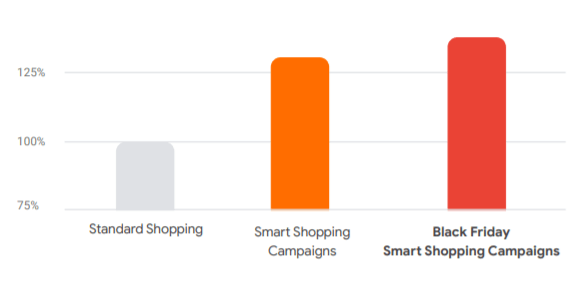
Smart Shopping campaigns have been around for a while now, and they’re only continuing to get more and more powerful. Advertisers typically see more than a 30% increase in conversion value on average when using Smart Shopping campaigns, and during black Friday weekend 2019, Smart Shopping further increased this uplift. This success can be mirrored in your January Sales period.
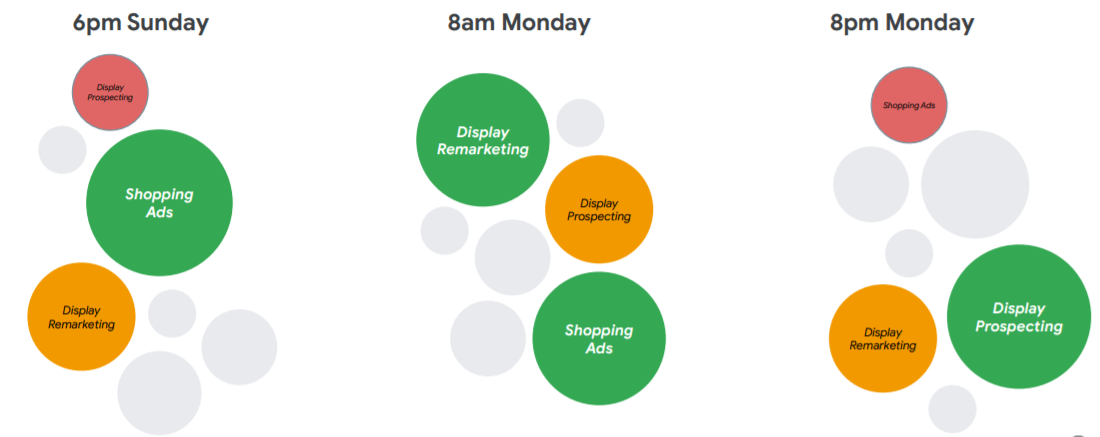
Smart Shopping campaigns encompass all types of networks, combining classic Search-based shopping with Dynamic Remarketing, use of the Display Network, Youtube & Gmail.
- These campaigns optimise to spend your budget in real time between each channel, meaning if conversion rate suddenly drops off on the Display Network, budget within the campaign will reallocate to the Search Network, or Youtube, or wherever is performing best. This saves both on wasted spend and man hours spent moving budgets between campaigns.
- Avoid oversegmentation when setting up your Smart Shopping campaigns. The more data the algorithms have to work with, the better results they can produce, so try to avoid product groups with fewer than 20 conversions in a 15-day period. Try to only segment Smart Shopping campaigns into multiple campaigns where your business goals require it (i.e. product lines with different ROAS targets due to higher/lower profit margins).
- Help Google Help You
As remarkable and advanced as Google’s Smart Solutions are, there is only so much that they can learn from machine learning. Whilst Google recommends that Smart Solutions should be able to notice and adapt to changes in conversion rate and traffic volume, there are a few things you can do to help push things along.
- Make use of Seasonality Adjustments. This is a feature where you can tell Google what you expect your conversion rate to increase to over certain time period. If you’ve already reviewed last year’s stats, you should have an idea of what this will be. This adjustment is perfect for short events between 1-7 days, but no more than 14.
- If you’re using Smart Bidding, consider adjusting your targets during your sales period to maximise on traffic volume. Lowering your Target ROAS or increasing your Target CPA will allow your campaigns to bid more aggressively in auctions and drive more sales. Remember to increase your budget in line with these adjustments.
- Set Up All Smart Campaigns 4 Weeks Early
All of Google’s Smart Solutions undergo an initial learning period when first set live. Performance may not be great during this time – conversion volume and spend may be low as Google’s algorithms adjust. It is important to not make any changes to your campaign during this time. If you’re planning on utilising Google’s Smart Solutions to boost your January sales performance, you need to ensure that all campaigns are out of the learning period and are performing at a good level already. This will give you time to evaluate performance and tweak as necessary before the sales season hits, hopefully making sure that you’re maximising on your exposure and profit.
- All Campaigns Are Only Ever As Good As Their Assets
Google’s Smart Solutions are impressive, but they’re not magic. They need great assets to push to begin with. Writing effective copy for your Search & Display campaigns and setting up all relevant ad extensions will get you on the path to success.
- Set up promotion extensions in your Search & Shopping campaigns – for Shopping, you’ll have to apply and send off a form to gain access to these features, so ensure you do this well before sales period.
- Set up a Countdown for when your promotions end. This adds urgency to your ads and could improve conversion rate.
- Add your offers into all your ad copy in either Headline 1 or Headline 2 – this will make sure that your offer will always be visible, as Headline 3 will sometimes not show.
- Add your new ads into your account at least a week in advance of your promotional period, and give yourself time to correct any disapprovals.
January sales continue to be one of the biggest consumer events in the UK. These are only a few of the things that you can do to ensure your PPC campaigns see success during this highly competitive time. If you’re unsure of where to begin, don’t hesitate to get in touch for a free account audit, and see how Circus can help you.
Circus Helps Prep for Black Friday Success
Last year UK shoppers spent a reported 1.49bn on online retail sites – a 7.3% rise on 2017. No longer isolated to a single day, 67% of all discounts offered were active between the Monday and Thursday preceding Black Friday. The extension of deals into Cyber Monday week may give the impression that Black Friday is a 2-week shopping event, but in reality it is a month-long affair. Consumer savviness is increasing and non-brand search volumes are strongest at the beginning of November as users identify what they want – and once they become informed about their product choices they will search for the best deals on branded terms.
With this is mind, online retailers need to ensure they have implemented their paid search strategy ahead of time if they want to beat the competition and enjoy Black Friday success.
What worked
Black Friday is a highly competitive landscape for PPC marketeers and through effectively implementing the below features and channels we helped ensure our clients were there (and with their best deals) when customers were searching.
Responsive Search Ads
Last year Google released Responsive Search Ads (RSAs) which allow advertisers to create up to 15 headlines and 4 descriptions within an ad, which are then automatically rotated to find the best creative for each individual user and their specific query. The more unique your headlines and descriptions are from each other, the greater your chances of being able to serve a hyper-relevant ad to a potential customer. Through analysing their Combinations Reports, advertisers can identify the most successful messaging and use their findings to help inform their Black Friday copy.
Catch-all Dynamic Search Ads Campaign
Ensure full coverage of your entire product inventory by creating an ad group set to target ‘all web pages’ and fill any gaps in users’ searches left by keywords you’re not actively bidding on but are relevant to your business. If ‘all web pages’ is to broad, specific pages can be chosen, as you may not wish to pay for clicks to certain pages if your goal is to spend your budget maximising sales.
Promotion Extensions
Google have reported on average a 10-15% uplift in click-through rate when promotion extensions are shown, and with the option to select Black Friday and Cyber Monday as occasions, these extensions are a must for all online retailers. Supply your promo code if applicable and set your sale dates to remind customers that this is a limited time offer.
Countdown Timers
Much like promotion extensions, countdown timers create a sense of urgency as the ad copy dynamically updates to display the time left for an offer, e.g. 3 days or 12 hours. Although not currently compatible with RSAs, countdown timers can be deployed in expanded text ads and dynamic search ads.
Amazon
In 2018 Amazon held 26% share of the Black Friday Market, up 3% from the previous year. For many consumers Amazon is akin to a search engine as millions of products from a huge range of retailers can be browsed and compared. It is likely this year Amazon will choose not to wait for Black Friday proper to release deals, and consumers will be able to purchase at a reduced price from the start of November.
What could do well this year
A new year means more new features and advertising channels to weave into Black Friday planning and listed below are our top picks for our paid strategies this year.
Smart Shopping
Google Smart Shopping campaigns were released last year and in early testing advertisers drove over 20% more conversion value at a similar cost – this figure is now closer to a 30% average increase in conversion value. Smart Shopping campaigns combine standard shopping with display remarketing and utilises automated bidding and ad placement to promote products across various Google networks. Advertisers can set a target return on ad spend which the Google Ads system optimises towards whilst aiming to maximise conversion value.
Smart Display with Pay for Conversions
In December 2018 Google released the option to pay for conversions, rather than clicks, when using a Smart Display campaign. Advertisers set a target cost-per-acquisition and only pay when a user converts; a CPA Target of £10 and 10 conversions in a month would result in a £100 overall spend. This is a great proposition not only for meeting ROI targets but also for brand awareness as users can click through to your site, and become familiar with your offering, for free.
LinkedIn Profile Targeting
Microsoft’s acquisition of LinkedIn allows advertisers on the Bing Ads platform to target potential customers based on their LinkedIn profile information. In particular, job function is useful to optimise against as spending habits tends to differ between those in entry level roles, compared to company heads.
Shopping Ads on Pinterest
Pinterest brands itself as a visual discovery tool, and although advertising on the platform has existed for many years, the introduction of Shopping Ads via the Ads Manager interface allows advertisers to launch Shopping campaigns and promote their products to an engaged audience. One study found that 84% of Pinterest’s weekly users use the app before deciding what to buy next, and the same study found that 83% of the same users have made a purchase based on content they found from brands advertising on Pinterest.
The Circus Method
Through a combination of early preparation and analysis, we helped our clients see on average a 50% revenue increase on Black Friday 2017, and this year we expect this to rise even further.
Shopping Feed Health
You lose 100% of the ad auctions you don’t enter – so make sure you have fixed any disapprovals in your Merchant Centre well in advance of Black Friday. Also make sure to complete as many of the columns in your product feed as possible – including information such as colour, size and gender helps shoppers evaluate your products. Use feed rules to strengthen your titles and descriptions – add the product’s brand to the start of the title, or test appending the size and colour to the end of the title.
Smart Shopping
If you’re not already utilising Smart Shopping, testing should begin at a minimum 5 weeks before Black Friday to allow enough time to evaluate the results. Avoid over segmenting your campaigns as this is likely to undermine performance since the algorithm will have less data to work with. A successful strategy could include segmentation by marketing strategy, or by category and margin goals:
Once you’ve selected and set up a campaign to test under Smart Shopping, you should allow your campaign to run for at least 14 days without making any changes, as this is the learning period. Remember to pause the original campaign to prevent any interference. After the initial period is complete, run your campaigns for days 15 – 28 as ‘business as usual’ – the campaign should be optimising and performing towards the targets you’ve set. Then wait several days for any conversions that may have occurred during days 15 – 28 days to convert – this conversion lag will vary depending on the product. After allowing for your conversion lag, you can evaluate performance. Compare the ‘business as usual’ period to the two-week period before the Smart Shopping campaign started. Remember to judge performance on the right metrics such as total conversion value or ROAS, don’t focus on metrics such as impressions and clicks as these do not reflect real business outcomes.
Optimising Smart Shopping for Black Friday
Adjust your ROAS targets to capture the extra demand – by decreasing your ROAS target it will be easier for the algorithm to respond to accelerating sales volume. Set the lowest ROAS you are willing to accept and where possible use an unlimited budget to make sure you’re not missing out on traffic later in the day.
Smart Bidding for Search
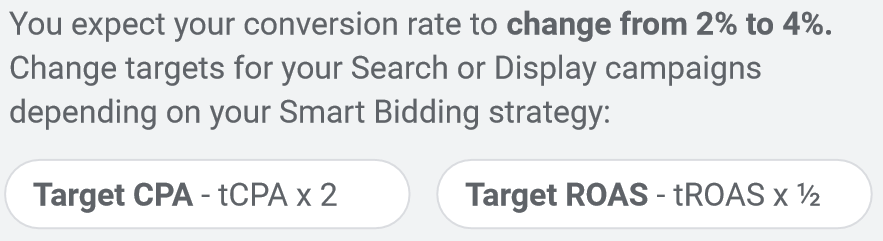
Many ecommerce clients are using Smart Bidding strategies such as Target CPA for their Search campaigns and it is important these campaigns are set up to cope with the increased traffic, increased conversion rates and increased competition we experience around Black Friday. If you expect more traffic to your site you will need to make sure budget is uncapped, but providing your conversion rates don’t change drastically, Smart Bidding will optimise as normal to achieve your goals. However, if conversion rates are expected to change significantly, slightly more action will be necessary. For a gradual increase in conversion rates over a period of 3+ days, no immediate change is required, but you may wish you make slight adjustments to the Target CPA/ROAS depending on your seasonal marketing goals. If your conversion rates are expected to spike in under 3 days, such as a flash sale, you can consider using seasonality adjustments or changing your target goal. To apply a seasonality adjustment, simply tell the system when and how to adjust for your sale. For example, if you expect conversion rate to increase from 5% to 10%, increase your conversion rate adjustment by 100%:
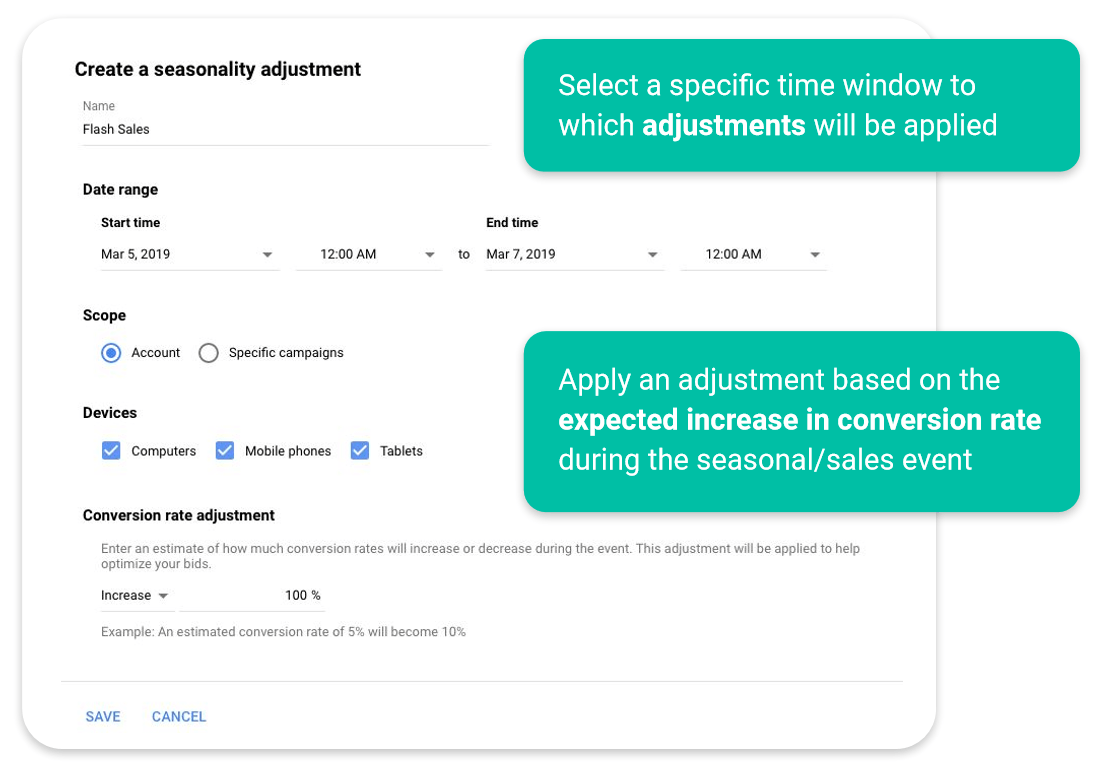
Alternatively, increase your CPA target by 2, or relax your ROAS target by half:
Analyse Previous Data
Review your 2018 Black Friday data and identify where you saw spikes in traffic so that you can adjust your budgets and smart bidding strategies accordingly this year. Review which products delivered strong sales and identify which offers you were running – if you plan to offer a less competitive discount this year be prepared that sales may not be as strong, since shoppers will be searching for the best deals. Review your ad copy and aim to improve and build on your messaging – incorporate this into an RSA ad and it will automatically rotate to find the best combination.
Key Dates
W/c 21st Oct – Final date for testing Smart Bidding and Smart Shopping
Black Friday Week Begins – 25th November
Black Friday – 29th November
Cyber Monday – 2nd December
End of Cyber Monday Week – 8th December
Treat Black Friday as a marathon, rather than a sprint, and you will see a greater return than if you rely on one day to drive all your success.
Post-Prime Day; Analysis, Predictions & PPC Planning For Next Year
Amazon Prime Day has quickly become one of the biggest days of the year for the online retailer. Launched in 2015, the event marked a celebration of the 20th anniversary of the site but it’s now in its 5th year and longer than ever.
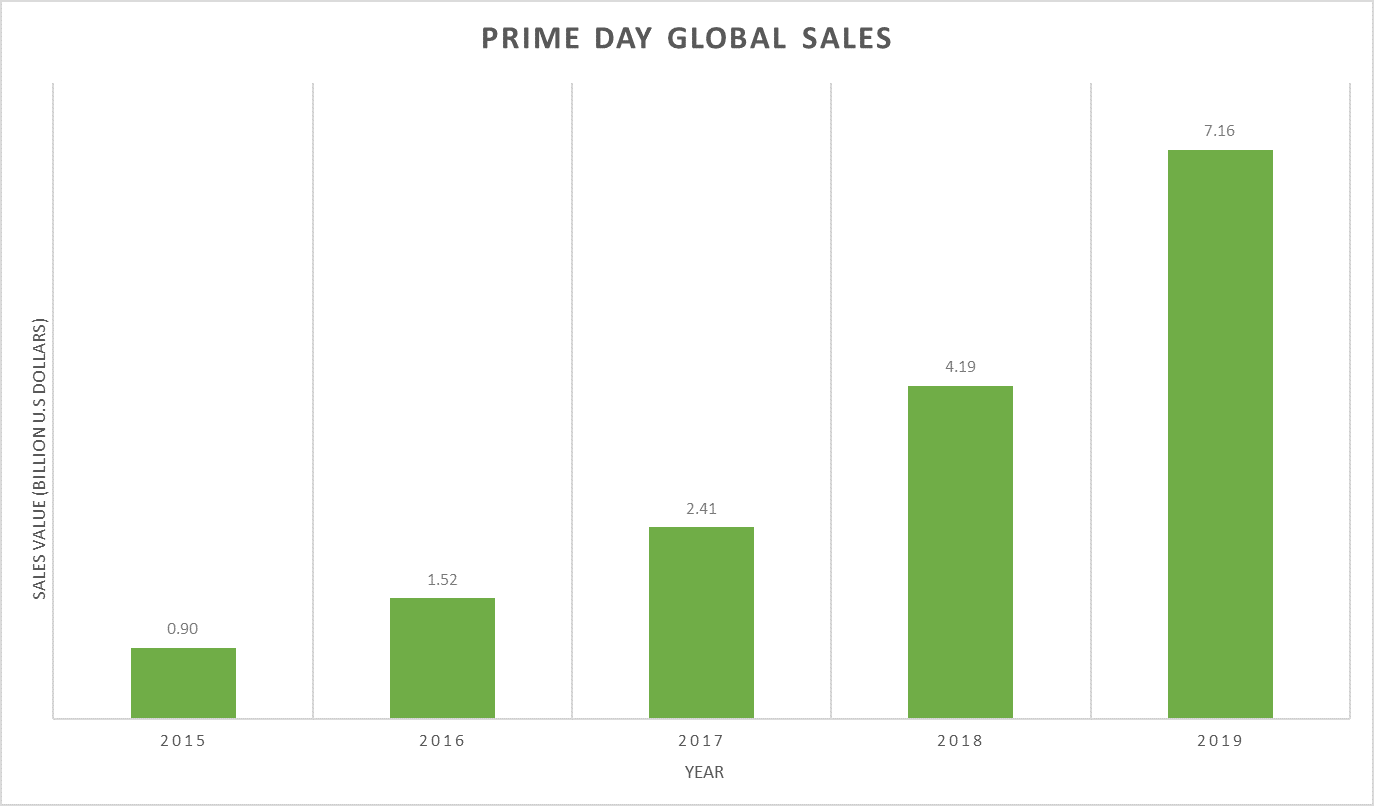
This year’s Prime Day event took an estimated $7.16 billion from over 175 million items, a 71% increase in sales value compared to 2018. Beating both Black Friday and Cyber Monday combined, this year’s event has been described by Amazon as “its biggest shopping event in history”.
Analysis
With over 100 million Prime members globally there’s a huge pool of opportunity for advertisers over the Prime Day period. We developed tailored strategies with our clients in order to reach the right members at the right time, to which we saw profitable results.
A client specialising in white goods saw the following results vs previous weeks;
- Week on week there was 1147% increase in impressions
- Bids were increased but we ensured all budget caps were lifted to allow for the natural uplift in traffic
- Tuesday saw a higher volume than Monday which wasn’t much of a surprise due to a higher sense of urgency with offers ending
- The account recorded the best day on record for revenue
- Compared to most recent peak times it saw 77% more revenue driven than Black Friday and 156% more than Boxing Day
- As expected, CPC rose following our aggressive bidding across the account
- However, this was counterbalanced by our average order value increasing by 30%, meaning each sale was more valuable
- Click-through-rate took a bit of a cut, sitting 40% under where we were in the lead up to that week
Overall during Prime Day, we generated 892% more revenue compared to previous weeks at an ROI of just under 1000%, a huge couple of days for sales.
However, it’s important not to forget other marketing channels during this time. We have seen affects of Prime Day amongst our accounts as a result of the natural increase of users online. The same client saw a 32% increase in Google traffic, but conversion rates dropped off by around 50%. Customers find deals on Amazon, perform research on the brand’s own site, then return to Amazon to buy the product at sale price as it’s not discounted on site. So, despite driving huge revenue through Amazon, you may want to consider options for your other channels in order to not let them suffer during that period.
Predictions
Despite seeing record highs for Prime Day, we may eventually start to see some saturation as rival sites capitalise on what is now an established peak time for retail.
There’s a halo-effect on ecommerce as a whole, as the event provides free marketing for other retailers who are starting to showcase their own competitive offerings. Multiple sources have predicted that revenue could lift up to 80% for non-Amazon retailers during the Prime Day period, so definitely one to incorporate into the wider PPC and marketing strategy.
Nonetheless Prime Day will continue to see revenue growth within the Amazon platform, most definitely entering double-figure-billion territory in 2020.
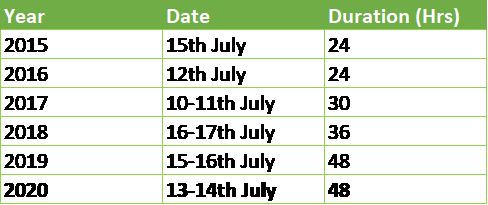
Although day of the event has changed over the years, it’s kicked off on a Monday since 2017 and through Tuesday where it’s increased to over 24 hours.
Our prediction for next year is a 48-hour event running from 13-14th July.
Planning for next year
Amazon hosts a number of deals all year round, but these two are particularly important for Prime Day preparation:
- Deals of the Day (deal that lasts 24 hours)
- Lightning Deals (limited time and limited stock offers)
One step which seems the most obvious, but many retailers fail to set up early enough, is sorting these discounts on products. Once you’ve decided how many and what your deals are going to be, you’ll need to register them with Amazon; there is a criteria that your products need to hit, followed by a reviewing process for approval.
Increasing your bids and budgets comes next. Planning how much to set bids at should be based on your value per sale against the expected uplift in conversion rate. Depending on what your main aim for this peak time is, you can then go on to continue increasing bids (which may end up being necessary anyway should your competitors ramp their bids harder).
As we know Prime Day traffic drives traffic with higher intent-to-buy so capturing as many clicks as possible from the right kind of users is imperative. With CTR potentially dropping 50% you’ll need to take a very targeted approach when prepping your account. Using the most relevant products, keywords and thorough negative keyword lists will help this.
Conclusion
Live across countries in USA, Canada, Europe & Asia, Prime Day is now a globally recognised peak time for retailers and with the numbers speaking for themselves, this event has quickly become Black Friday’s Q2 counterpart. Amazon’s event is no flash-in-the-pan, but a prime opportunity for online marketers to take advantage of the organic lift in online traffic and boost sales, whether they are live on the platform or not.
With the Amazon Advertising platform steadily becoming one of the bigger players in the online advertising world, PPC has become a huge part of retailers’ strategies
With their advertising platform steadily becoming one of the bigger players in the retail PPC world, retailers are now weaving this into their Amazon strategies more and more. Amazon’s newer targeting options have increased ways for your products to be seen, thus gaining more exposure to new users. No doubt there will be new feature releases on the horizon that will be advantageous for Prime Day 2020.
If you are wanting to prepare your Amazon strategy for next year and don’t know where to start, don’t hesitate to get in touch.
What PPC tools are you using?
With 100’s of different tools available out there how do you decide what to use?
There are some which are free and some which are paid for. Google have plenty of free tools available which you will want to investigate.
Below are some of the ones that will be very handy in your day to day PPC life.
Search |
||
| GOOGLE TRENDS google.com/trendsChart the relative popularity of search terms and topics.When do people tend to search for information about baby gifts? |
GOOGLE CORRELATE google.com/trends/correlateIdentify correlations between different search terms.What search queries tend to follow the Christmas trend? |
KEYWORD PLANNER goo.gl/HYFvQkGet keyword ideas and historical performance statistics.What search terms do people use when looking for a new blender? |
Research |
||
| CONSUMER SURVEYS g.co/consumersurveysRun surveys of a representative audience with a fast turnaround.What words come to mind when consumers think of my brand? |
CONSUMER BAROMETER consumerbarometer.comUnderstand how people use the internet across the world.How many people use mobile devices in Kentucky? |
|
Other |
||
| THINK WITH GOOGLE thinkwithgoogle.comRead up on the latest trends, insights, and best practices.What are examples of great mobile advertising campaigns? |
YOUTUBE TRENDS youtube-trends.blogspot.comDiscover what videos are most popular with your audience.What videos are women 18-24 sharing with their friends today? |
NEW MARKET INSIGHTS marketfinder.thinkwithgoogle.comTap into public data across a variety of metrics and countries.How has the US population changed over the last 10 years? |
We have only just touched the surface with these tools. There are plenty more that can help improve the account performance, but we cannot give away all our secrets, can we?
Feel free to get in touch to have a further discussion on this.
Google Ads Tracking
Common questions we get asked:
- Why do Google Ads and Google Analytics not match?
- Why do the PPC numbers not match with the backend numbers?
- How does tracking work? (sometimes with added expletives!)
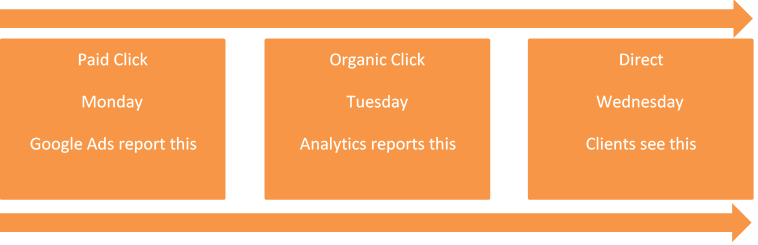
We wanted to try and answer these questions here so below we have created a scenario where a sale occurs on a Wednesday – and then explained why this sale may report differently across Google Ads, Google Analytics, and backend data systems.
Google Ads allocates credit when the click occurs, not when the sale/lead occurs, so our conversion reports may differ to the client’s backend sale/lead data.
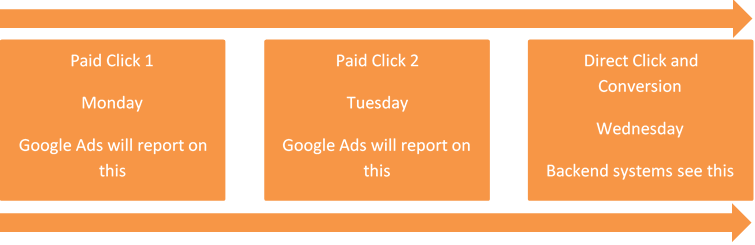
*if you are still using last click attribution then in the above example it will not report on Monday in Google Ads, only on Tuesday. Ideally advertisers should move away from last click attribution to a different model.
We also need to remember Google Ads and Google Analytics do not track in quite the same way.
Google Analytics credits when the last non-direct click occurs, so if the conversion journey was Paid > Organic > Direct then Analytics would credit Organic, but Google Ads would ignore the organic and credit the paid click.
*there are reports in Analytics which allow you to see the data in different attribution models, which better reflect reality.
This can be quite confusing and cause a great deal of hours to be spent looking through data, only for it to not add up.
Other platforms also work differently which can create further confusion if you are managing the accounts yourself.
If you are unsure as to why you have tracking issues, or need the help of an expert agency who understand this and can help you better strategize for the future, then please do get in touch.
Monthly Updates – March 2019
Welcome to a new series of blogs which we will do at the end of every month. We will look at some of the latest tests we are running and analyse some findings.
Automated Bidding
This is a huge area but for this month lets focus on target CPA bidding. This is an area which can help elevate your accounts performance quite drastically overnight almost however there are quite a few elements you need to be careful of:
- Do you have the correct tracking in place? This is a key area. If you are tracking extra conversion points the technology will try and get more of these conversions as well which may be not what is worth anything to you. E.g. if you are tracking newsletter signups as well as sales the software would try and drive more of all conversions.
- Is your account CPA focussed? Retailers wont always care about CPA as much as they do about ROI or cost of sale. A ROAS strategy may be better in this case.
- What campaigns drive the higher value conversions?
- Do you need to consider using different targets for different campaigns?
- This is especially more relevant for lead gen campaigns.
- The account can go from spending £100’s to £1000’s overnight if you are not careful. Whilst you would still expect a strong CPA, the spend can increase quite drastically which may not be your goal. Having campaign budgets in place will help control this as well as monitoring this closely.
- Do you need to consider using different targets for different campaigns?
What results have we seen for this:
In February we saw a 23% increase in leads with a 19% reduction in CPA. For March we have already seen a further an increase of 100% in leads from February with a further reduction in CPA by 18% from February. – Simon Wells
In the first month of using target CPA bidding we saw a 26% increase in sales with the ROI improving by 38%. This has improved further this month with a 59% increase with the ROI continuing to improve. – Meg Wilson-Taylor
Amazon Advertising
Whilst we have been doing this for a while, we thought it would be worthwhile highlighting this, this month. Amazon advertising is something we have ran a series of blogs on separately. It is slowly becoming a key area for retail clients.
We have seen 5 times the ROI on Amazon than that on Google Ads (case study coming soon). However, there are other chargers that can incur which do need to be considered when looking at cost of sale.
This month on Amazon there have been 2 recent changes that are being tested. These are detailed below:
Bidding Strategy BETA
- Old bidding strategy options
- Fixed bids (equivalent to Manual CPC)
- Dynamic Bids – Down Only (only to lower bids when a conversion is less likely to happen)
- New bidding strategy BETA
- Dynamic Bids – Up & Down (equivalent to Enhanced CPC in Google Ads, increases/decreases based on how likely a conversion is)
- This is very new so next month we will cover some results on this.
Sponsored Products Campaigns – Product Targeting
- Old SP targeting option
- Target search keywords
- New SP targeting option
- Target specific product(s)
- Again, this is very new so next month we will cover some results on this. Anna Wood
Shopping Feed Optimisation
This has been extensively covered in our guest blog last month, so I won’t go into detail here however it is worth looking at this in more detail as it can totally change the game for you when it comes to shopping ads. The link to the blog is below:
Guest Blog: Product Feed Optimisation
If you sell products online, then the chances are that you have a Product Feed and utilise Google Shopping within your Paid Search strategy. In this case, it’s important to look at Product Feed Optimisation.
In December 2018, retail related Google Shopping traffic overtook retail related search traffic for the first time and has shown no sign of slowing down ever since.
Merkle’s recent Q4 2019 marketing report further highlighted this trend:
- Google Shopping Ads accounted for 89% of retailers’ non-brand ad clicks in Q4
- Spending on Google Shopping ads grew 42% YoY in Q4 2018
But there is more to Google Shopping than just managing Google Ads. Every search term your Shopping Ads appear for is solely dependent upon the information within your Product Feed.
Therefore, the quality and the content of your Product Feed has a huge impact upon your overall search terms, product visibility and ultimately your performance.
You wouldn’t run a race with untied shoelaces so why would you expect to get the most out of Google Shopping with a poorly optimised feed?
But to optimise a product feed to industry best practise standards, you have got to take control of your Product Feed. Once you have control you can focus on two of the most important areas within Google Shopping that exist outside of Google Ads.
1 – Product Feed Optimisation
Regardless of how much you bid or how you structure your Shopping Campaigns. Around 80% of all the search terms you appear for are based on the words in your Product Titles. 15% are based on the words in our Product Descriptions and 5% are based on the words in your Product Titles.
You should ensure that you have the right product attributes appear within these areas for each variant as well as your high converting search terms.
Product Feed Optimisation can also help you to expand your reach with the introduction of new search terms. Try being very narrow and specific with product variants whilst using more generic terms with parent products.
Ensure you’re constantly adding high converting terms into your Product Descriptions. But keep it sensible with well written, well-formed sentences. Don’t just keyword stuff!
Make sure your Product Types have a minimum depth of 5 and that they contain the key attributes of your products. Don’t be lazy and just copy your website navigation.
Product Type Examples
Trainers
Category > Sub Category > Brand > Style > Gender/Age Group > Colour > Size
Trainers > Running > Nike > Waffle > Ladies > Red/Blue > 7
TV
Brand > Style > Size > Technology > Resolution > Colour > TV Style
Sony > Bravia > 50 Inch > LED > 4K > Black > Curved
We’d even recommend adding in the GTIN & MPN where relevant which will help you pick up more highly relevant traffic.
If you’re fan of segmenting your Shopping campaigns by Product ID, we’d recommend adding your Item Group ID as the last level of your Product Types, so you can group your products together, before splitting out by Product ID. For example:
Brand > Style > Size > Technology > Resolution > Colour > TV Style > MPN > Item Group ID
Sony > Bravia > 55 Inch > LED > 4K Ultra HD > Black > Smart TV > KD55XF9005 > SB55LED4KUH
2 – Product Feed Management
Without having control over the Product Feed, you can only structure your Google Shopping campaigns based on the quality of the existing feed.
However, if you control the Product Feed, your Google Shopping campaign structure and strategy can be based on far more than you imagined.
Any PPC Manager can create Google Shopping campaign structure that focuses on Brands or Google Categories such as Jeans, Toys, Pens etc before segmenting further in Ad Groups.
But only those with control over Product Feeds can use Custom Labels to add Stock Value/Quantity, Price Bands, Product Margins, Top Seller Labels, Sales Labels and much more.
Google Shopping is essentially about driving the best possible ROAS for your products, so spending your budget on campaigns which are focused on Price, Stock and Margin will always provide far better returns.
If you want to make sure your Google Shopping strategy is fully managed from start to finish, you need to ensure you work with an Agency like Circus PPC who can manage your Google Ads and your Product Feed.
Don’t pay anybody to do half a job.
Author: John Cave Profile
John Cave has 12 years of experience within Paid Search, Ecommerce & Travel. Having held senior positions both in-house and within agencies. He founded the dedicated Paid Search agency Biddible, before moving on to co-found Shoptimised, the UK’s fastest growing Product Feed Optimisation platform.
Circus PPC Agency Earns 5-Stars on Clutch
As a PPC management agency, it’s not every day that we talk about ourselves. In fact, what we usually do is boast about our clients, develop their online identities, and make sure that they are getting the recognition they deserve in their markets.
The team at Circus PPC Agency is pleased that since creating a profile on Clutch and joining their list of the best PPC agencies in our area, we’ve gotten our own fair share of positive recognition. Clutch is a ratings and reviews platform for businesses, with coverage that ranges from the IT and development space all the way to the digital marketing, design, and creative industries. Their segments for PPC and SEO are some of the largest and most competitive on their platform, and Circus PPC Agency is proud to stand out amongst so many distinguished agencies.
To be included, our team was put to the test. At first, Clutch analysts evaluated our market presence by looking at our established client base, examples of projects we’ve completed for our partners, and our overall expertise in the PPC industry. The next, and possibly most important, component of our evaluation was generated from the reviews our clients have given us through first hand interviews conducted with analysts at Clutch.
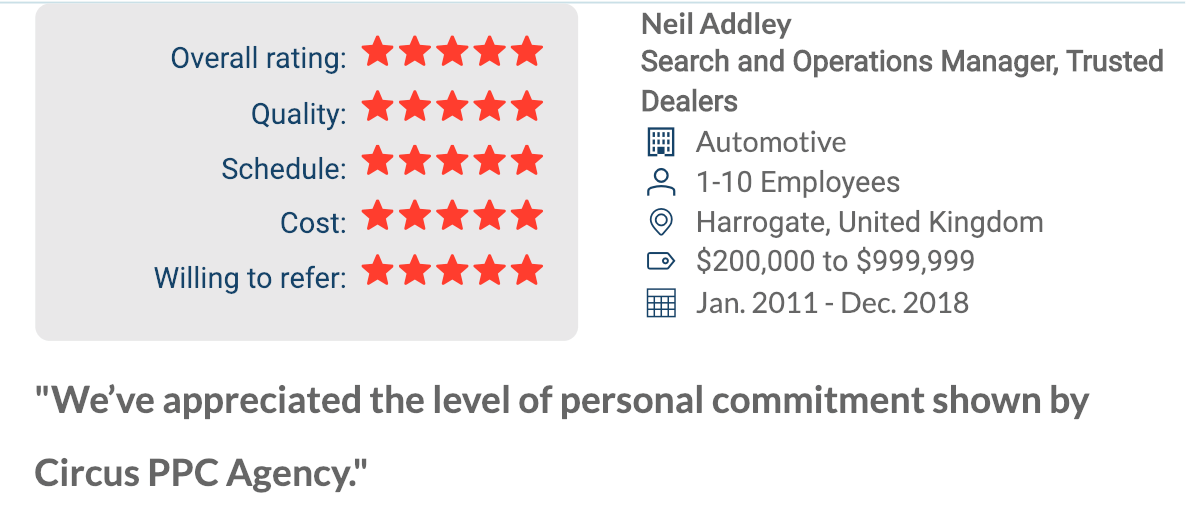
Our clients, as awesome as they are, have taken the time to speak about their experiences working with Circus PPC, providing direct context about our ability to deliver as a service provider. Take a look at the first 5-Star review we have on our profile so far:
It’s because of our positive client reviews and our high score on Clutch that we’ve also been able to be featured on their sister website, The Manifest, amongst the best PPC companies in the United Kingdom. It’s amazing being recognized on these third-party sites!
We would like to thank our clients for taking the time to reflect on their work with us. With the projects we’re working on now, we are confident that our profile on Clutch will only continue to expand and our placement in their rankings will rise to the top.