


With its immense hive of online activity, Black Friday is one of the busiest days of the year for a PPC advertiser. With millions of internet users eagerly shopping with higher intent to buy, it’s important you try to capture that valuable traffic. However, if for whatever reason you missed this, fear not! Christmas and Boxing Day are just around the corner, and we’ve got some top tips for ensuring you’re ready:
Key Dates
- Dec 25 – Christmas Day
- Dec 26 – Boxing Day
- Dec 27-31 – Year End sales
Top Tips
- Prepare in advance by capturing the top of funnel traffic
- People are already researching the best Christmas deals and even what to expect when Boxing Day sales go live
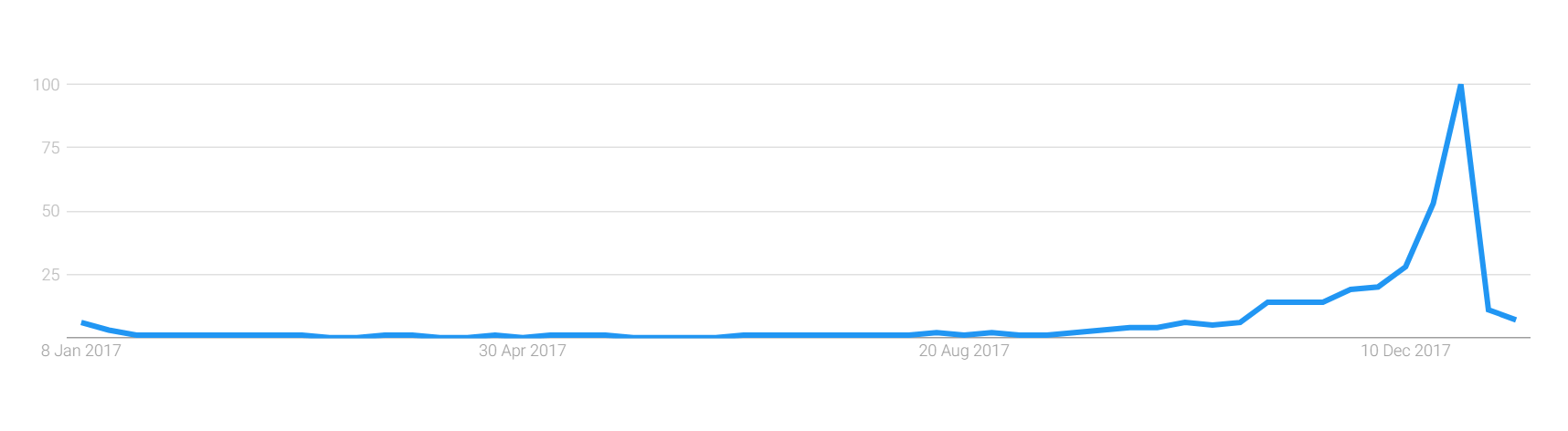
- Terms such as ‘Christmas sales’ are searched for as early as October, as you can see in the graph below taken from searches on Google last year
- Review your ad scheduling & device bid adjustments
- It’s important to make sure you’re appearing to your audience at the right hours of the day and days of the week
- Use historical data to plan how aggressive you want to be during peak times
- There will likely be high traffic volume from mobile devices, especially when people are in the research stage, so it’s imperative to capture this
- Make sure your ad copy is up-to-date
- Do you want your ads to contain promotional-based copy? If you’ve got strong sales or activity going on within the business, this could be used as a powerful USP
- Ads may also seem more relevant if seasonal ad copy is used, so try to tailor your words as much as applicable
- Be sure to make use of the larger Expanded Text Ads, with 3 headlines and 2 description lines
- Get the most out of your ad extensions
- Offers such as free delivery & 24hr customer service are great USPs at this time of year and should be displayed as additional information alongside your ad
- If calls are important to your business, ensure call extensions are live
- Use themed landing pages
- This may not be essential for every business, but using a themed landing page can provide a better experience for the user
- For peak periods like Christmas/Boxing Day, a seasonal landing page may be more likely to meet the expectations of what the user is searching for
- Ensure to align your ad copy with your landing page to give a more consistent journey
- Make Use of Google Ads’ Features
- Countdowns
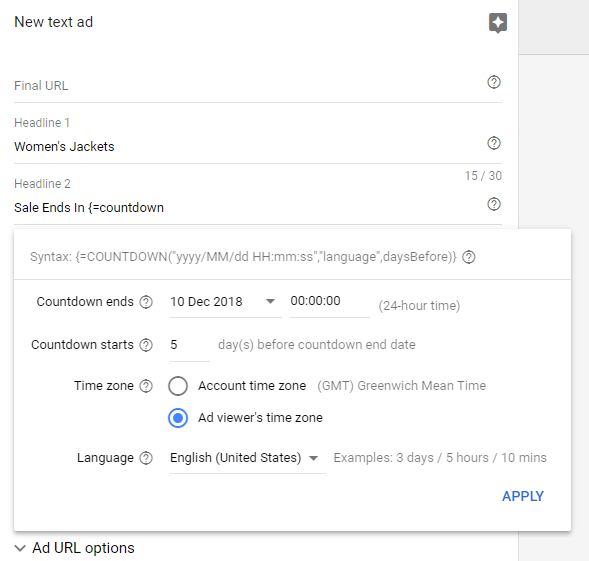
- Highlight your upcoming event or sale by inserting the countdown formula into your ad copy
- You can use them to count down to a sale and give users a solid reason to return, or to add a sense of urgency when a sale is coming to a close
- Countdowns
- Remarketing lists & seasonal audiences
- Returning customers are more likely to convert, so make sure you’ve applied your RLSA lists where possible
- Review historical performance to set bid adjustments
- Look out for Google’s seasonal audiences; lists of users who are actively researching or showing interest in online seasonal events such as Christmas and Boxing Day sales, and therefore valuable to your business
These are just some of the ways in which you can assure your campaigns are Christmas-ready. Making the most of the ad space and the extensions is an essential first step in getting your seasonal message to the user, but you’ll still need to make all the checks to guarantee you’re appearing to the right people at the right time.
We can help you create a tailored PPC strategy for your business this Christmas. Get in touch for a free audit.
Google’s New Impression Share Metrics, And How They Can Help You
Monitoring and improving prominence of your PPC ads has just become much easier with Google’s newly released Impression Share metrics. Advertisers finally have a reliable way to track the placement of ads on a page, rather than tracking the position your ads place in auction, as Average Position does. To pair with this, Google is also rolling out a new automated bidding strategy – Target Impression Share – where you will be given the option to let Google automatically set bids in order to achieve an impression share goal.
What are these new metrics?
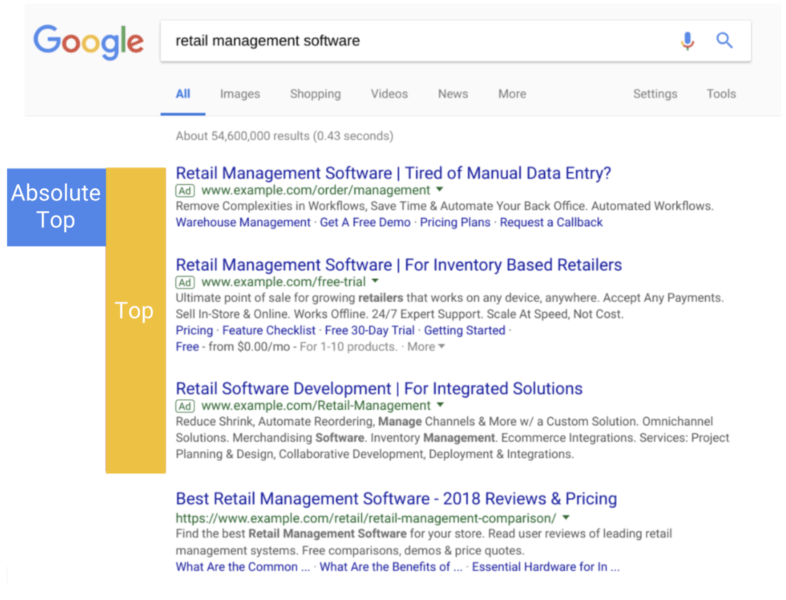
- (Top) % shows the percentage of all your impressions which appeared at the top of the page, above organic search results.
- (Abs. Top) % is the percentage of your impressions appearing in the very first position on the page, and tells you reliably how often your ad is the first thing someone sees on the page.
- Search (Abs. Top) IS is calculated by dividing your impressions at Absolute Top by the total possible number of impressions available at Abs. Top.
- Search (Top) IS is calculated by dividing your impressions in top positions, above organic results, by the total number of available impressions in these positions.
What is the new Smart Bidding Strategy?
Target Impression Share is Google’s newest bid strategy primarily aimed at improving awareness and reach. It allows you to set a target percentage share goal, and Google will automatically set bids in order to achieve this goal. There are three placement options: absolute top (the first position), top of the page (above organic results), or anywhere on the first page. After choosing a placement option, you can choose your impression share target – anywhere up to 100%. You can also set a bid limit in order to restrict spend, however setting a limit which is too low may end up in low traffic and your goals not being met.
How can these help me and my PPC campaigns?
Average position was – and is still – used by many as an indicator of the position of your ads in comparison to other advertisers. But have you ever had a high Avg. Pos., and yet seen a low CTR? This could be down to the fact that these numbers are only informing you about your position in relation to other ads in each auction. What Avg. Pos. fails to tell you is the location of the ads on the page. For example, Google’s algorithms may have determined the ad relevance too low to show at the top of the page, above the fold. By exclusively optimising using Avg. Pos., you would be fighting for that number 1 spot – positioned at the bottom of the page. When utilising these new metrics, you can ensure that you are always vying for that prominent spot above organic search results, or making informed decisions as to whether those lower positioned ads are still valuable to you. In fact, Google themselves now recommend using these new metrics exclusively to help bid for top spots, rather than using Avg. Pos. They make it possible to better evaluate your spending and alter your bid strategies in accordance with your true position in the search results.
So although you may have found Avg. Position useful in the past, it is important to remember that it only refers to the auction itself, not the position on the results page. Now, if you want to focus on prominence, you have a far more straight-forward way of monitoring this, and achieving success.
Using these two new features, it is now even easier to evaluate the effect location has on performance. Although it is important to remember that top locations may not automatically improve your stats, when this is combined with great ad copy and a well thought-out PPC strategy, you can drive clicks from the positions that matter most to you.
If you would like support with improving the position of your ads or any other aspect of PPC please get in touch and we will be happy to help.